
NW 1776 W-912
Meridian Energy Acupuncture Pen
Model: W-912
Brand: NW 1776
Introduction
This manual provides comprehensive instructions for the safe and effective use of your Meridian Energy Acupuncture Pen W-912. Please read this manual thoroughly before operating the device and retain it for future reference. The Meridian Energy Acupuncture Pen is designed to apply electrical pulses to specific points on the body, based on the principles of traditional Chinese medicine.
Important Safety Information
Statements regarding this device have not been evaluated by the FDA and are not intended to diagnose, treat, cure, or prevent any disease or health condition. Consult with a healthcare professional before using this device, especially if you have pre-existing medical conditions, are pregnant, or have a pacemaker.
- Do not use on open wounds, sensitive skin areas, or near the eyes.
- Keep out of reach of children.
- Do not immerse the device in water or other liquids.
- Discontinue use if you experience any discomfort or adverse reactions.
- Ensure hands are clean and dry before handling the device.
Product Overview
The Meridian Energy Acupuncture Pen W-912 is a portable device designed for personal use. It features adjustable intensity levels and replaceable massage heads.

Image Description: This image displays a detailed diagram of the Meridian Energy Acupuncture Pen W-912. Key components are labeled, including the battery bay, strength level display, electric pulse display light, replaceable massage head, and buttons for adjusting (increasing and decreasing) the strength. It also indicates the '0 stall status' and 'shutdown state' when pressing start.

Image Description: This image shows the complete product package. On the left is the retail box for the 'Massager Pen W-912' with 'HEALTH & BEAUTY' branding. In the center, the pen itself is displayed in a plastic tray along with two additional massage heads. To the right is the 'Meridian Energy Pen User manual' booklet, indicating the model W-912.
Setup
Before first use, install one AA battery into the device.
- Open the Battery Cover: Unscrew the cap at the bottom of the pen to access the battery compartment.
- Insert Battery: Insert one AA battery, ensuring correct polarity (+/-).
- Tighten the Battery Cover: Screw the cap back on securely until it is fully closed.

Image Description: This image illustrates the three steps for battery installation. The first panel shows the bottom cap unscrewed. The second panel shows a single AA battery being inserted into the pen. The third panel shows the cap being screwed back onto the pen, securing the battery.
Operating Instructions
The Meridian Energy Acupuncture Pen features a 9-speed adjustment for varying intensity levels.
- Power On/Off: Press the "+" button to power on the device. To power off, press the "-" button until the display shows "0", and the device will automatically shut down after 3 seconds.
- Adjusting Strength: Use the "+" button to increase the intensity and the "-" button to decrease it. The strength level is displayed numerically (1-9). "1" indicates low pulse strength, while "9" indicates strong pulse intensity. It is recommended to start with an initial gear of 2-3.
- Application: Hold the pen firmly. The principle of the meridian pen involves electric pulse points creating an "electrical circulation." The current from the pen tip passes through the human body to form a circulation. The sensation experienced is normal and can be increased with higher settings.
- Reducing Static Sensation: If you experience a mild shock sensation (often referred to as "Ma Ma" feeling or electro-caesthetic feeling), especially if your hands are tender or wet, adjust your grip. Holding the pen firmly and ensuring good contact can help alleviate this.

Image Description: This image shows a close-up of the Meridian Energy Acupuncture Pen. The digital display clearly shows the number '8', indicating the current strength level. Text overlays explain the '9-speed adjustment' and recommend using initial gears 2-3. A smaller inset image shows the '+' and '-' buttons for adjusting the intensity.
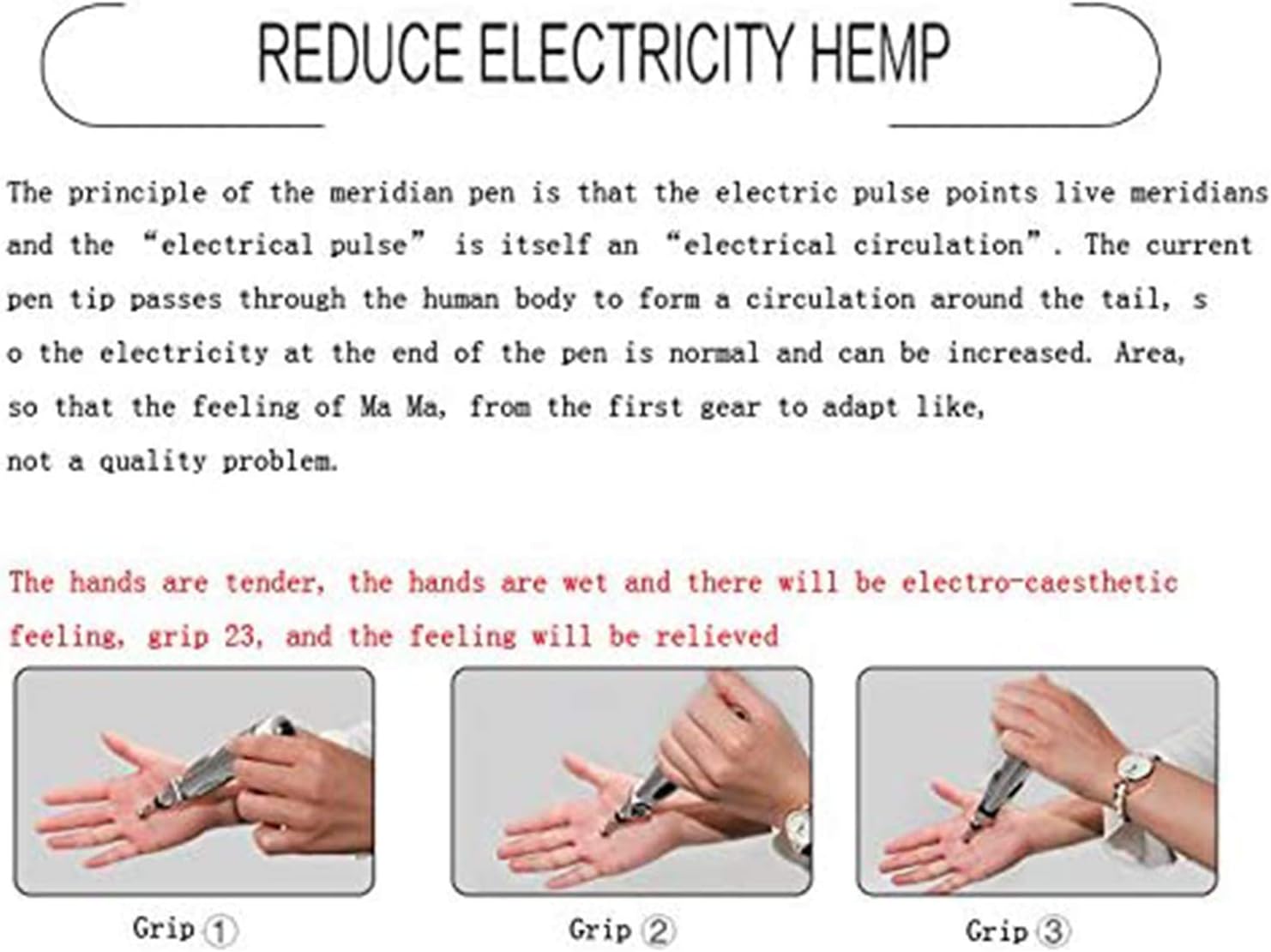
Image Description: This image provides visual cues for operating the pen. The top left panel shows pressing the '-' button to power off, leading to an automatic shutdown at '0'. The bottom left panel shows the pen displaying '1', indicating low pulse strength. The bottom right panel shows the pen displaying '9', indicating strong pulse intensity.

Image Description: This image explains how to reduce the electro-caesthetic feeling (static sensation). It shows three different grips on the pen, labeled 'Grip 1', 'Grip 2', and 'Grip 3', demonstrating how holding the pen can affect the sensation. The accompanying text explains that if hands are tender or wet, an electro-caesthetic feeling may occur, and adjusting the grip can relieve it.
Maintenance
To ensure the longevity and proper functioning of your Meridian Energy Acupuncture Pen, follow these maintenance guidelines:
- Cleaning: Wipe the device with a soft, dry cloth after each use. Do not use abrasive cleaners or immerse in water.
- Storage: Store the pen in a cool, dry place, away from direct sunlight and extreme temperatures. Remove the battery if the device will not be used for an extended period.
- Battery Replacement: Replace the AA battery when the device's performance diminishes or it fails to power on.
Troubleshooting
If you encounter issues with your Meridian Energy Acupuncture Pen, refer to the following common solutions:
- Device does not power on:
- Check if the battery is inserted correctly with the correct polarity.
- Replace the AA battery with a new one.
- Ensure the battery cover is securely tightened.
- Weak or no sensation:
- Increase the intensity level using the "+" button.
- Ensure good contact between the pen tip and your skin.
- Ensure you are holding the pen firmly to complete the circuit.
- Replace the battery.
- Uncomfortable static sensation:
- Adjust your grip on the pen.
- Ensure your hands are not excessively wet.
- Decrease the intensity level.
Specifications
| Feature | Detail |
|---|---|
| Model | W-912 |
| Power Source | 1 x AA Battery |
| Intensity Levels | 9 (Adjustable) |
| Manufacturer | COSYBH |
| Package Dimensions | 8 x 3.2 x 1.2 inches |
| Item Weight | 4.48 ounces |
Warranty and Support
For warranty information or technical support, please refer to the contact details provided with your purchase or visit the official NW 1776 store page on Amazon.
NW 1776 Store: Visit Store
Ask a question about this manual
Ask about setup, troubleshooting, compatibility, parts, safety, or missing instructions. Manuals+ will review the question and use this page’s manual context to help answer it.