
1. Introduction
This instruction manual provides essential information for the proper use and maintenance of your Brother BTD60BK Black Ink Bottle. Designed for specific Brother DCP, HL, and MFC series printers, this genuine ink ensures optimal print quality and printer longevity. Please read this manual thoroughly before installation and use.

Image 1.1: Brother BTD60BK Black Ink Bottle and its retail packaging.
2. Printer Compatibility
The Brother BTD60BK Black Ink Bottle is compatible with a range of Brother Ink Tank System printers. Using genuine Brother ink ensures the best performance and prevents potential damage to your printer.
Compatible Printer Models:
- DCP-T220, DCP-T226, DCP-T310, DCP-T420W, DCP-T426W
- DCP-T510W, DCP-T520W, DCP-T525W, DCP-T710W, DCP-T820DW, DCP-T825DW
- MFC-T810W, MFC-T910DW, MFC-T920DW, MFC-T925DW, MFC-T4500DW
- HL-T4000DW

Image 2.1: Visual representation of compatible Brother printer models.
3. Ink Bottle Installation
Follow these general steps to refill your Brother Ink Tank System printer. Refer to your printer's specific user manual for detailed instructions, as procedures may vary slightly by model.
- Prepare the Printer: Ensure your printer is powered on. Open the ink tank cover on your printer.
- Identify the Correct Tank: Locate the black ink tank. Each tank is typically color-coded and labeled.
- Open the Tank Cap: Carefully remove the cap from the black ink tank.
- Prepare the Ink Bottle: Remove the cap from the Brother BTD60BK ink bottle. Do not squeeze the bottle.
- Insert and Refill: Invert the ink bottle and insert its nozzle firmly into the ink tank's refill port. The ink will flow automatically into the tank. Do not force the bottle or squeeze it.
- Monitor Ink Level: Watch the ink level in the tank. The ink flow will stop automatically when the tank is full.
- Remove Bottle and Close Caps: Once refilling is complete, carefully remove the ink bottle. Replace the ink tank cap securely, then close the printer's ink tank cover.
- Dispose of Empty Bottle: Dispose of the empty ink bottle responsibly according to local regulations.

Image 3.1: The Brother BTD60BK ink bottle, designed for spill-free refilling.
4. Usage Guidelines
The Brother BTD60BK Black Ink Bottle is designed to provide a high page yield, supporting efficient printing for your documents.
- Page Yield: This ink bottle yields approximately 6,500 to 7,500 pages. Actual yield may vary significantly based on content of printed pages and other factors. Yield is based on Brother Original Methodology with test patterns ISO/IEC 24712.
- Ink Type: The BTD60BK uses water and fade-resistant pigment ink, ensuring durable and high-quality prints.
- Optimal Performance: For best results, always use genuine Brother ink and follow your printer's recommended settings.
5. Storage and Handling
Proper storage and handling of your ink bottle will help maintain its quality and extend its shelf life.
- Storage: Store ink bottles upright in a cool, dry place, away from direct sunlight and extreme temperatures.
- Keep Out of Reach: Keep ink bottles out of reach of children and pets.
- Avoid Contamination: Do not open the ink bottle until you are ready to refill the ink tank to prevent contamination or drying.
- Expiration Date: Check the expiration date on the packaging and use the ink before it expires for optimal performance.
6. Troubleshooting Common Issues
Using genuine Brother ink is crucial for preventing common printing problems and ensuring the longevity of your printer. Non-genuine supplies can lead to various issues.
Problems Caused by Non-Genuine Supplies:
- Poor Quality Prints: Non-genuine inks may result in faded colors, streaks, or inconsistent output.
- Less Print Yield: The actual number of pages printed may be significantly lower than advertised.
- Leakage: Inferior ink bottle designs or ink formulations can lead to leaks, causing mess and potential printer damage.
- Printer Failures: Increased likelihood of printer jams, clogs, or other mechanical failures due to incompatible ink properties.
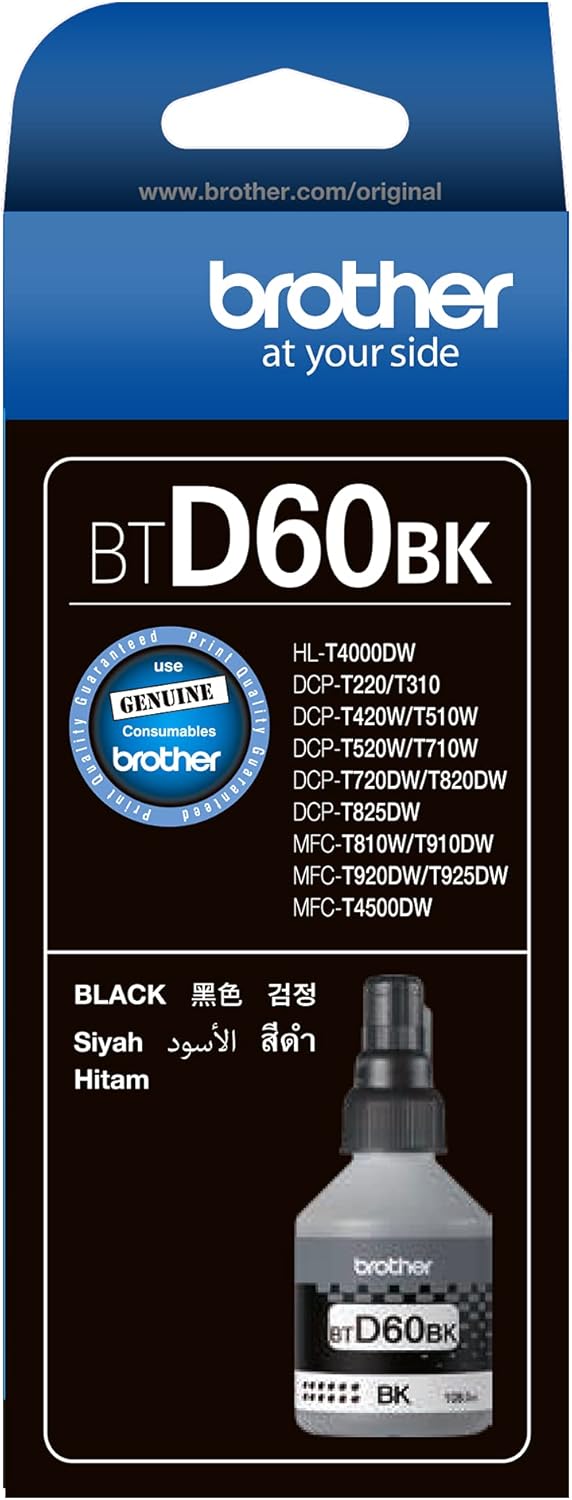
Image 6.1: Potential issues arising from the use of non-genuine ink supplies.
Benefits of Using Genuine Brother Supplies:
- Professional Quality Prints: Consistent, vibrant, and sharp output for all your documents and images.
- Reliable Print Page Yield: Achieve the expected number of pages, ensuring cost-effectiveness.
- Longer Lasting Printer: Protect your printer from damage and extend its operational lifespan.
- Engineered for Brother Printers: Specifically formulated and designed to work seamlessly with your Brother device.

Image 6.2: Advantages of choosing genuine Brother ink for your printer.
7. How to Identify Genuine Brother Ink
To ensure you are using authentic Brother products, you can verify the genuineness of your ink bottle through several methods:
- Mobile Authentication: Authenticate by scanning the QR code on the label using the Brother Support Center app or a data matrix reader app.
- Web Authentication: Log on to www.brother.com/id and authenticate by entering the 7-digit ID number printed on the label.
- Examine the Label: Authenticate by tilting and rotating the label against light to verify the genuine Brother hologram. Look for changes in the hologram as you tilt it.
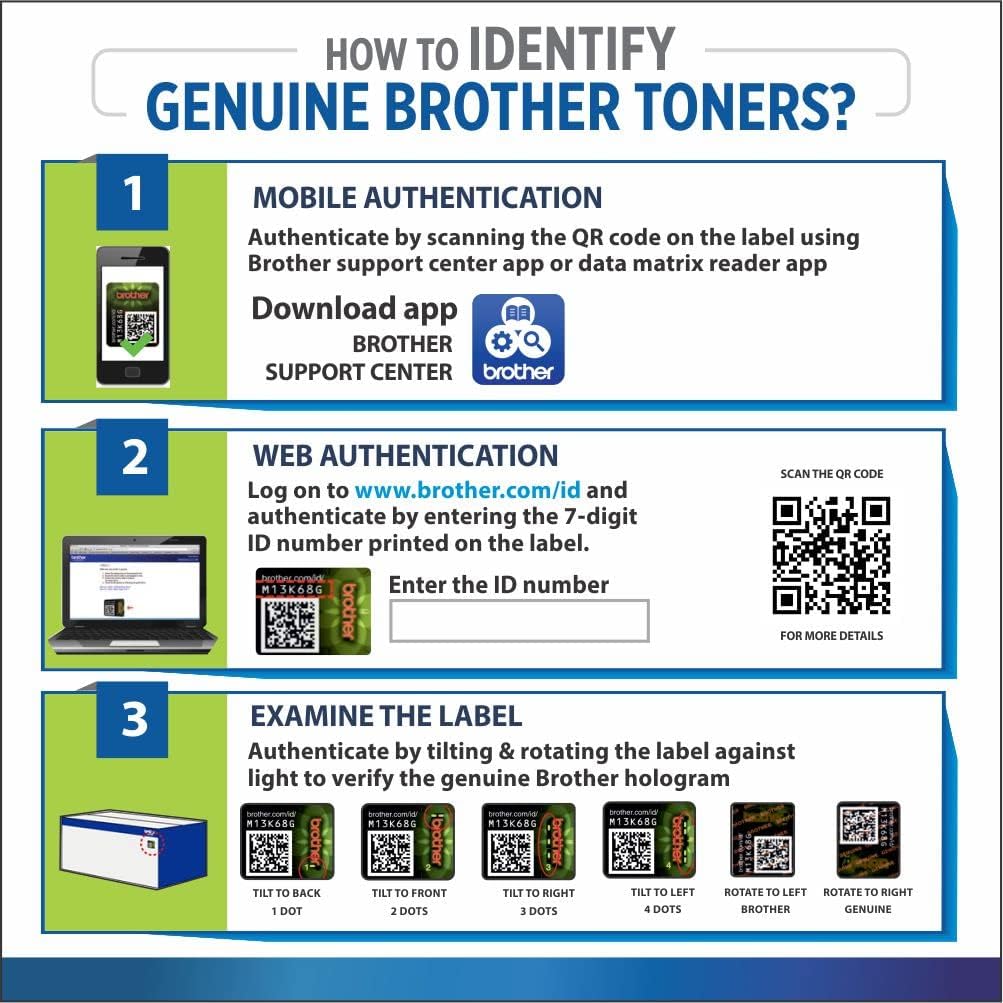
Image 7.1: Methods for verifying the authenticity of Brother ink products.
8. Product Specifications
| Feature | Detail |
|---|---|
| Brand | Brother |
| Model Number | BT-D60BK |
| Ink Colour | Black |
| Ink Base | Water (Pigment Ink) |
| Page Yield | Approximately 6,500 - 7,500 pages (ISO/IEC 24712) |
| Special Features | High Yield, High Quality, Water and Fade-Resistant |
| Product Dimensions | 29.6 x 26.1 x 16.1 cm |
| Item Weight | 3.9 kg (packaging weight) |
9. Warranty and Support
Brother genuine ink bottles are covered by Brother's standard warranty. Using non-genuine supplies may void your printer's warranty. For detailed warranty information, technical support, or service inquiries, please visit the official Brother support website or contact your local Brother customer service center.
You can find more information and support resources on the official Brother website: www.brother.com
Visit the Brother Store on Amazon: Brother Store


