
VGEBY VGEBYgqx3r67fdi
VGEBY 5.5'' HUD Head Display User Manual
Model: VGEBYgqx3r67fdi
Introduction
The VGEBY 5.5'' HUD Head Display is designed to project essential vehicle information onto your windshield, allowing drivers to view data without diverting their eyes from the road. This enhances driving safety by providing real-time information such as vehicle speed, engine RPM, water temperature, battery voltage, and fuel consumption directly in your line of sight. It also includes various warning functions to alert the driver to potential issues or speed limits.
This device is compatible with vehicles equipped with an OBD II or EUOBD (On-Board Automatic Diagnostic System) interface.
What's in the Box
- 5.5'' HUD Head Display Unit
- OBDII Connection Cable
- Reflective Film for Windshield
- Anti-slip Mat
- User Manual

Figure 1: Package Contents - HUD unit, OBDII cable, reflective film, anti-slip mat, and user manual.
Setup Instructions
Placement of the HUD Unit
Place the HUD unit on the dashboard near the windshield. Ensure it is positioned where the projected display is clearly visible to the driver without obstructing the view of the road. The anti-slip mat can be used to secure the unit in place.

Figure 2: Optimal placement of the HUD unit on the dashboard for clear projection.
Connecting to the OBDII Port
Locate your vehicle's OBDII port, typically found under the dashboard on the driver's side. Connect the provided OBDII cable to the port and then to the HUD unit's OBD data interface. Ensure a secure connection.

Figure 3: OBD data interface on the HUD unit for connecting to the vehicle.
Applying Reflective Film (Optional but Recommended)
For optimal display clarity and to eliminate double images, it is recommended to apply the provided reflective film to your windshield. Clean the windshield thoroughly before application. Spray some water on the windshield where the HUD will project, then carefully apply the film, smoothing out any air bubbles. Position the film directly in the line of sight of the HUD projection.
Power On/Off
The HUD unit features an auto power on/off design. It will automatically power on when the vehicle starts and power off when the vehicle is turned off. A manual power switch is also available on the unit.

Figure 4: Manual power switch location on the HUD unit.
Operating Instructions
Display Contents
The HUD displays a variety of information to assist the driver:
- Speed: Digital display of vehicle speed (MPH or Km/h).
- Engine Speed (RPM): Displays engine revolutions per minute.
- Water Temperature: Shows the car's water tank temperature.
- Battery Voltage: Indicates the vehicle's battery voltage.
- Fuel Consumption: Instantaneous and average fuel consumption (L/100km or L/h).
- Mileage Measurement: Tracks mileage.
- Fault Code: Displays diagnostic trouble codes if detected.

Figure 5: HUD Screen Function Introduction Diagram.

Figure 6: HUD Screen Function Introduction Table (Part 1).

Figure 7: HUD Screen Function Introduction Table (Part 2).
Warning Functions
- Overspeed Alarm: The HUD will flicker and alarm if the vehicle exceeds a pre-set speed limit.
- Fatigue Driving Warning: An indicator light will flash to remind the driver to rest during long drives.
- High Water Temperature Alarm: Alerts the driver if the engine water temperature becomes too high.
- Low Voltage Alarm: Warns of low battery voltage.
- Shift Reminding: Provides reminders for optimal gear shifting.

Figure 8: Fatigue Driving Warning feature for safe driving assistance.
Adjusting Settings
The HUD unit features a paddle wheel for easy navigation and adjustment of settings. You can dial up or down to set parameters such as brightness, speed units (Km/h or MPH), and alarm thresholds.
Figure 9: Paddle wheel for adjusting HUD settings.
The display brightness can be manually adjusted or set to automatically adapt to ambient light conditions using nano-technology to eliminate reflections and enhance clarity.

Figure 10: Display clarity before and after lighting adjustment.

Figure 11: Nano-technology for enhanced display clarity.
Maintenance
To ensure the longevity and optimal performance of your VGEBY HUD Head Display, follow these maintenance guidelines:
- Cleaning: Use a soft, dry cloth to clean the display screen and the unit's exterior. Avoid using abrasive cleaners or solvents, as they may damage the surface.
- Storage: When not in use for extended periods, store the unit in a cool, dry place away from direct sunlight and extreme temperatures.
- Cable Care: Handle the OBDII cable with care. Avoid sharp bends or excessive pulling that could damage the cable or connectors.
Troubleshooting
| Problem | Possible Cause | Solution |
|---|---|---|
| No display or power | OBDII cable not connected properly; vehicle's OBDII port not supplying power; manual switch off. | Ensure the OBDII cable is securely connected to both the HUD unit and the vehicle's OBDII port. Check if the vehicle is running or ignition is on. Verify the manual power switch is in the ON position. |
| Double image on windshield | Reflective film not applied or applied incorrectly; windshield angle. | Apply the provided reflective film to the windshield. Ensure the film is smooth and free of air bubbles. Adjust the HUD unit's angle if possible. |
| Inaccurate speed reading | Incorrect speed unit setting (Km/h vs MPH); calibration needed. | Check the unit settings to ensure the correct speed unit (MPH or Km/h) is selected. Refer to the manual for calibration steps if necessary. |
| HUD causes vehicle error codes | Compatibility issue with specific vehicle's ECM. | Disconnect the HUD unit. If error codes persist, consult a professional mechanic. If codes clear after disconnection, the unit may not be fully compatible with your vehicle's system. |
| Display too dim or too bright | Brightness setting incorrect; ambient light sensor issue. | Adjust the brightness setting using the paddle wheel. Ensure the sensitive element (light sensor) on the unit is not obstructed. |
Specifications
| Feature | Detail |
|---|---|
| Product Name | A8 HUD |
| HUD Color | Black |
| Screen Size | 5.5 Inches |
| Material | Metal |
| Item Weight | 2.46 Ounces |
| Work Voltage | 9V~16Vdc (12Vdc/400mA) |
| Environment Temperature | -40°C ~ +80°C |
| Barometric Pressure | 86-106KPa |
| Relative Humidity | 10%-95% |
| Environment Voice | <=60dB |
| Alarm Sound Level | >=30dB(A) |
| Manufacturer Part Number | VGEBYgqx3r67fdi |
| UPC | 783335865055 |
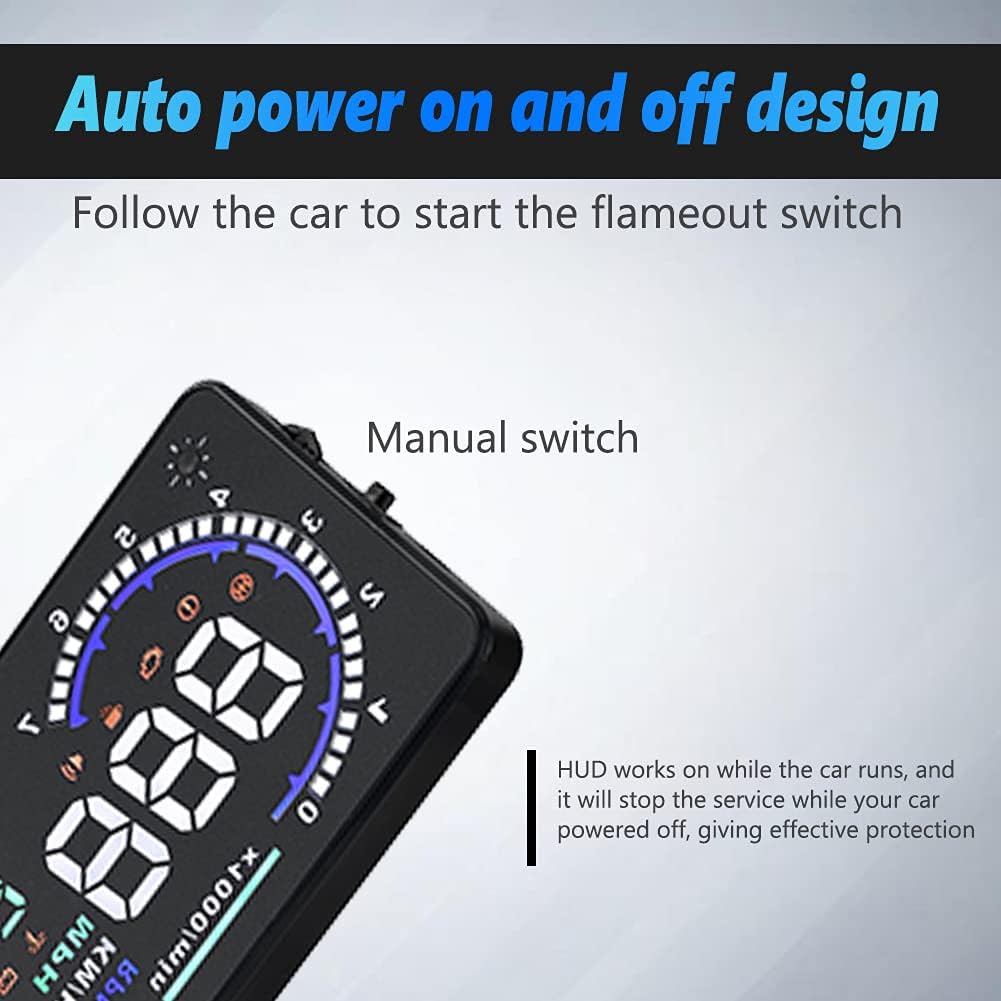
Figure 12: Product Dimensions and Specifications Overview.
Official Product Video
Video 1: Official product video demonstrating the VGEBY 5.5'' HUD Head Display, including unboxing, setup, and in-car usage examples. This video provides a visual guide to the product's features and installation process.
Warranty and Support
Warranty: If you are not satisfied with your VGEBY HUD Head Display, you may apply for an unconditional return and refund within 180 days of receipt.
Support: For any product-related issues or inquiries, please contact us via email. We are committed to providing prompt assistance.
Ask a question about this manual
Ask about setup, troubleshooting, compatibility, parts, safety, or missing instructions. Manuals+ will review the question and use this page’s manual context to help answer it.