
1. Introduction
This manual provides essential information for the safe and effective use of your EPtech AC Power Adapter, Model TNS30W-xy-z. This power adapter is designed to provide reliable power to compatible devices, such as the Vox AV15 1x8 15W Tube Analog Modeling Amplifier.
Please read this manual thoroughly before using the product and retain it for future reference.
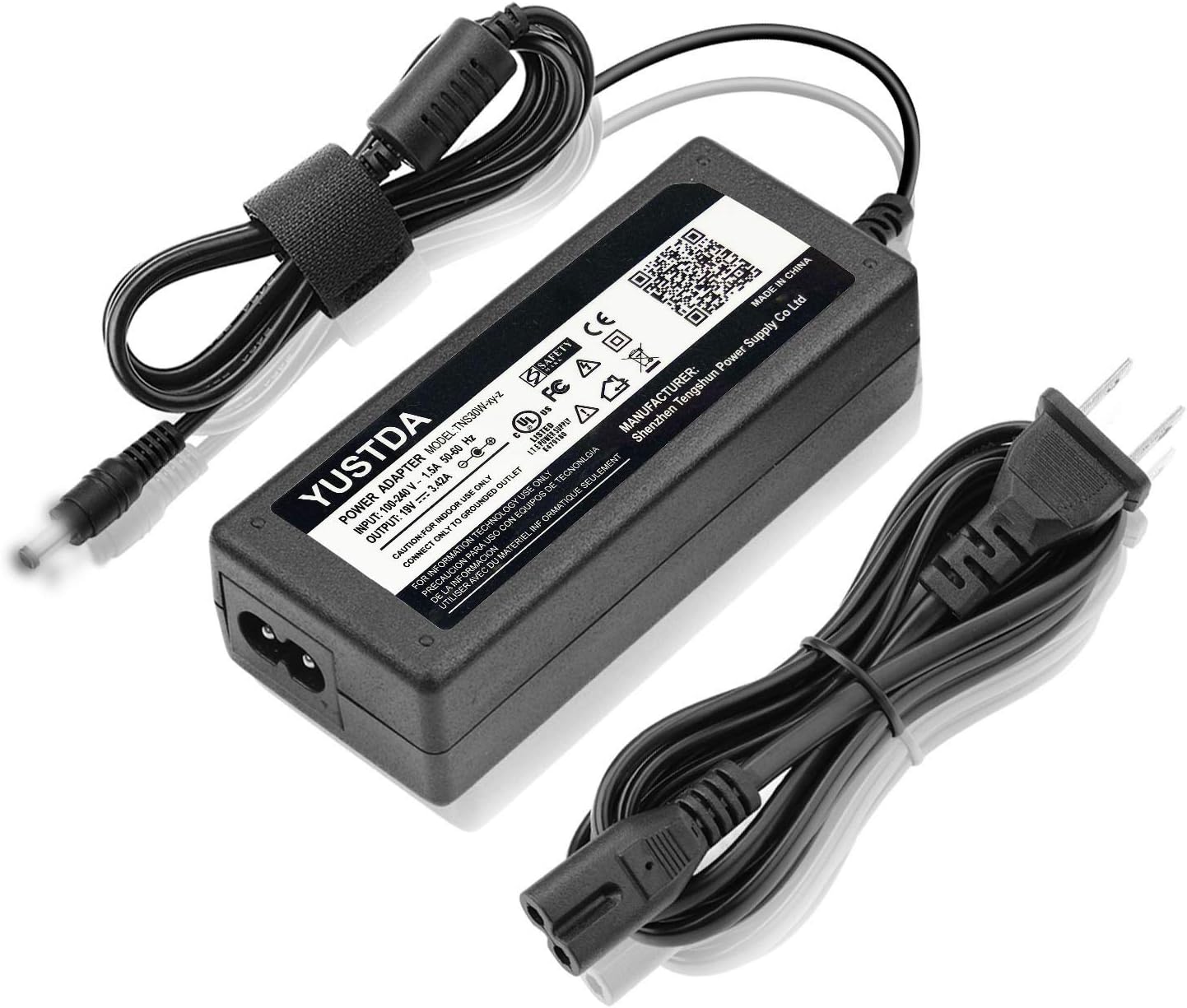
Figure 1: EPtech AC Power Adapter (Model TNS30W-xy-z) with its integrated cables.
2. Product Features
The EPtech AC Power Adapter is engineered with several key features to ensure optimal performance and safety:
- Universal Input Voltage: Supports World Wide Input Voltage 100-240VAC 50/60Hz, allowing for international use with appropriate plug adapters.
- Compatibility: A direct replacement AC Adapter/Charger, 100% compatible with the device models listed, including the Vox AV15 amplifier.
- Extended Reach: Features a total 10 Ft (approximately 3 meters) long power cord for flexible placement.
- Advanced Safety Features: Incorporates multiple protection mechanisms including Over Current Protection, Total Power Protection, Over Voltage Protection, and Short Circuit Protection.
- Quality Construction: Manufactured with high-quality materials and certified by FCC, CE, and RoHS standards for reliability and safety.
- Anti-interference Magnet Ring: Includes an anti-interference magnet ring for enhanced reliability and stability of system operation.
- Durable & Compact Design: Built for durability with a compact form factor, suitable for home, office, and travel.

Figure 2: Safety Design with Multiple Protections.

Figure 3: High Quality Power Cable Design.
3. Setup
Follow these steps to properly set up your EPtech AC Power Adapter:
- Verify Compatibility: Ensure that your device (e.g., Vox AV15 amplifier) requires a power adapter with the specifications provided by this product (19V output). Refer to your device's manual for its power requirements.
- Connect to Device: Plug the DC output connector of the power adapter firmly into the power input port of your device. Ensure a snug fit to prevent accidental disconnection.
- Connect to Power Outlet: Insert the AC input plug of the power adapter into a standard, grounded electrical wall outlet. The adapter supports 100-240VAC.
- Power Indicator: Once connected to a live outlet, the LED indicator on the power adapter should illuminate, indicating that power is being supplied.
Important Safety Note: This power adapter is designed for INDOOR USE ONLY. Connect only to a GROUNDED OUTLET.

Figure 4: Power Adapter Cable Lengths and LED Indicator. The LED light indicates power is on.
4. Operating Instructions
Operating the EPtech AC Power Adapter is straightforward:
- Ensure the adapter is correctly connected to both your device and a power outlet as described in the "Setup" section.
- Confirm the LED indicator on the adapter is lit, signifying active power delivery.
- Power on your device as per its own operating instructions. The adapter will continuously supply the necessary power.
- To disconnect, first power off your device, then unplug the adapter from the wall outlet, and finally disconnect it from your device.
5. Maintenance
Proper maintenance ensures the longevity and safe operation of your power adapter:
- Cleaning: Disconnect the adapter from all power sources before cleaning. Use a soft, dry cloth to wipe the surface. Do not use liquid cleaners or aerosols.
- Storage: When not in use, store the adapter in a cool, dry place, away from direct sunlight and extreme temperatures. Avoid tightly winding the cables to prevent damage.
- Inspection: Periodically inspect the power cord and adapter casing for any signs of damage, such as cuts, fraying, or cracks. If damage is found, discontinue use immediately and replace the adapter.
- Ventilation: Ensure the adapter has adequate ventilation during operation. Do not cover it or place it in an enclosed space where heat cannot dissipate.
6. Troubleshooting
If you encounter issues with your power adapter, refer to the following common troubleshooting steps:
| Problem | Possible Cause | Solution |
|---|---|---|
| No power to device / Adapter LED not lit. |
|
|
| Device not charging or powering on consistently. |
|
|
| Adapter feels excessively hot. |
|
|
If these steps do not resolve the issue, please contact customer support.
7. Specifications
Detailed technical specifications for the EPtech AC Power Adapter:
| Attribute | Detail |
|---|---|
| Model Number | TNS30W-xy-z |
| Input Voltage | 100-240VAC, 50/60Hz |
| Output Voltage | 19V |
| Output Current | 3.42A |
| Connector Type | AC input |
| Color | Black |
| Item Weight | 8 ounces (approx. 227 grams) |
| Manufacturer | YUSTDA |
| Certifications | FCC, CE, RoHS, UL Listed |

Figure 5: Adapter Label with Specifications.
8. Safety Information
Adhere to the following safety guidelines to prevent injury or damage to the product and connected devices:
- Indoor Use Only: This adapter is designed exclusively for indoor use. Do not expose it to rain, moisture, or extreme environmental conditions.
- Grounded Outlet: Always connect the adapter to a properly grounded electrical outlet.
- Avoid Overloading: Do not overload the power outlet or extension cords. Ensure the total power draw of connected devices does not exceed the outlet's capacity.
- Handle with Care: Do not drop, disassemble, or attempt to repair the adapter. Refer all servicing to qualified personnel.
- Cable Management: Route cables in a way that prevents tripping hazards and protects them from being pinched or walked on.
- Temperature: Do not operate the adapter in excessively hot or cold environments. Ensure proper ventilation to prevent overheating.
- Children and Pets: Keep the adapter and its cables out of reach of children and pets.
9. Warranty and Support
EPtech stands behind the quality of its products. For any questions, problems, or warranty inquiries regarding your AC Power Adapter, please contact our customer service team.
Customer Support Email: epcustomerservice@yahoo.com
When contacting support, please provide your product model number (TNS30W-xy-z) and a detailed description of the issue.