
1. Introduction
This manual provides essential information for the proper installation, operation, and maintenance of your Pioneer AVH-1400NEX 6.2-inch Double-DIN In-Dash DVD Receiver. Please read this manual thoroughly before using the product to ensure safe and optimal performance.
The Pioneer AVH-1400NEX is a versatile multimedia receiver designed to enhance your in-car entertainment and connectivity. It features a 6.2-inch WVGA touchscreen display, built-in Bluetooth for hands-free calling and audio streaming, Apple CarPlay compatibility, and readiness for SiriusXM. Additional features include AppRadio Mode+, FLAC audio support, Spotify and Pandora compatibility, Siri Eyes Free, 3 RCA preouts, USB/Aux input, backup camera readiness, a 13-band graphic equalizer, and color customization options.
2. Important Safety Information
WARNING:
- Read all safety instructions in the product documentation before use.
- Distracted driving can result in serious injury or death.
- Only use a function when it is safe and legal in your location. Pay attention to the road and your surroundings, and obey all traffic rules.
- Ensure proper installation by a qualified professional to prevent electrical shock or fire.
- Do not operate the unit in a way that distracts you from driving safely.
3. Package Contents
Verify that all items are present in the package:
- Pioneer AVH-1400NEX 6.2" Double-DIN In-Dash DVD Receiver
- Wiring Harness
- USB Extension Cable
- Microphone
- Mounting Hardware
- User Manual (this document)

The image above displays the wiring harness and external microphone included with your Pioneer AVH-1400NEX receiver. These components are crucial for connecting the unit to your vehicle's electrical system and enabling hands-free communication.
4. Setup and Installation
4.1 General Installation Notes
Installation of this unit requires technical knowledge and experience. It is highly recommended to have the unit installed by a qualified professional. Incorrect installation can lead to damage to the unit, your vehicle, or personal injury.
Ensure you have the correct dash kit and wiring harnesses specific to your vehicle model. The factory radio opening may require modification or an adapter kit for a proper fit.
4.2 Wiring Connections
The rear of the AVH-1400NEX unit provides various connection points for power, speakers, external devices, and accessories. Refer to the wiring diagram provided in the separate installation guide for detailed instructions.

The image above shows the rear panel of the receiver, featuring connections for power, speaker outputs, RCA preouts (front, rear, subwoofer), USB, AUX input, and a dedicated input for a backup camera. Proper connection of these terminals is essential for the unit's functionality.
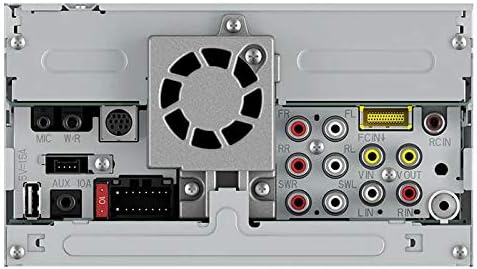
This detailed view of the rear connections emphasizes the RCA outputs for connecting external amplifiers (front, rear, subwoofer), the main power and speaker wire harness, and other auxiliary inputs. Ensure all connections are secure and correctly matched to avoid damage or malfunction.
5. Operating Instructions
5.1 Basic Controls and Interface
The AVH-1400NEX features a responsive 6.2-inch WVGA touchscreen for intuitive control. Physical buttons are located on the left side of the unit for quick access to essential functions like volume, mute, and source selection.

The image above illustrates the receiver's display with the Apple CarPlay interface active. This interface provides access to phone, music, maps, messages, and other compatible applications directly from the touchscreen.
5.2 Audio Features
- Radio: Access AM/FM radio stations.
- Bluetooth Audio: Stream music wirelessly from your Bluetooth-enabled device.
- Pandora/Spotify: Integrated control for these popular streaming services.
- iPod/USB/AUX: Connect external audio sources via USB or 3.5mm auxiliary input.
- Graphic Equalizer: Customize audio output with the 13-band graphic equalizer.
- Fader/Balance: Adjust sound distribution between front/rear and left/right speakers.
- Subwoofer Control: Manage subwoofer output levels and settings.

This image demonstrates the media playback interface, displaying current song information, album art, and controls for streaming services like Pandora or Spotify. The intuitive layout allows for easy navigation of your music library.
5.3 Video Features
- DVD Playback: Insert a DVD into the disc slot for video playback. Ensure the vehicle is parked and the parking brake is engaged for safety.
- Video Signal Setting: Adjust video output settings as needed.
5.4 Connectivity
- Bluetooth: Pair your smartphone for hands-free calling and audio streaming. The unit supports automatic connection.
- Apple CarPlay: Connect your iPhone via USB to access Apple CarPlay features, including navigation, music, messages, and Siri Eyes Free.
- AppRadio Mode+: Utilize compatible smartphone apps directly from the receiver's touchscreen.
- SiriusXM Ready: Requires an optional SiriusXM Connect Vehicle Tuner and subscription (sold separately).
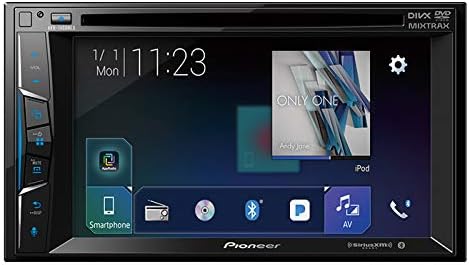
The image above shows the AppRadio Mode+ interface, offering a centralized hub for various media sources and smartphone integration. This mode allows for seamless control of your connected devices.
5.5 Camera View
The unit is equipped with a dedicated input for a backup camera. When the vehicle is shifted into reverse, the display automatically switches to the camera view, providing assistance for parking and maneuvering.
6. Maintenance
- Cleaning the Display: Use a soft, dry cloth to gently wipe the touchscreen. Avoid abrasive cleaners or solvents.
- Disc Care: Handle discs by their edges. Keep them clean and free of scratches.
- Software Updates: Periodically check the Pioneer website for any available firmware updates to ensure optimal performance and compatibility.
7. Troubleshooting
If you encounter issues with your AVH-1400NEX, refer to the following common problems and solutions:
| Problem | Possible Cause | Solution |
|---|---|---|
| No power | Incorrect wiring; blown fuse | Check power connections; replace fuse if necessary. |
| No sound | Speaker wires disconnected; volume too low; mute activated | Verify speaker connections; increase volume; deactivate mute. |
| Bluetooth not connecting | Device not in pairing mode; unit not discoverable | Ensure device is in pairing mode; make unit discoverable in settings. |
| Apple CarPlay not launching | Incorrect USB cable; iPhone not compatible; parking brake not engaged | Use a certified USB cable; check iPhone compatibility; ensure parking brake is set. |
| Backup camera not displaying | Camera not connected; reverse signal wire incorrect | Check camera connections; verify reverse signal wire. |
If the issue persists after attempting these solutions, contact Pioneer customer support or a qualified service technician.
8. Specifications
| Feature | Specification |
|---|---|
| Display Type | LCD |
| Screen Size | 6.2 Inches |
| Display Resolution | 800x480 WVGA |
| Media Type | DVD, CD, USB, AUX |
| Connectivity Technologies | Bluetooth |
| Audio Jack | RCA, USB |
| Amplifier | Built-In MOSFET 50W x 4 |
| Preouts | 3 RCA (4V) |
| USB Port | 1.5A |
| Equalizer | 13-Band Graphic Equalizer |
| Product Dimensions | 11 x 10 x 7 inches |
| Item Weight | 0.01 ounces |
| Model Number | AVH-1400NEX |
9. Warranty and Support
For warranty information and customer support, please refer to the warranty card included with your product or visit the official Pioneer website. Keep your proof of purchase for any warranty claims.