
1. Introduction
Thank you for choosing the Merkury Innovations 4.8 Amp 4-Port USB Charging Station. This device is designed to efficiently charge multiple smartphones, tablets, and other USB-powered devices simultaneously, providing a centralized and organized charging solution. Its sleek design and customizable features make it a practical addition to any space.

Image 1.1: The Merkury Innovations 4-Port USB Charging Station in use, showing an iPad and three iPhones charging simultaneously. The station is white and gold with clear dividers.
2. Package Contents
Please verify that all items are present in the package:
- 1 x Merkury Innovations 4-Port USB Charging Station
- 5 x Translucent Device Dividers
- 1 x Power Cable
3. Setup Instructions
- Unpack the Charging Station: Carefully remove all components from the packaging.
- Insert Device Dividers: The charging station includes five translucent dividers. These can be inserted into the slots on the top surface of the station to create individual compartments for your devices. Arrange them as needed to accommodate various device sizes.
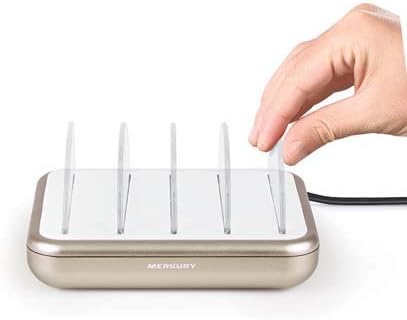
Image 3.1: A hand demonstrating the insertion of a translucent divider into one of the slots on the charging station's white top surface.
- Connect Power: Plug the provided power cable into the power input port on the back of the charging station. Then, plug the other end of the power cable into a standard wall outlet (AC 100-240V).
4. Operating Instructions
- Connect Devices: Use your device's USB charging cable (not included) to connect it to one of the four USB ports on the front of the charging station.
- Place Devices: Position your devices upright within the compartments created by the dividers. This helps keep them organized while charging.

Image 4.1: The charging station with an iPad and three iPhones connected and charging, neatly arranged between the clear dividers.
- Charging Indication: When a device is properly connected and charging, a blue light above the corresponding USB port will illuminate. This indicates active charging.
- Fast Charging: The station provides a total of 4.8 Amps across its four ports, enabling fast charging for compatible devices. The charging speed may vary depending on the device and the number of devices connected simultaneously.
5. Maintenance
- Cleaning: Disconnect the charging station from the power outlet before cleaning. Use a soft, dry cloth to wipe the exterior. Do not use liquid cleaners or abrasive materials.
- Storage: Store the charging station in a cool, dry place when not in use for extended periods.
- Cable Management: Ensure charging cables are not excessively bent or tangled to prevent damage.
6. Troubleshooting
| Problem | Possible Cause | Solution |
|---|---|---|
| Device not charging. |
|
|
| Charging is slow. |
|
|
| Blue indicator light not on. |
|
|
7. Specifications
- Model: MIC-CS405-900
- Input Voltage: AC 100-240V, 50/60Hz
- Total USB Output: 5V / 4.8A (shared across 4 ports)
- Number of USB Ports: 4
- Dimensions: 6 x 4.8 x 1.2 inches (15.24 x 12.19 x 3.05 cm)
- Weight: 13.7 ounces (388.4 grams)
- Compatible Devices: Smartphones, Tablets, and other USB-powered mobile devices
- Color: White/Gold
8. Safety Information
Please read and follow these safety guidelines to ensure safe operation:
- Do not expose the device to liquids, moisture, or extreme temperatures.
- Do not disassemble or attempt to repair the device yourself. Refer all servicing to qualified personnel.
- Keep out of reach of children.
- Use only the provided power cable.
- Avoid placing the charging station on unstable surfaces.
- Unplug the device during lightning storms or when unused for long periods.
9. Warranty and Support
Merkury Innovations products are designed with quality and performance in mind. For warranty information or technical support, please contact Merkury Innovations customer service. Details can typically be found on the product packaging or the official Merkury Innovations website.
For further assistance, please visit: www.merkuryinnovations.com