
1. Introduction
Thank you for choosing the SilverCrest SC-3-DV70 Fixed LCD/LED TV Mount. This mount is designed to securely hold your 42" to 55" television to the wall, providing a stable and space-saving solution. Its universal construction and automatic lock system ensure your screen remains safely in place. This manual provides essential information for proper installation, operation, and maintenance of your TV mount.
2. Safety Information
Please read all instructions carefully before installation. Failure to do so may result in personal injury or property damage. Keep this manual for future reference.
- Weight Capacity: Do not exceed the maximum load capacity of 40 kg (88 lbs). This mount is suitable for VESA 200-400 compatible televisions.
- Wall Type: Ensure the wall structure can safely support the combined weight of the mount and your television. Consult a professional if unsure.
- Tools: Use appropriate tools for installation. Always wear safety glasses.
- Children: Keep children away from the work area during installation.
- Damage: Do not install the mount if any parts are damaged or missing. Contact customer support for replacement parts.
3. Package Contents
Verify that all components are present before beginning installation. The package includes all materials required for assembly.
- Wall Plate (1)
- TV Brackets (2)
- Mounting Hardware Kit (screws, anchors, washers, spacers)
- Installation Instructions (this manual)
- Warranty Certificate
4. Setup and Installation
Follow these steps carefully to ensure a secure installation of your SilverCrest SC-3-DV70 TV mount.
4.1 Tools Required (Not Included)
- Drill
- Stud Finder (recommended for wood stud walls)
- Level
- Pencil
- Measuring Tape
- Phillips Head Screwdriver
4.2 Attaching TV Brackets to Television
- Carefully place your TV face-down on a soft, clean surface to prevent screen damage.
- Identify the VESA mounting holes on the back of your TV.
- Select the appropriate screws, washers, and spacers from the hardware kit that fit your TV's mounting holes.
- Attach the two TV brackets to the back of your television, ensuring they are centered and level. Do not overtighten.
4.3 Mounting the Wall Plate
- Determine the desired height for your TV. Mark the position for the wall plate on the wall.
- Use a level to ensure the wall plate is perfectly horizontal. Mark the drilling points through the holes on the wall plate.
- Drill pilot holes at the marked locations. The drill bit size will depend on your wall type (wood stud, concrete, brick).
- Insert wall anchors into the pilot holes if required for your wall type.
- Secure the wall plate to the wall using the provided screws. Ensure it is firmly attached and level.
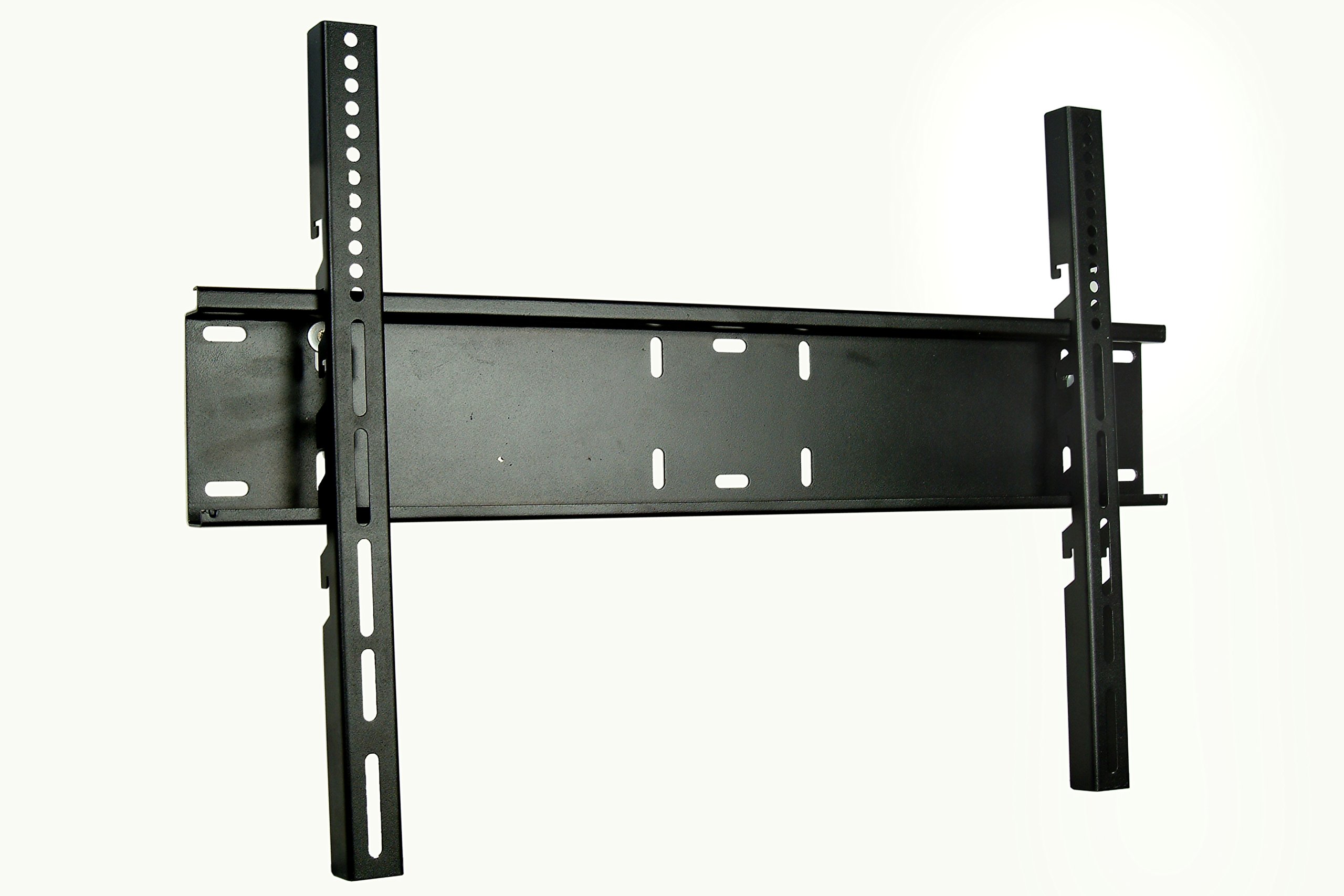
Image 1: Overview of the SilverCrest SC-3-DV70 Fixed LCD/LED TV Mount, showing the wall plate and TV brackets. This image illustrates the primary components before assembly.
4.4 Hanging the Television
- With assistance, carefully lift the television with the attached brackets.
- Hook the TV brackets onto the top edge of the wall plate.
- Gently lower the TV until the brackets engage with the wall plate's automatic lock system. You should hear a click or feel it lock into place.
- Verify that the TV is securely mounted and level. Gently pull on the bottom of the TV to ensure it is locked.
5. Operating Instructions
The SilverCrest SC-3-DV70 is a fixed TV mount, meaning once installed, the television's position is static. The primary operation involves ensuring the TV is correctly seated and locked onto the wall plate.
- Secure Locking: The mount features an automatic lock system. After hanging the TV, ensure the brackets are fully engaged with the wall plate to prevent accidental movement.
- Fixed Position: This mount does not allow for tilting, swiveling, or extending the TV. The TV will remain in a fixed position against the wall.
6. Maintenance
Regular maintenance ensures the longevity and safety of your TV mount.
- Cleaning: Wipe the mount with a soft, dry cloth. Avoid abrasive cleaners or solvents.
- Periodic Check: Periodically check all screws and connections to ensure they remain tight and secure. Do not overtighten.
- Damage Inspection: Inspect the mount for any signs of wear, corrosion, or damage. If any damage is found, do not use the mount and contact customer support.
7. Troubleshooting
If you encounter issues during or after installation, refer to the following common solutions.
| Problem | Possible Cause | Solution |
|---|---|---|
| TV is not level. | Wall plate not level during installation. | Remove TV, adjust wall plate, and re-mount. Use a level during installation. |
| TV feels loose or unstable. | TV brackets not fully engaged with wall plate; screws not tightened. | Ensure TV brackets are fully seated and locked. Check all screws for tightness. Do not exceed weight capacity. |
| Mounting screws do not fit TV. | Incorrect screw size selected. | Refer to your TV's manual for correct VESA screw specifications. Use the appropriate screws from the provided kit or purchase compatible ones. |
If you cannot resolve the issue, please contact SilverCrest customer support.
8. Specifications
- Model: SC-3-DV70
- Brand: Silver Crest
- Movement Type: Fixed
- Compatible Devices: Television
- Minimum Supported Screen Size: 42 Inches
- Maximum Supported Screen Size: 55 Inches
- VESA Compatibility: 200 - 400 (e.g., 200x200, 300x300, 400x400)
- Load Capacity: 40 kg (88 lbs)
- Material: 2mm extra reinforced metal housing, electrostatic paint
- Color: Black
- Item Type Name: Fixed LCD / LED TV Mount
- Item Weight: 1010 Kilograms (Note: This value is provided by the manufacturer. Please verify actual product weight upon receipt.)
- Country of Origin: Turkey
- Manufacturer: Benceiyi Bilgi Teknolojileri
- ASIN: B07D2MW46T
9. Warranty and Support
A warranty certificate is included in the product box. Please refer to this document for specific warranty terms and conditions.
For technical assistance, missing parts, or warranty claims, please contact SilverCrest customer support through your retailer or the official SilverCrest website. Please have your model number (SC-3-DV70) and purchase information ready when contacting support.