
Introduction
The BH i.Boxster treadmill is engineered for intensive home use, providing a robust and quiet running experience with advanced features for effective fitness training. This manual offers essential information for safe operation, proper maintenance, and effective troubleshooting to ensure the longevity and optimal performance of your equipment.

Image: The BH i.Boxster treadmill, showcasing its robust frame and console design.
Safety Information
Always read and fully understand all warnings and instructions before operating the treadmill. Prioritize safety by keeping children and pets away from the machine during use. Ensure the safety clip is securely attached to your clothing before initiating any workout.
- Place the treadmill on a flat, stable, and non-slip surface.
- Maintain a clear safety zone of at least 2 meters (6.5 feet) behind the treadmill and 0.6 meters (2 feet) on each side.
- Do not operate the treadmill if it appears damaged or is malfunctioning.
- Consult a healthcare professional before commencing any new exercise program.
- Always wear appropriate athletic footwear with good traction.
- Disconnect the power cord from the outlet when not in use or before performing maintenance.
Setup and Assembly
The BH i.Boxster treadmill is designed for straightforward assembly. Follow these steps for final setup and optimal placement:
- Unpacking: Carefully remove all components from the packaging. Due to the unit's substantial weight (approximately 102 kg), it is highly recommended that two people handle the unpacking and initial positioning.
- Base Assembly: Attach the main uprights to the treadmill's base frame using the provided hardware. Ensure all connections are secure.
- Console Attachment: Securely mount the console to the top of the uprights. Carefully connect all electrical cables, ensuring they are not pinched.
- Handlebar Installation: Install the handlebars and any integrated pulse sensors.
- Placement: Position the assembled treadmill on a level surface in your desired workout area. The integrated transport wheels facilitate easier relocation.
- Power Connection: Plug the power cord into a dedicated, grounded electrical outlet.

Image: The BH i.Boxster treadmill in its vertically folded position, demonstrating its space-saving capability for storage.
Operating Instructions
Console Overview

Image: Close-up view of the BH i.Boxster treadmill's LED console and control panel, highlighting various buttons and display areas.
The intuitive LED monitor provides real-time display of essential workout metrics, including speed, incline, heart rate, calories burned, distance covered, and training duration. It features convenient instant keys for quick speed and incline adjustments.
Starting a Workout
- Ensure the safety clip is properly attached to your clothing and securely inserted into its slot on the console.
- Press the START button. The running belt will begin to move at a low, safe speed.
- Adjust your desired speed using the SPEED +/- buttons or by selecting one of the instant speed keys. The treadmill supports a maximum speed of 20 km/h.
- Adjust the incline level using the INCLINE +/- buttons or instant incline keys. The treadmill offers an electric incline range of up to 12%.
Programs and Features
- Preset Programs: Choose from 14 pre-defined workout programs designed to offer varied intensity and training goals.
- BodyFat Test: Utilize this integrated function to estimate your body fat percentage.
- Heart Rate Monitoring: Measure your pulse using the contact sensors located on the handlebars. The treadmill is also compatible with Bluetooth Smart and 5 kHz radio frequency chest straps (not included) for continuous heart rate tracking.
- i.Concept 3.0 & FTMS: Connect your personal device via Bluetooth to compatible fitness applications for an interactive and engaging training experience.
- ECO-MODE: Activate this energy-saving function to reduce power consumption by up to 25% during your workout.
- Fan: Benefit from the integrated fan for enhanced comfort and airflow during your exercise sessions.
Stopping a Workout
To safely conclude your workout, press the STOP button. The treadmill belt will gradually decelerate and come to a complete stop. In case of an emergency, pulling the safety clip will immediately halt the running belt.
Maintenance
Consistent and proper maintenance is crucial for ensuring the longevity, safety, and optimal performance of your treadmill.
- Cleaning: After each use, wipe down the console and frame with a soft, damp cloth. Avoid using abrasive cleaners or solvents, as they may damage the surfaces.
- Belt Lubrication: The running belt requires periodic lubrication to minimize friction and wear. Refer to the specific instructions provided with your treadmill lubricant for frequency and application method.
- Belt Tension and Alignment: Regularly inspect the running belt for proper tension and alignment. Adjustments should be made according to the detailed instructions found in the complete product manual to prevent premature wear and ensure smooth operation.
- General Inspection: Periodically check all visible bolts, nuts, and screws to ensure they are tight and secure. Tighten any loose fasteners immediately.
Troubleshooting
| Problem | Possible Cause | Solution |
|---|---|---|
| Treadmill does not start. | Power cord not securely plugged in; Safety clip not attached; Circuit breaker tripped. | Ensure power cord is fully inserted; Attach safety clip correctly; Reset the circuit breaker if necessary. |
| Running belt slips or hesitates. | Belt tension is too loose; Belt requires lubrication. | Adjust the running belt tension as per manual; Lubricate the running belt surface. |
| Unusual noise during operation. | Loose components; Motor or roller issue; Excessive belt friction. | Check and tighten all visible bolts and screws; Lubricate the belt; If noise persists, contact customer support. |
| Incline function is not working. | Incline motor malfunction; Cable disconnected. | Verify all cable connections to the incline motor; If the issue persists, contact customer support. |
Specifications
| Feature | Detail |
|---|---|
| Model | BH i.Boxster |
| Motor (Continuous) | 2.0 HP |
| Motor (Peak) | 3.5 HP |
| Maximum Speed | 20 km/h (12.4 mph) |
| Electric Incline | 0-12% |
| Running Surface | 140 cm x 51 cm (55.1 in x 20.1 in) |
| Maximum User Weight | 130 kg (286 lbs) |
| Dimensions (Unfolded) | 184 cm (L) x 94 cm (W) x 149 cm (H) |
| Dimensions (Folded) | 125 cm (L) x 94 cm (W) x 156 cm (H) |
| Product Weight | 102 kg (224.9 lbs) |
| Cushioning System | K-Dumper & Progressive Cushioning System |
| Connectivity | i.Concept 3.0, FTMS, Bluetooth Smart (chest strap compatible) |
| Programs | 14 Preset Programs, BodyFat Test |
| Special Features | Foldable, Transport Wheels, Safety Clip, ECO-MODE, Integrated Fan, Bottle Holders |
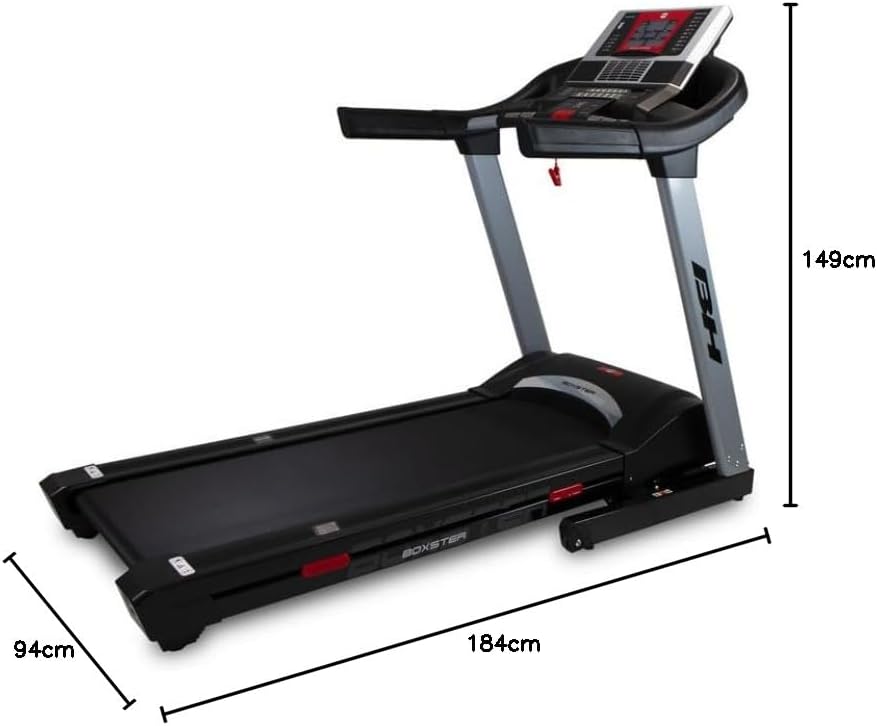
Image: Diagram illustrating the key dimensions of the BH i.Boxster treadmill: 184 cm length, 94 cm width, and 149 cm height.
Warranty and Support
For detailed warranty information and technical support, please refer to the warranty card included with your product packaging. It is advisable to retain your purchase receipt as proof of purchase for any warranty claims.
For further assistance, including service requests or inquiries not covered in this manual, please contact BH Fitness customer service directly. Contact details are typically available on the official BH Fitness website or within the product documentation.

