Introduction
This manual provides essential information for the safe and effective use of Hillflower AAA G.I. 1.5V Heavy Duty Carbon Zinc Batteries. These batteries are designed for general-purpose use in various electronic devices requiring AAA size batteries. Please read this manual thoroughly before using the product.
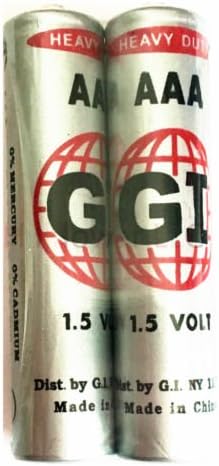
Image: Two Hillflower AAA G.I. 1.5V Heavy Duty Carbon Zinc Batteries, showing branding and voltage.
Safety Information
To prevent personal injury or damage to your device, always follow these safety guidelines:
- Keep batteries out of reach of children and pets.
- Do not attempt to recharge these batteries, as they are single-use carbon zinc type.
- Do not disassemble, crush, puncture, or modify the batteries.
- Do not expose batteries to fire or extreme temperatures (high or low).
- Do not mix old and new batteries, or batteries of different types or brands, in the same device.
- Ensure correct polarity (+ and -) when inserting batteries into a device. Incorrect insertion can cause damage.
- Remove exhausted batteries promptly from devices to prevent potential leakage and damage.
- If a battery leaks, avoid contact with skin and eyes. If contact occurs, rinse immediately with plenty of water and seek medical attention.
- Dispose of used batteries according to local regulations.
Product Features
The Hillflower AAA G.I. batteries offer the following characteristics:
- Battery Type: AAA, also known as LR3, LR03, AM4, MN2400.
- Voltage: 1.5 Volts.
- Composition: Heavy Duty Carbon Zinc.
- Mercury Content: 0% Hg (Mercury-free).
- Duration: Designed for long-lasting performance in appropriate devices.
- Quality: High-quality construction for reliable power.
Setup and Installation
- Locate Battery Compartment: Identify the battery compartment on your electronic device. This is typically found on the back or bottom of the device.
- Open Compartment: Open the battery compartment cover. This may involve sliding a latch, pressing a button, or unscrewing a small screw.
- Observe Polarity: Inside the compartment, you will see markings indicating the correct orientation for the positive (+) and negative (-) terminals of the batteries. Match these markings with the corresponding ends of the Hillflower AAA batteries.
- Insert Batteries: Carefully insert the batteries, ensuring that the positive (+) end of the battery aligns with the positive (+) terminal in the compartment, and the negative (-) end aligns with the negative (-) terminal.
- Close Compartment: Securely close the battery compartment cover.

Image: A single Hillflower AAA G.I. battery, illustrating its size and markings for proper installation.
Operating Instructions
Once the Hillflower AAA batteries are correctly installed in your device, it should be ready for operation. Simply turn on your device as per its own instruction manual. These batteries are suitable for low to medium drain devices such as remote controls, clocks, flashlights, and toys.
For optimal performance, it is recommended to replace all batteries in a device simultaneously rather than mixing new and used batteries.
Maintenance
- Storage: Store unused batteries in their original packaging in a cool, dry place, away from direct sunlight and extreme temperatures.
- Device Storage: If a device will not be used for an extended period (e.g., several weeks or months), remove the batteries to prevent potential leakage and corrosion within the device.
- Cleaning Contacts: If battery contacts in a device appear dirty or corroded, gently clean them with a pencil eraser or a cotton swab dipped in rubbing alcohol to ensure good electrical connection.
Troubleshooting
| Problem | Possible Cause | Solution |
|---|---|---|
| Device not powering on. | Incorrect battery installation (polarity). Exhausted batteries. Corroded contacts. | Check and correct battery polarity. Replace with new batteries. Clean battery contacts in the device. |
| Short battery life. | Device is high-drain. Mixing old and new batteries. | Ensure the device is suitable for carbon zinc batteries. For high-drain devices, consider alkaline or lithium batteries. Replace all batteries simultaneously. |
| Battery leakage. | Over-discharge. Extreme temperatures. Prolonged storage in device. | Remove exhausted batteries promptly. Store batteries in a cool, dry place. Remove batteries from devices not in use for extended periods. |
Specifications
| Specification | Detail |
|---|---|
| Brand | Hillflower |
| Model Number | AAA-HFGI-L1AC1-B40 |
| Battery Cell Composition | Zinc (Carbon Zinc) |
| Unit Count | 40 Count |
| Voltage | 1.5 Volts |
| Reusability | Single Use (Non-rechargeable) |
| Mercury Content | 0% Hg |
| Date First Available | May 14, 2018 |
| Manufacturer | HillflowerLLC |

Image: A technical table comparing typical energy densities of various battery types, including AAA.
Warranty and Support
Hillflower batteries are manufactured to high-quality standards. For any questions regarding product performance, safety, or general inquiries, please contact Hillflower customer service directly. Specific warranty details may vary; please refer to your purchase documentation or the official Hillflower website for the most current information.
Manufacturer: HillflowerLLC