
1. Introduction
This manual provides essential instructions for the safe and effective use of your EPtech Car DC Adapter. This adapter is designed to power compatible RCA 7-inch Mobile Dual Portable DVD Players, including models DRC69705E28G, DRC69707E, and DRC69707, from a vehicle's 12V-24V cigarette lighter socket.
Please read this manual thoroughly before using the product and retain it for future reference.
2. Safety Information
To ensure safe operation and prevent damage, observe the following safety guidelines:
- Compatibility: Use this adapter only with devices that require 9V-12V DC input and have a compatible DC barrel connector. Verify your device's power requirements before connecting.
- Vehicle Voltage: The adapter is designed for 12V-24V DC vehicle power outlets (cigarette lighter sockets). Do not use in vehicles with incompatible voltage systems.
- Protection Features: The adapter includes built-in safety features such as over current protection, total power protection, over voltage protection, and short circuit protection.
- Environment: Avoid exposing the adapter to moisture, extreme temperatures, or direct sunlight. Do not operate in wet conditions.
- Handling: Do not attempt to disassemble, modify, or repair the adapter. Refer all servicing to qualified personnel.
- Cable Care: Ensure the cable is not pinched, twisted, or walked on. Damaged cables can pose a safety risk.
3. Product Overview
The EPtech Car DC Adapter provides a reliable power source for your portable DVD player while on the go. It features a durable design and multiple safety protections.
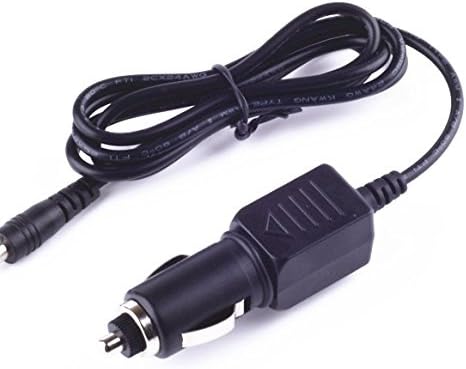
Image 1: EPtech Car DC Adapter. This image shows the adapter's cigarette lighter plug on one end and the DC barrel connector on the other, connected by a black cable.

Image 2: Illustrative cross-section of a high-quality power cable, highlighting the copper wire and PVC insulation jacket for durability and efficient power delivery.
4. Setup and Installation
- Verify Compatibility: Before connecting, confirm that your RCA portable DVD player requires a 9V-12V DC input and has a compatible DC power input port.
- Connect to Device: Insert the DC barrel connector end of the adapter firmly into the power input port of your RCA portable DVD player.
- Connect to Vehicle: Insert the cigarette lighter plug end of the adapter into your vehicle's 12V-24V DC accessory power socket (cigarette lighter socket). Ensure it is fully seated.
- Power On: Once connected, turn on your portable DVD player. The adapter will begin supplying power.
5. Operation
The EPtech Car DC Adapter operates automatically once connected to a powered vehicle socket and a compatible device. It provides continuous power to your portable DVD player, allowing for extended use during travel.
- The adapter is designed for charging and powering your device simultaneously.
- Disconnect the adapter from the vehicle's power socket when not in use to prevent draining the vehicle's battery.
6. Maintenance
Proper care ensures the longevity and performance of your adapter:
- Cleaning: Use a soft, dry cloth to clean the adapter. Do not use liquid cleaners or solvents.
- Storage: Store the adapter in a cool, dry place when not in use. Avoid extreme temperatures.
- Inspection: Periodically inspect the cable and connectors for any signs of damage, such as fraying, cuts, or bent pins. Discontinue use if damage is found.
7. Troubleshooting
If you encounter issues with your adapter, refer to the following common solutions:
- No Power to Device:
- Ensure the adapter is fully inserted into both the vehicle's power socket and the DVD player's power port.
- Check if the vehicle's power socket is active (some vehicles require the ignition to be on).
- Verify that your DVD player is turned on and functioning correctly.
- Inspect the adapter cable and connectors for any visible damage.
- Intermittent Power:
- Ensure connections are secure and free from debris.
- Avoid excessive movement of the adapter or device during use.
- Adapter Overheating:
- Ensure the adapter is not covered or placed in an enclosed space that restricts airflow.
- Confirm that the connected device's power requirements do not exceed the adapter's capacity.
If problems persist, contact customer support.
8. Specifications
| Feature | Specification |
|---|---|
| Brand | EPtech |
| Model Number | A1805131591 |
| Input Voltage (Vehicle) | 12V - 24V DC |
| Output Voltage (Device) | 9V - 12V DC (Compatible with specified RCA DVD Players) |
| Connector Type | DC Barrel Connector (for device), Cigarette Lighter Plug (for vehicle) |
| Safety Features | Over current protection, Total power protection, Over voltage protection, Short Circuit Protection |
| Certifications | FCC, CE, RoHS |
| Item Weight | 8 ounces |
9. Warranty and Support
EPtech products are manufactured with high-quality materials and undergo rigorous quality control procedures. For any questions, issues, or support needs regarding your EPtech Car DC Adapter, please contact our customer service team.
Email: epcustomerservice@yahoo.com