
1. Introduction
The Pomelotree LED Storefront Lights are designed to provide bright, energy-efficient, and waterproof illumination for various applications, including business storefronts, advertising signs, and home decoration. This manual provides detailed instructions for the proper setup, operation, and maintenance of your LED lights.

Image: Overview of the LED storefront lights, including the modules, remote control, and various application examples such as window outlines and interior lighting.
2. Package Contents
Please verify that all items are included in your package:
- 4 sets of 20-piece 3-LED RGB Storefront LED Lights (total 80 pieces, 40ft)
- 1 x 12V Power Adapter
- 1 x 44 Keys IR Remote Controller
- 1 x Receiver
- 20 x Connectors

Image: A visual representation of all components included in the product package, ensuring users can confirm they have everything needed for installation.
3. Features
- High Brightness: Equipped with upgraded 5050 SMD lamp beads, providing brighter illumination and a 120-degree angle of illumination.
- Waterproof Design: LED modules are designed to work in damp conditions without short-circuiting. Ensure proper wiring of positive and negative poles.
- Energy-saving: Low power consumption and high energy efficiency.
- Flexible Installation: Features sticky self-adhesive tape on the back of each module for easy attachment and optional screw holes for secure hanging.
- DIY Customization: Modules can be cut to desired lengths.
- Remote Control: Includes a 44-key IR remote for color selection, dimming, and mode changes.
4. Setup and Installation
Follow these steps for proper installation of your LED storefront lights:
4.1. Preparation
- Ensure the installation surface (e.g., inside of channel letter or sign box) is clean and free of debris.
- Plan your layout before adhering or screwing the modules.

Image: Step-by-step guide for installing LED modules within channel letters or sign boxes, detailing preparation, layout, securing, and wiring connections.
4.2. Connecting the Modules
The LED modules can be connected in parallel or series. Parallel connection is recommended for consistent brightness across all modules.
- Parallel Connection: Connect all modules directly to the power source in parallel. This ensures each module receives the full voltage, maintaining uniform brightness.
- Series Connection: Connecting modules in series may result in gradually dimming lights further down the chain due to voltage drop.

Image: Illustration of two wiring methods: parallel connection, which ensures consistent brightness, and series connection, which can lead to brightness variations.
Use the provided connectors to quickly connect strand tips. Pay special attention to the positive and negative poles of the connectors to avoid short circuits.

Image: A detailed view of the user-friendly connectors, highlighting the importance of correct positive and negative wire connections to prevent electrical issues.
Video: An official Pomelotree video demonstrating the connection process for the LED storefront lights, showing how to properly wire the modules to the controller.
4.3. Mounting the Modules
There are two primary methods for mounting the LED modules:
- Self-Adhesive Tape: Each module has sticky self-adhesive tape on the back. Simply peel and stick the modules to your desired clean surface.
- Screw Holes: For a more secure installation, use the optional screw holes on each module to fix them in place with screws.

Image: Depicts two convenient installation options: using the pre-applied double-sided adhesive tape for quick setup or securing with screws for a more permanent fixture.

Image: A visual guide to the two installation methods, showing how to use both the adhesive backing and the screw holes for flexible mounting.
4.4. Cutting Modules (DIY)
The LED modules can be cut to length if needed. Be sure the end of the wire is wrapped by silica gel casing; otherwise, it should be cut off to maintain waterproof integrity.

Image: Demonstrates the DIY capability of the LED modules, showing they can be cut to specific lengths to fit various installation requirements.
Video: An official Pomelotree video showcasing the LED storefront lights in action, providing a visual example of their brightness and application.
5. Operating Instructions
Use the included 44-key IR remote controller to operate your LED lights:
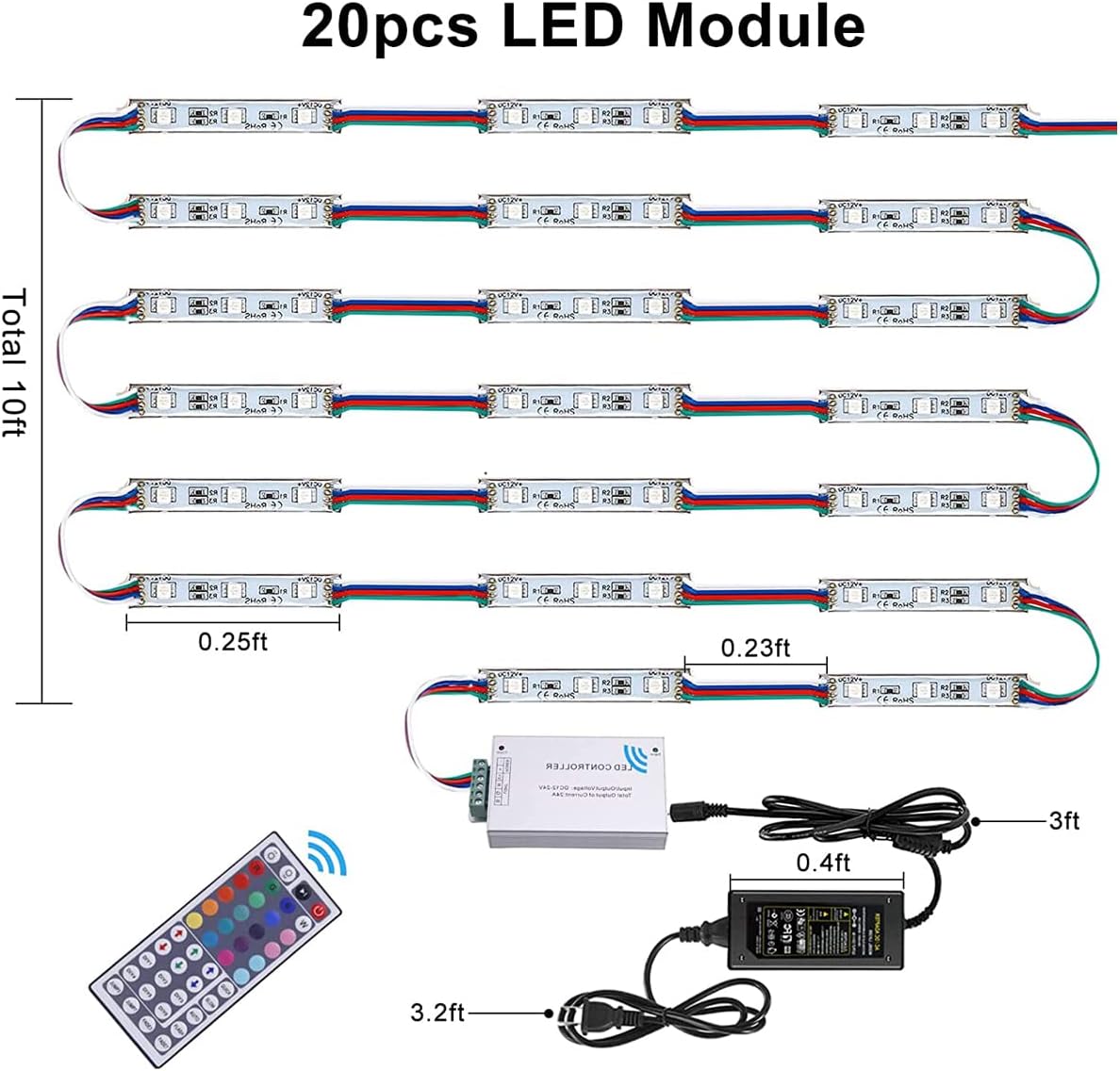
Image: A detailed layout of the 44-key IR remote control, with labels indicating buttons for power, brightness adjustment, color selection (RGB, white, custom), speed control, and various lighting modes (jump, fade, auto, flash).
- ON/OFF: Power button to turn the lights on or off.
- Brightness Adjustment: Increase or decrease brightness in 8 grades.
- Color Selection: Choose from Red, Green, Blue, White, and various mixed colors. Note: SMD2835 LED Strip lights do NOT support pure static single color or white color; it's a combination mixed by red & green & blue in different types.
- Custom Colors (DIY1-DIY6): Create and save your own custom color settings.
- Speed Control: Speed up or slow down color changing modes.
- Mode Selection:
- AUTO: Automatically changes colors and modes.
- FLASH: Turns flash on and off.
- JUMP3/JUMP7: Jump change 3 or 7 colors.
- FADE3/FADE7: Gradual change 3 or 7 colors.
6. Maintenance
The LED modules are waterproof and designed for durability. However, proper care can extend their lifespan:
- Cleaning: Gently wipe the modules with a soft, damp cloth to remove dust or dirt. Avoid abrasive cleaners.
- Wiring Inspection: Periodically check all wire connections to ensure they are secure and free from damage, especially in outdoor installations.
- Water Protection: While waterproof, avoid submerging the modules or exposing the power adapter and controller to direct water.
7. Troubleshooting
| Problem | Possible Cause | Solution |
|---|---|---|
| Lights do not turn on. | No power, loose connection, faulty power adapter/controller. | Check power outlet, ensure all connections are secure. Verify power adapter and controller are functioning. |
| Remote control not working. | Remote battery dead, remote not pointed at receiver, faulty remote/receiver. | Replace remote battery. Ensure clear line of sight to the receiver. Test with another remote if available or contact support. |
| Lights are dim or inconsistent. | Series connection, voltage drop, insufficient power. | Ensure modules are connected in parallel. Verify power supply meets wattage requirements. |
| Some modules are not lighting up. | Loose connection to specific module, damaged module. | Check connections to the affected modules. If connections are secure, the module may be faulty and require replacement. |
8. Specifications
| Attribute | Detail |
|---|---|
| Color | RGB light |
| Brand | Pomelotree |
| Indoor/Outdoor Usage | Outdoor, Indoor |
| Special Feature | Remote Controlled, Dimmable, Twinkling, Adjustable |
| Light Source Type | LED |
| Power Source | Corded Electric |
| Light Color | Multicolor |
| Style | Modern |
| Material | Plastic |
| Controller Type | Remote Control |
| Number of Light Sources | 240 (total for 4 sets) |
| Voltage | 12 Volts |
| Wattage | 60 watts |
| Item Weight | 2.27 pounds |
| Number of Items | 4 (sets) |
| Control Method | Remote |
| Water Resistance Level | Waterproof |
| UPC | 657835010454 |
| Package Dimensions | 13.7 x 5.67 x 3.5 inches |
| Country of Origin | China |
9. Warranty and Support
For warranty information or technical support, please refer to the product packaging or contact Pomelotree customer service directly. Keep your purchase receipt for warranty claims.
You can visit the official Pomelotree store for more information: Pomelotree Store