
1. Introduction
Thank you for purchasing the Meike MK-MT24S 2.4G Wireless Macro Twin Lite Flash. This advanced flash system is designed to provide versatile and precise lighting for macro photography with compatible Sony MI Hot Shoe Mount Mirrorless Cameras. Please read this manual thoroughly before use to ensure proper operation and to maximize the potential of your new equipment.
2. Product Overview
2.1 Key Features
- FSK 2.4GHz Wireless Control
- Multiple Flash Modes: TTL (Through-The-Lens), Manual (M), S1/S2 Optical Slave Modes
- High-Speed Synchronization (HSS)
- Adjustable Tilt & Swivel Flash Heads for flexible lighting angles
- LED-Assistive Preview Focus Light
- Supports Firmware Upgrading Online
- Guide Number: 10 (ISO 100.m), 14 (ISO 200.m)
- LED Light: 0.5W, 5500K±200, Ra 90
- Group and Channel Control: Groups A/B/C and Channels 1/2/3/4
- Wireless Distance: Stable within 15m (any angle), actual measurement >100m in open environment
- Cover Angle: Covers light of 24mm lens
- Recycle Time: 4s at 1/1 output (2.4-2.8V)
- Battery Requirements: 2x AAA Ni-MH for R200 flashes, 2x AA Ni-MH for GT620 trigger (batteries not included)
- Operating Temperature: -10°C to 50°C
- Storage Temperature: -20°C to 70°C
2.2 Package Contents
The Meike MK-MT24S Macro Flash Set includes the following components:
- 1 x MK-GT620 Trigger
- 2 x MK-R200 Flash Units
- 2 x MK-R200 Soft Flash Diffusers
- 2 x Hot Shoe Mounts (MK-AS-R200A)
- 2 x Lamp Holders (MK-AS-R200B)
- 1 x Hot Shoe (for trigger)
- 2 x Diffusers (MK-SZ)
- 18 x Color Filters (MK-SB-R200)
- 1 x Annular Lamp Holder
- 6 x Lens Adapter Rings (ø52mm, ø55mm, ø62mm, ø67mm, ø72mm, or ø77mm)
- 1 x MK-MT24 Storage Pocket
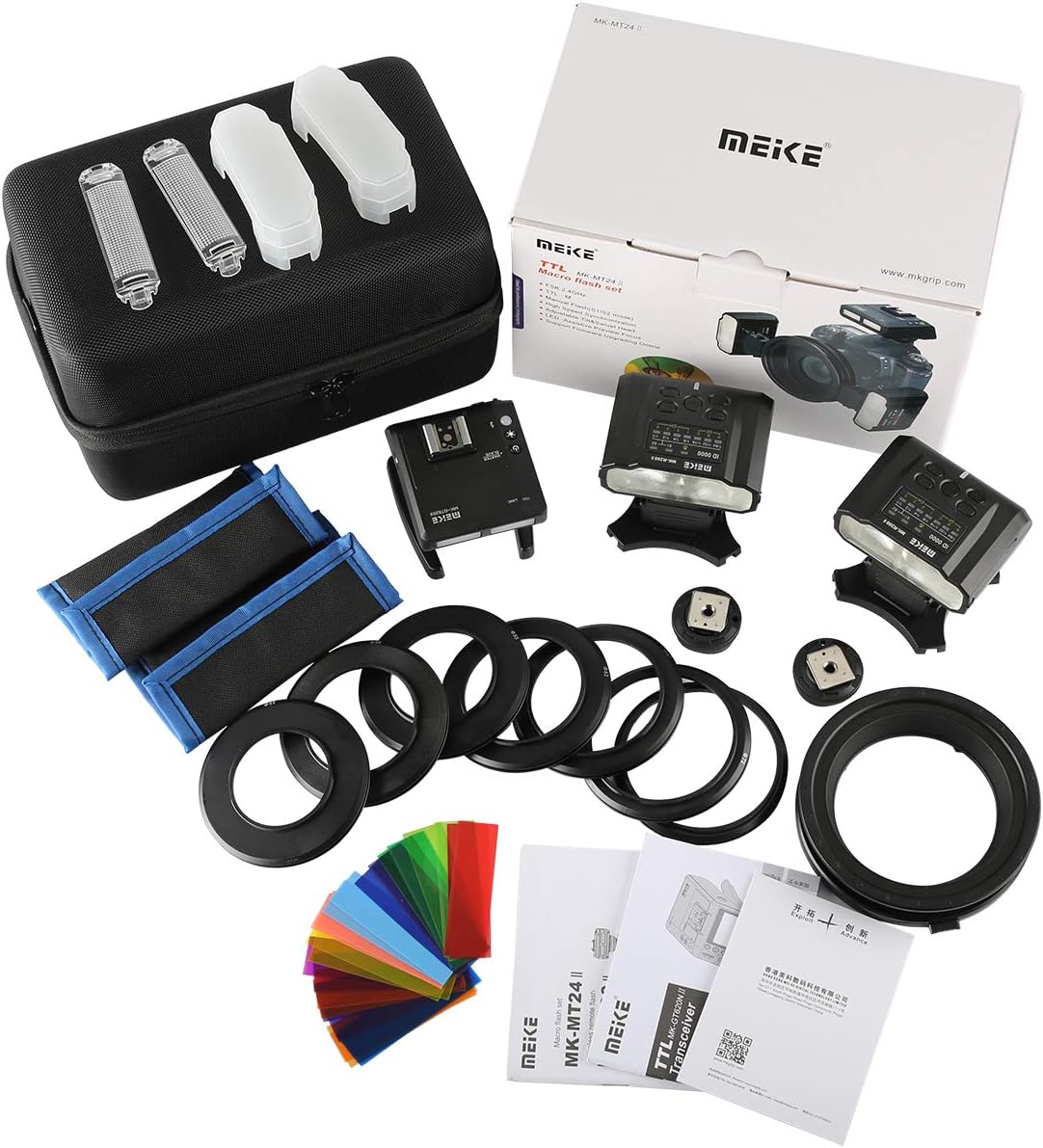
Figure 2.2.1: All components included in the Meike MK-MT24S Macro Flash Set.

Figure 2.2.2: Main components including the ring flash adapter, two flash units, and lens adapter rings.
3. Setup
3.1 Battery Installation
The MK-GT620 trigger requires 2x AA Ni-MH batteries, and each MK-R200 flash unit requires 2x AAA Ni-MH batteries. Ensure correct polarity when inserting batteries.
- Open the battery compartment cover on the back of the MK-GT620 trigger and each MK-R200 flash unit.
- Insert the required batteries according to the polarity indicators (+/-).
- Close the battery compartment cover securely.
3.2 Mounting the Trigger
The MK-GT620 trigger mounts directly onto your camera's hot shoe.
- Slide the MK-GT620 trigger onto your camera's hot shoe until it clicks into place.
- Tighten the locking ring or lever on the trigger to secure it to the hot shoe.

Figure 3.2.1: The MK-GT620 trigger mounted on a Sony camera's hot shoe.
3.3 Attaching Flash Units and Lens Adapter
The MK-R200 flash units attach to the annular lamp holder, which then connects to your lens via an adapter ring.
- Select the appropriate lens adapter ring (ø52mm, ø55mm, ø62mm, ø67mm, ø72mm, or ø77mm) that matches your camera lens filter thread.
- Screw the selected lens adapter ring onto the front of your camera lens.
- Attach the annular lamp holder to the lens adapter ring.
- Slide each MK-R200 flash unit onto the designated slots on the annular lamp holder. Ensure they are securely locked.
- The flash units can be tilted and swiveled for optimal lighting angles.

Figure 3.3.1: The complete macro flash setup with trigger and flash units attached to the camera and lens.
4. Operating Instructions
4.1 Power On/Off
Press and hold the power button on the MK-GT620 trigger and each MK-R200 flash unit to turn them on or off. Ensure all units are powered on for wireless operation.
4.2 Mode Selection
The MK-MT24S supports TTL, Manual (M), and S1/S2 optical slave modes.
- TTL Mode: The flash output is automatically controlled by the camera's metering system.
- Manual (M) Mode: Allows manual adjustment of flash power from 1/1 to 1/128.
- S1/S2 Optical Slave Mode: The flash units can be triggered by another flash. S1 mode triggers on the first flash, S2 mode ignores the pre-flash of a TTL system.
Use the mode button on the trigger to cycle through available modes.
4.3 Adjusting Flash Power (Manual Mode)
In Manual mode, use the adjustment buttons on the MK-GT620 trigger to increase or decrease the flash output power for individual groups (A, B, C).
4.4 Group and Channel Settings
The system supports 3 groups (A, B, C) and 4 channels (1, 2, 3, 4). Ensure the trigger and flash units are set to the same channel for communication. Different flash powers can be set for up to 3 different groups of flashes.
- On the MK-GT620 trigger, use the 'Gr' button to select the group (A, B, C) you wish to control.
- Use the 'CH' button to select the desired channel.
- On each MK-R200 flash unit, set the corresponding group and channel to match the trigger.

Figure 4.4.1: Setting groups and channels on the trigger and flash units.
4.5 High-Speed Synchronization (HSS)
HSS allows you to use the flash at shutter speeds faster than your camera's native flash sync speed. Refer to your camera's manual for HSS compatibility and activation. The MK-MT24S supports HSS when used with compatible cameras and settings.
4.6 LED-Assistive Preview Focus
The flash units feature an LED light to assist with focusing in low-light conditions. Activate this feature via the trigger or individual flash units as needed.
4.7 Firmware Upgrading
The MK-MT24S supports online firmware upgrades. Visit the official Meike website for the latest firmware and detailed instructions on how to perform the upgrade. Always ensure your device has sufficient battery power before attempting a firmware update.
5. Maintenance
- Keep the flash units and trigger clean and dry. Use a soft, dry cloth to wipe surfaces.
- Avoid exposing the equipment to extreme temperatures, humidity, or direct sunlight for prolonged periods.
- Remove batteries if the unit will not be used for an extended period to prevent leakage.
- Store the equipment in the provided storage pocket to protect it from dust and physical damage.
6. Troubleshooting
| Problem | Possible Cause | Solution |
|---|---|---|
| Flash not firing. | Low battery, incorrect channel/group, unit not powered on, hot shoe connection issue. | Check/replace batteries. Ensure trigger and flashes are on the same channel and group. Power on all units. Re-seat trigger on hot shoe. |
| Inconsistent flash output. | Low battery, interference, incorrect mode. | Replace batteries. Move away from sources of interference. Ensure correct flash mode (TTL/M) is selected. |
| Flashes not syncing with camera. | Incompatible lens (manual lenses may not work), firmware issue, hot shoe connection. | Ensure an automatic lens is used with Sony cameras (as per user reviews). Check for firmware updates. Verify hot shoe connection. |
| Diffusers keep falling off. | Loose fit. | Ensure diffusers are properly seated. Consider using tape if necessary for a secure fit during active use. |
7. Specifications
- Model: MK-MT24
- Product Dimensions: 8.86 x 5.51 x 5.51 inches
- Item Weight: 7 ounces
- Flash Sync Speed: 1/250s (standard, HSS supported)
- Camera Flash Type: Macro
- Compatible Mountings: Sony MI Hot Shoe
- Manufacturer: Meike
- Country of Origin: China
- Date First Available: May 8, 2018
8. Warranty and Support
For warranty information, technical support, or service inquiries, please refer to the official Meike website or contact your local distributor. Keep your purchase receipt as proof of purchase for warranty claims.
Visit the official Meike Store for more information: Meike Store