
1. Product Overview
The ECPURCHASE USB Rechargeable Portable Blender is designed for convenient blending of fruits, vegetables, and other ingredients into smoothies, shakes, and baby food. Its compact size and rechargeable battery make it suitable for travel and on-the-go use.

Image: The ECPURCHASE portable blender in pink, shown alongside a variety of fresh fruits and glasses of blended juice, highlighting its primary function.
2. Package Contents
Verify that all items are present in the package:
- 1 x Portable Personal Blender
- 1 x USB Charging Cable
- 1 x User Manual
- 1 x Cleaning Brush

Image: A visual representation of the package contents, displaying the pink portable blender, a white cleaning brush with a pink handle, a white USB charging cable, and the product manual.
3. Safety Information
- Do not immerse the motor base in water or any other liquid.
- Keep hands and utensils out of the blender cup while operating to prevent injury.
- Ensure the blender cup is securely tightened to the base before operation.
- Do not operate the blender while it is charging.
- Keep out of reach of children.
- The blades are sharp; handle with care during cleaning and assembly.
- Do not overfill the blender; ensure ingredients do not exceed 2/3 of the cup capacity.
4. Setup and Charging
- Initial Charge: Fully charge the blender for approximately 3 hours before its first use. Subsequent charges typically take about 1 hour.
- Charging Method: The blender can be charged using the provided USB cable via a power bank, laptop, computer USB port, or a compatible adapter.
- Operation During Charging: The blender is designed not to operate while it is charging.

Image: An illustration detailing the internal components of the blender's motor base and various charging methods, including a laptop, power bank, and wall adapter, emphasizing its USB rechargeable feature.
5. Operating Instructions
Follow these steps to prepare your blended drink:
- Prepare Ingredients: Cut ingredients into small pieces, approximately 1 inch (2-3 cm) in size.
- Add Ingredients: Place the cut ingredients into the blender cup. Ensure the total volume does not exceed 2/3 of the cup's capacity.
- Add Liquid: Pour in a sufficient amount of liquid (e.g., milk, water) to cover the ingredients, filling no more than 1/4 of the bottle.
- Secure Lid: Tighten the base and cup body firmly to ensure the blue light flashes, indicating it's ready for operation.
- Activate Blender: Double-click the power button to start blending.
- Blend: Invert the blender, then tilt it to a 45 or 180-degree angle. Gently shake the blender up and down to ensure thorough mixing. Adjust shaking speed based on ingredient viscosity.
- Serve: Once blended to your desired consistency, pour out the contents and enjoy.
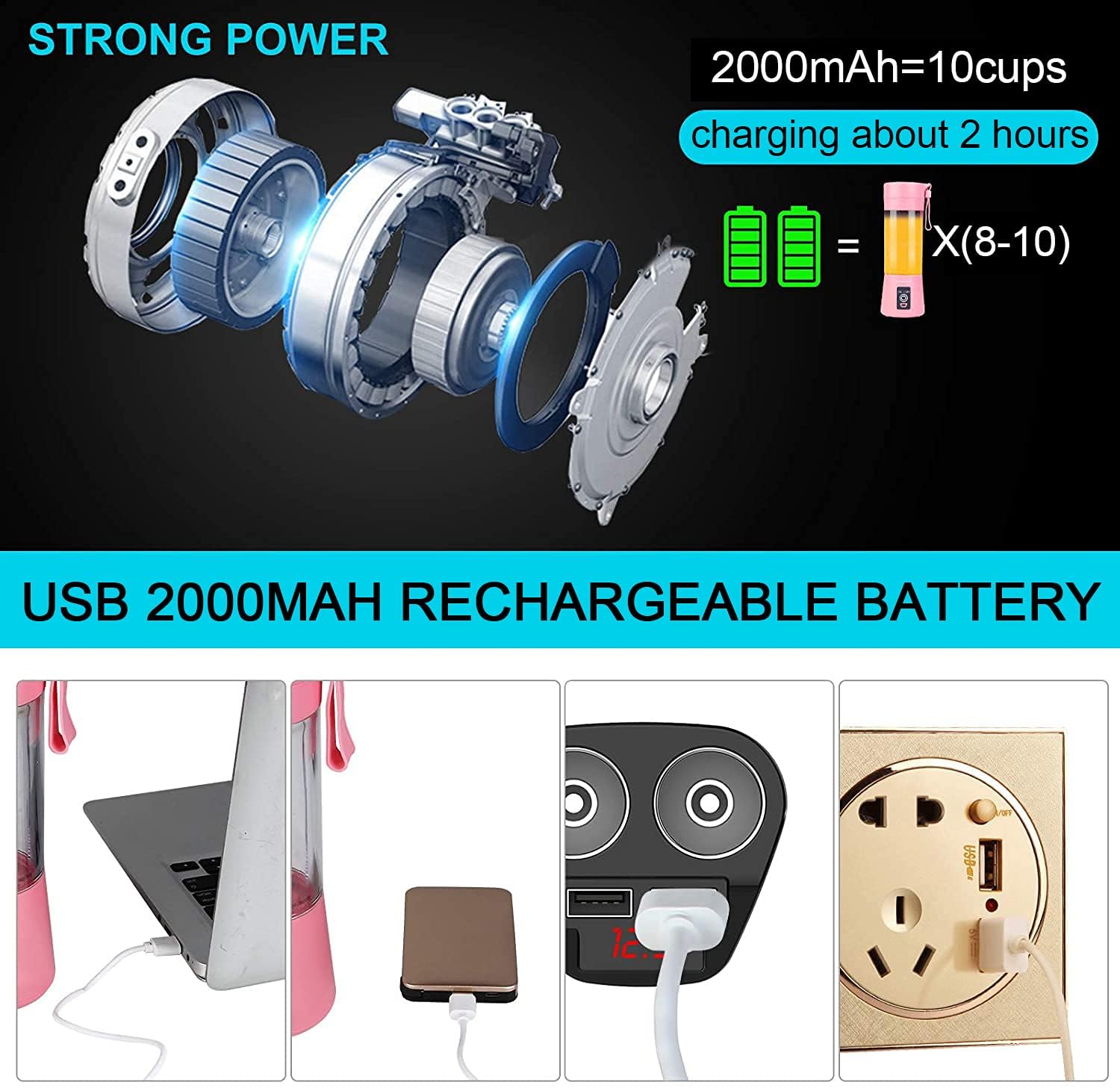
Image: A six-panel visual guide demonstrating the simple operation of the blender, from preparing ingredients and adding liquid to blending and serving the finished drink.
Official Product Video: Operation Demonstration
Video: A demonstration of the ECPURCHASE portable blender in use, showing how to add ingredients, blend, and pour, highlighting its personal size and portability.
6. Cleaning and Maintenance
Proper cleaning ensures the longevity and hygiene of your blender:
- Quick Clean: Pour approximately half a cup of water into the blender cup.
- Activate: Turn on the blender for about 5 seconds.
- Discard: Pour out the dirty water.
- Manual Cleaning: The blender cup's body and bottom can be separated for more thorough cleaning. Use the provided cleaning brush to clean around the blades and inside the cup.
- Base Care: Keep the motor base away from water to prevent damage. Wipe the base with a damp cloth if needed.
Official Product Video: Easy Cleaning
Video: A short demonstration showing how to easily clean the portable blender by adding water and briefly running the motor, then pouring out the water.
7. Specifications
| Feature | Detail |
|---|---|
| Brand | ECPURCHASE |
| Model Number | 4347739916 |
| Color | Pink |
| Capacity | 400 Milliliters (13.7 oz) |
| Product Dimensions | 3.2"D x 3.2"W x 8.9"H |
| Item Weight | 10.6 ounces |
| Blade Material | 304 Stainless Steel (6 blades in 3D) |
| Battery Type | Lithium ion |
| Battery Capacity | 2000mAh 3.7V |
| Material Type Free | BPA Free |
| Controls Type | Push Button |
| Special Features | Portable, USB Rechargeable, Single Serve, Upgraded 6 Blades in 3D for Superb Mixing |

Image: A visual comparison highlighting the blender's 6-blade design against less efficient 2-blade and 4-blade designs, emphasizing its superior mixing capability.
8. Troubleshooting
- Blender not starting: Ensure the cup is securely tightened to the base. The indicator light should be blue. If not, re-tighten. Check if the battery is charged.
- Ingredients not blending smoothly: Cut ingredients into smaller pieces (approx. 1 inch). Add more liquid if the mixture is too thick. Shake the blender gently during operation to help circulate ingredients.
- Blender stops during operation: This may indicate the battery is low or the motor is overloaded. Charge the battery or reduce the amount/size of ingredients.
- Leakage: Ensure the lid and base are tightly secured before blending. Check for any damage to the silicone seals.
9. Warranty and Support
This ECPURCHASE Portable Blender comes with a limited warranty. For specific details regarding warranty coverage, duration, and terms, please refer to the warranty information provided in your product packaging or contact ECPURCHASE customer support.
For any product inquiries, technical assistance, or support, please contact ECPURCHASE directly through their official channels.