
1. Product Overview
The Dunlop SC95 Slash Cry Baby Classic Wah Pedal is a guitar effects pedal designed to produce a distinctive wah effect. This pedal is custom-voiced to a lower frequency and features a custom-wound resonance inductor, offering a wide dynamic range and sweep. It includes side-mounted blue LEDs to indicate the ON/OFF status, ensuring visibility during live performances. The pedal is built with high-quality components, including a true hardwire bypass switch and a long-life potentiometer, housed in a durable die-cast casing with a distressed finish.
This bundle includes three MXR patch cables for connecting the pedal within your effects chain.

Image 1.1: The Dunlop SC95 Slash Cry Baby Classic Wah Pedal shown alongside three MXR patch cables. The pedal features a distressed black and orange finish.
2. Setup Instructions
Follow these steps to properly set up your Dunlop SC95 Wah Pedal:
- Power Connection: The SC95 requires a 9-volt DC power supply (not included) with a minimum current rating of 100mA. Connect the power supply to the 9V input jack located on the side of the pedal. Ensure the power supply is center-negative.
- Instrument Input: Connect your guitar or other instrument to the INPUT jack on the right side of the pedal using a standard 1/4-inch instrument cable.
- Amplifier Output: Connect the OUTPUT jack on the left side of the pedal to your amplifier or the next pedal in your effects chain using a standard 1/4-inch instrument cable.
- Using Patch Cables: The included MXR patch cables are ideal for connecting the SC95 to other pedals on your pedalboard. Connect one end of a patch cable to the output of your preceding pedal and the other end to the SC95's INPUT. Similarly, connect the SC95's OUTPUT to the input of your next pedal.

Image 2.1: Side view of the Dunlop SC95 Wah Pedal, illustrating the input, output, and power jacks for connection. A blue LED indicator is also visible.

Image 2.2: A close-up view of one of the included MXR patch cables, featuring right-angle connectors.
3. Operating Instructions
The Dunlop SC95 Wah Pedal is designed for intuitive operation:
- Activating the Wah Effect: To engage the wah effect, press down firmly on the toe end of the pedal until you feel a click. The blue LED indicators on the sides of the pedal will illuminate, confirming the effect is active.
- Controlling the Wah Sweep: Once activated, rock the pedal back and forth with your foot to sweep through the wah effect's frequency range. Pushing the pedal forward (toe down) emphasizes higher frequencies, while rocking it back (heel down) emphasizes lower frequencies.
- Deactivating the Wah Effect: To bypass the wah effect, press down firmly on the toe end of the pedal again until you feel a click. The blue LEDs will turn off, indicating the pedal is in true hardwire bypass mode.
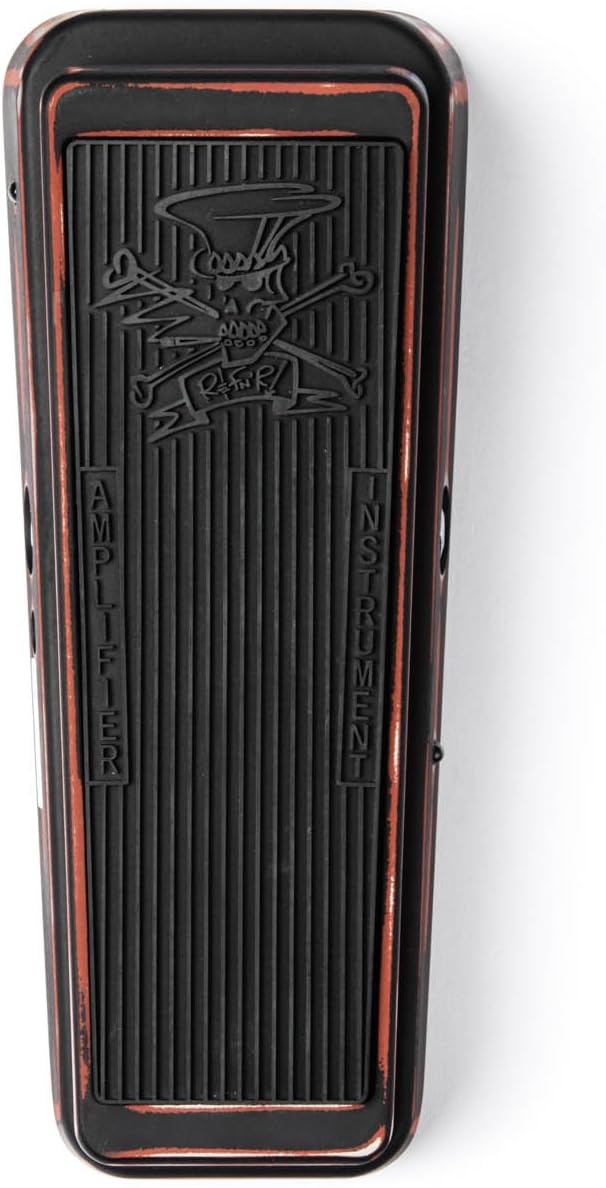
Image 3.1: Top view of the Dunlop SC95 Wah Pedal's treadle, showing the textured surface and the "Amplifier" and "Instrument" labels indicating signal flow.
4. Maintenance
To ensure the longevity and optimal performance of your Dunlop SC95 Wah Pedal, consider the following maintenance tips:
- Cleaning: Wipe the pedal with a soft, dry cloth to remove dust and grime. Avoid using abrasive cleaners or solvents, which can damage the finish.
- Storage: When not in use, store the pedal in a dry environment away from extreme temperatures and direct sunlight.
- Potentiometer Life: The SC95 features a long-life potentiometer. If you notice any scratchiness or inconsistent sweep over time, consult a qualified technician for inspection or replacement.
- Cable Inspection: Regularly check all cables for signs of wear or damage. Replace faulty cables to prevent signal loss or noise.
5. Troubleshooting
If you encounter issues with your Dunlop SC95 Wah Pedal, refer to the following common troubleshooting steps:
- No Sound or Weak Signal:
- Ensure all cables are securely connected to the correct input and output jacks.
- Verify that the power supply is properly connected and providing the correct voltage (9V DC) and current (100mA minimum).
- Test with different instrument cables and patch cables to rule out faulty wiring.
- Bypass the pedal by connecting your instrument directly to the amplifier to confirm other equipment is functioning correctly.
- Humming or Unwanted Noise:
- Ensure you are using a regulated, isolated 9V DC power supply. Unregulated or daisy-chained power supplies can introduce noise.
- Check for ground loops by trying different power outlets or isolating the pedal's power.
- Move the pedal away from other electronic devices or power transformers that might be causing interference.
- Test with different cables, as faulty shielding can cause hum.
- Wah Effect Not Engaging/Disengaging:
- Ensure you are pressing down firmly on the toe end of the pedal to activate or deactivate the switch. You should feel a distinct click.
- Check if the blue LEDs illuminate when attempting to engage the effect. If not, there might be a power issue or a switch malfunction.
6. Specifications
| Feature | Specification |
|---|---|
| Model | SC95 Slash Cry Baby Classic Wah |
| Signal Format | Analog |
| Power Requirement | 9V DC (center-negative) |
| Current Draw | 100mA (minimum) |
| Bypass Type | True Hardwire Bypass |
| Indicators | Side-mounted blue LEDs for ON/OFF status |
| Construction | Heavy-duty die-cast casing |
| Finish | Distressed hot-rod paintjob (black and orange) |
| Item Weight | 3.98 pounds (approx. 1.8 kg) |
| Package Dimensions | 10.75 x 4.92 x 3.5 inches (approx. 27.3 x 12.5 x 8.9 cm) |
7. Warranty and Support
Dunlop Manufacturing, Inc. warrants its products to be free from defects in material and workmanship for a period of one year from the date of purchase. This warranty applies only to the original purchaser and is not transferable. It does not cover damage due to accident, misuse, abuse, neglect, unauthorized modification, or normal wear and tear.
For technical support, service, or warranty claims, please contact Dunlop Customer Service through their official website or authorized distributors. Please retain your proof of purchase for warranty validation.
Note: Extended protection plans may be available from your retailer, offering additional coverage beyond the manufacturer's standard warranty.