
1. Introduction
Thank you for purchasing the MASUNN T2 Portable Bluetooth Stereo Speaker. This manual provides essential information for setting up, operating, and maintaining your device. Please read it carefully before use and retain it for future reference.
Package Contents:
- 1 x MASUNN T2 Bluetooth Speaker
- 1 x USB Charging Cable
- 1 x Carabiner
- 1 x User Manual
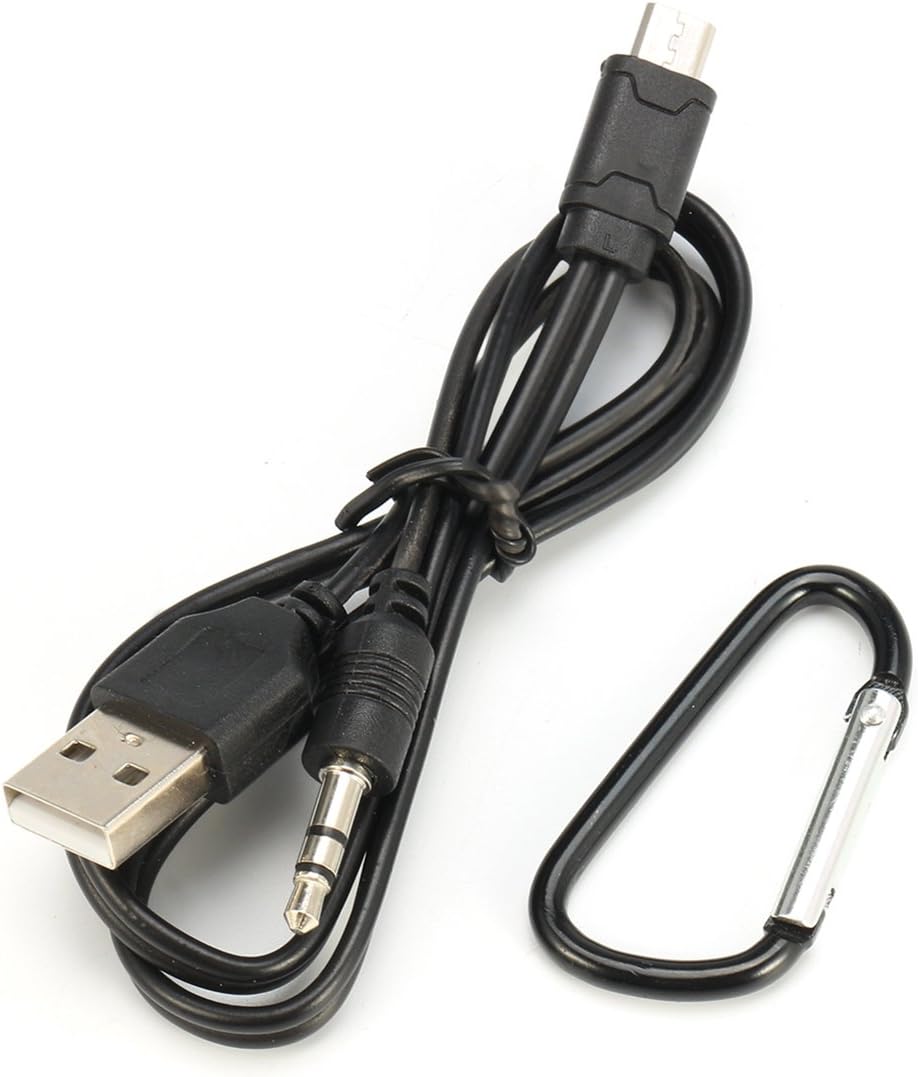
Image: The USB charging cable and carabiner included with the speaker.
2. Product Overview
Familiarize yourself with the speaker's components and controls.
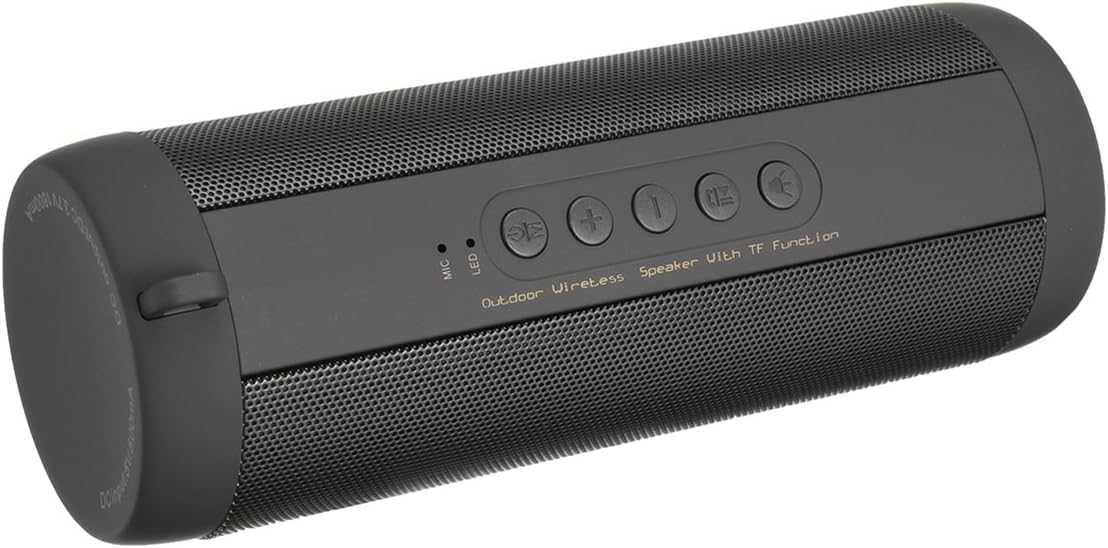
Image: Top view of the MASUNN T2 speaker, highlighting the control panel.
Control Panel:
- Power Button: Press and hold to power on/off. Short press to play/pause in Bluetooth/TF mode, answer/end calls.
- Mode Button (M): Short press to switch between Bluetooth, TF Card, and FM Radio modes.
- Volume Up / Next Track (+): Short press for next track (Bluetooth/TF), long press for volume up.
- Volume Down / Previous Track (-): Short press for previous track (Bluetooth/TF), long press for volume down.
- Light Button: Controls the integrated LED light.
- MIC: Built-in microphone for hands-free calls.
- LED Indicator: Shows power, charging, and Bluetooth status.
Ports (under protective flap):

Image: Detailed view of the charging and TF card ports.
- Micro USB Port: For charging the speaker.
- TF Card Slot: Insert a MicroSD card (up to 32GB) for local music playback.
3. Setup
3.1 Charging the Speaker
- Open the protective rubber flap on the side of the speaker.
- Connect the supplied USB charging cable to the speaker's Micro USB port.
- Connect the other end of the USB cable to a 5V 500mA USB power adapter (not included) or a computer's USB port.
- The LED indicator will illuminate during charging.
- Charging typically takes approximately 4 hours for a full charge. The LED indicator will change or turn off once charging is complete.
Note: Ensure the protective flap is securely closed after charging to maintain the speaker's IPX5 waterproof rating.
3.2 Power On/Off
- To power on: Press and hold the Power Button for a few seconds until you hear an audible prompt and the LED indicator lights up.
- To power off: Press and hold the Power Button for a few seconds until you hear an audible prompt and the LED indicator turns off.
3.3 Bluetooth Pairing
- Ensure the speaker is powered on and in Bluetooth mode. If not, short press the Mode Button (M) to switch to Bluetooth mode. The LED indicator will flash, indicating it's ready for pairing.
- On your mobile device (smartphone, tablet, etc.), enable Bluetooth and search for available devices.
- Select "T2" from the list of found devices.
- Once paired, the speaker will emit an audible confirmation, and the LED indicator will stop flashing and remain solid.
- The speaker will automatically connect to the last paired device when powered on, if the device is within range and Bluetooth is enabled.
3.4 TF Card Playback
- With the speaker powered off, open the protective rubber flap.
- Insert a TF (MicroSD) card (up to 32GB) with MP3 audio files into the TF card slot.
- Close the protective flap.
- Power on the speaker. It should automatically switch to TF card mode and begin playing music. If not, short press the Mode Button (M) to select TF card mode.
3.5 FM Radio Operation
- Power on the speaker.
- Short press the Mode Button (M) repeatedly until you enter FM Radio mode.
- In FM mode, short press the Power Button to automatically scan and save available FM stations. The speaker will then play the first saved station.
- Use the Volume Up / Next Track (+) and Volume Down / Previous Track (-) buttons to switch between saved stations.
- Long press these buttons to adjust the volume.
4. Operating Instructions
4.1 Music Playback (Bluetooth/TF Card)
- Play/Pause: Short press the Power Button.
- Next Track: Short press the Volume Up (+) button.
- Previous Track: Short press the Volume Down (-) button.
- Volume Up: Long press the Volume Up (+) button.
- Volume Down: Long press the Volume Down (-) button.
4.2 Hands-Free Calling
When connected via Bluetooth to your smartphone:
- Answer Call: Short press the Power Button when an incoming call rings.
- End Call: Short press the Power Button during a call.
- Reject Call: Long press the Power Button when an incoming call rings.
- Redial Last Number: Double-press the Power Button (functionality may vary by phone model).
4.3 LED Light Control
- Short press the Light Button to turn the integrated LED light on or off.
5. Maintenance
- Cleaning: Use a soft, dry cloth to clean the speaker's surface. Do not use abrasive cleaners or solvents.
- Water Resistance: The speaker is IPX5 waterproof, meaning it is protected against low-pressure water jets from any direction. Do not submerge the speaker in water. Ensure the protective rubber flap covering the ports is securely closed when near water or in damp environments.
- Storage: Store the speaker in a cool, dry place away from direct sunlight and extreme temperatures.
- Battery Care: To prolong battery life, fully charge the speaker before first use and at least once every three months if not used regularly.
6. Troubleshooting
| Problem | Possible Cause | Solution |
|---|---|---|
| Speaker does not power on. | Low battery. | Charge the speaker for at least 4 hours. |
| Cannot pair via Bluetooth. | Speaker not in pairing mode; device Bluetooth off; too far from speaker. | Ensure speaker is in Bluetooth mode (flashing LED). Turn on Bluetooth on your device. Move device closer to speaker (within 10 meters). |
| No sound. | Volume too low; incorrect mode; paused playback. | Increase speaker and device volume. Check if speaker is in correct mode (Bluetooth/TF/FM). Press Power button to play. |
| FM radio reception is poor. | Weak signal. | Move the speaker to a location with better reception. Re-scan for stations. |
| TF card not recognized. | Card not inserted correctly; unsupported format; card corrupted. | Re-insert TF card. Ensure card is formatted correctly and contains supported audio files (e.g., MP3). Try a different TF card. |
7. Specifications
| Model | T2 |
| Bluetooth Version | v3.0 + EDR Class 2 |
| Working Range | Up to 10 meters (33 feet) |
| Speaker Output | 2 x 3W (6W total) |
| Speaker Size | 40mm |
| Frequency Response | 280Hz - 16kHz |
| Signal-to-Noise Ratio | ≥ 95dB |
| Distortion | ≤ 0.5% |
| Battery Capacity | 3.7V 1800mAh |
| Battery Charge Time | Approx. 4 hours |
| Playback Time | Approx. 10 hours |
| Standby Time | Approx. 200 hours |
| DC Input | 5V 500mA |
| Waterproof Rating | IPX5 |
| TF Card Support | Up to 32GB |
| Shell Material | Plastic |
| Dimensions | Approx. 18cm x 6cm |
8. Safety Information
- Do not expose the speaker to extreme temperatures, direct sunlight, or high humidity.
- Do not disassemble, repair, or modify the device yourself. This will void the warranty and may cause damage.
- Keep the speaker away from children and pets.
- Use only the provided USB cable for charging.
- Dispose of the product and its battery responsibly according to local regulations.
- Avoid listening at high volumes for extended periods to prevent hearing damage.
9. Warranty and Support
MASUNN products are designed and manufactured to the highest quality standards. For warranty information and customer support, please refer to the documentation provided at the time of purchase or contact your retailer. Please have your model number (T2) and purchase details ready when contacting support.
For further assistance, please visit the MASUNN official website or contact their customer service department.