
Introduction
The Nagoya RB-700N is a premium NMO lip mount designed for securely attaching antennas to vehicles without the need for drilling. This mount offers multi-axis adjustability, allowing for precise positioning of your antenna to achieve optimal signal reception. It is suitable for a variety of vehicles including trucks, SUVs, and cars, and comes complete with a 20-foot RG-58A/U coaxial cable, a PL-259 connector, and a protective rain cap.
Product Features
- Vehicle Surface Protection: Integrated rubber pads prevent direct contact and abrasion, safeguarding your vehicle's finish from scratches and contributing to the mount's durability.
- Flexible & Precise Antenna Positioning: A two-axis adjustable design enables 360-degree rotation and accurate angling of the antenna for optimal signal reception. This feature provides stability and adaptability, especially for larger antennas.
- Effortless, No-Drill Installation: The RB-700N offers a secure, straightforward mounting solution that eliminates the need for drilling, preserving your vehicle's condition and making it ideal for leased vehicles or non-permanent setups.
- Extended Range with Quality Cable: Includes a 20 ft. RG-58A/U cable with a PL-259 connector, ensuring a reliable connection and extended communication range. A protective rain cap is also included for weather resistance.
Package Contents
Please verify that all items are present and in good condition upon unpacking:
- Nagoya RB-700N NMO Lip Mount
- 20 ft. RG-58A/U Coaxial Cable with PL-259 Connector
- Protective Rain Cap
- Hex Wrenches (for adjustment and tightening)
Safety Information
- Ensure the mount is securely fastened to prevent detachment during vehicle movement.
- Route the coaxial cable carefully to avoid pinching, sharp edges, or areas of high heat, which can damage the cable and affect performance.
- Always perform a Standing Wave Ratio (SWR) check after antenna installation to ensure proper tuning and prevent damage to your radio equipment.
- Be aware of overhead obstructions when driving with an antenna mounted on your vehicle.
Setup Guide
1. Choosing a Mounting Location
Select a suitable edge on your vehicle, such as a trunk lid, hatchback, or hood edge. The chosen location should provide a stable surface for the mount and allow for proper grounding of the antenna. A large, flat metal surface is ideal for optimal antenna performance.

Image: The RB-700N NMO Lip Mount securely installed on the trunk edge of a red vehicle, demonstrating a typical mounting position.
2. Attaching the Mount
- Open the lip mount by loosening the hex screws using the provided wrenches.
- Position the mount on the chosen vehicle edge, ensuring the rubber pads are correctly placed between the mount and the vehicle surface to prevent scratches.
- Carefully close the mount around the vehicle edge and tighten the hex screws until the mount is secure. Do not overtighten, as this may damage the vehicle or the mount.

Image: A close-up view of the textured rubber pads on the RB-700N mount, designed to protect the vehicle's surface during installation.

Image: A side view of the RB-700N mount, highlighting the hex screws used for securing the mount to the vehicle edge and adjusting its angle.
3. Connecting the Antenna
Screw your NMO-compatible antenna onto the NMO connector at the top of the mount. Ensure it is finger-tight to establish a good electrical connection.
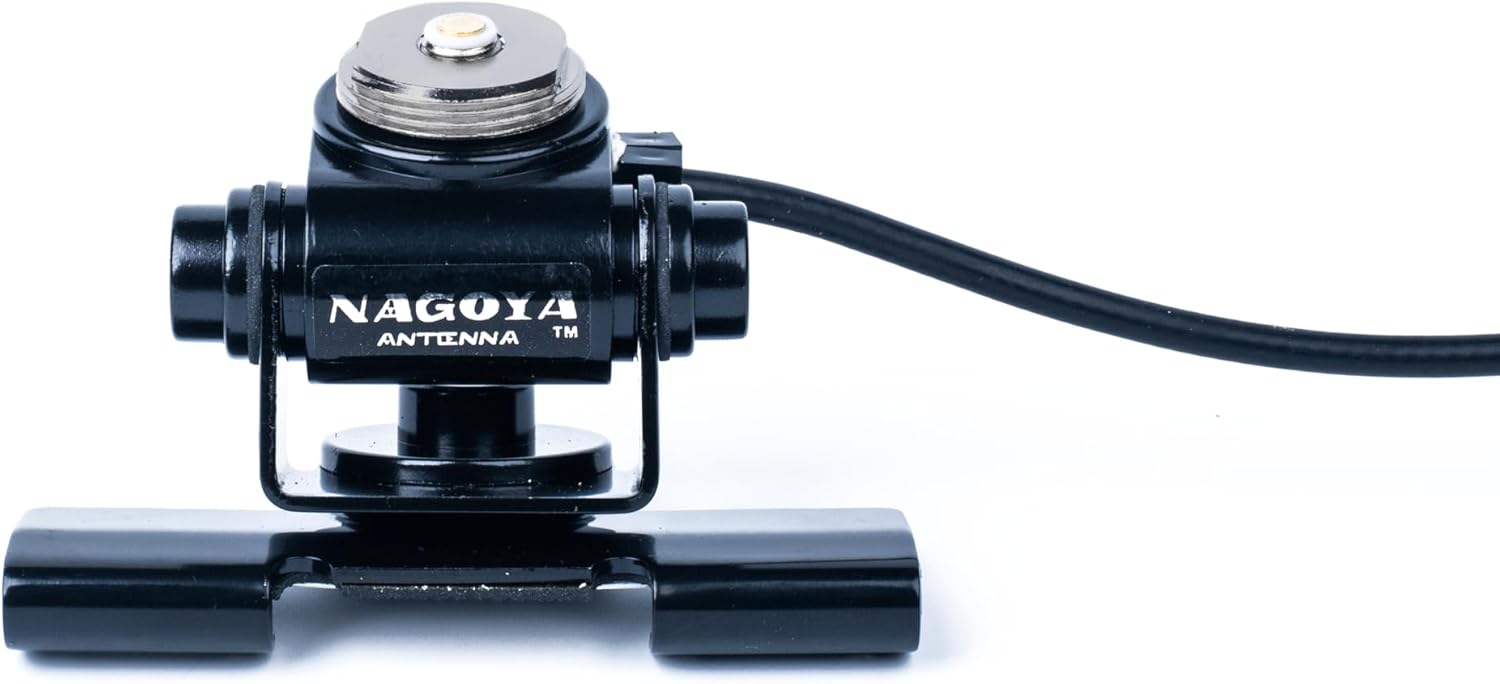
Image: A front view of the Nagoya RB-700N NMO Lip Mount, showing the NMO connector where the antenna attaches.
4. Cable Routing
Route the 20-foot RG-58A/U coaxial cable from the mount into your vehicle and to your radio. Take care to avoid:
- Pinching the cable in door jambs or trunk lids.
- Routing near hot engine components or exhaust pipes.
- Sharp edges that could cut or fray the cable insulation.
The cable terminates with a PL-259 connector, which connects to most amateur and CB radios.

Image: The Nagoya RB-700N NMO Lip Mount shown with its included 20-foot RG-58A/U coaxial cable, coiled, and the necessary hex wrenches for installation.
5. Initial SWR Check
After installation, it is highly recommended to perform an SWR (Standing Wave Ratio) check using an SWR meter. This ensures that your antenna system is properly tuned and prevents potential damage to your radio transceiver. An SWR reading below 1.5:1 is generally considered good.
Operating Instructions
Adjusting Antenna Angle
The RB-700N features a multi-axis adjustable design. To adjust the antenna angle for optimal signal reception, slightly loosen the hex screws on the mount's pivot points. Position the antenna as desired, then re-tighten the screws to secure the angle. Ensure the antenna is vertical for most mobile applications unless specific propagation conditions require a different orientation.
Maintenance
- Regular Inspection: Periodically check the mount for tightness and ensure the rubber pads are still in place and in good condition. Inspect the coaxial cable for any signs of wear, cuts, or kinks.
- Cleaning: Keep the NMO connector and antenna base clean from dirt, moisture, and corrosion. Use a soft, dry cloth.
- Rain Cap: When the antenna is removed, always use the protective rain cap to prevent moisture and debris from entering the NMO connector, which can lead to corrosion and signal degradation.
Troubleshooting
- High SWR / Poor Signal:
- Check all connections: ensure the antenna is securely screwed onto the NMO mount and the PL-259 connector is tight on the radio.
- Verify the mount has good electrical contact with the vehicle's metal surface for proper grounding.
- Inspect the coaxial cable for damage.
- Ensure the antenna itself is appropriate for the frequency range you are operating on.
- Mount Loosening: Re-tighten the hex screws on the mount. Ensure the mount is placed on a stable, flat edge of the vehicle.
- Vehicle Surface Scratches: Ensure the rubber pads are correctly positioned and have not shifted during installation or use. If pads are worn, replace them.
Specifications
| Feature | Specification |
|---|---|
| Model | Nagoya RB-700N |
| Mount Type | NMO Lip Mount |
| Installation | No-Drill |
| Adjustability | Multi-Axis, 360-degree rotation |
| Coaxial Cable Length | 20 feet |
| Coaxial Cable Type | RG-58A/U |
| Connector Type | PL-259 |
| Impedance | 50 Ohm |
| Color | Black |
| Product Dimensions (Mount) | Approximately 17 x 0.5 x 0.1 inches |
| Item Weight | Approximately 1.4 ounces |
Warranty and Support
BTECH is committed to providing quality radio products and accessories. For any issues that may arise, BTECH offers USA-based warranty and support. Please refer to your purchase documentation or the BTECH website for specific warranty terms and contact information for customer support.