
1. Introduction
Thank you for purchasing the Mikado MD-A24 Bluetooth Speaker. This device combines a portable Bluetooth speaker with a digital clock, alarm function, FM radio, and support for USB and SD card playback. Please read this manual carefully to ensure proper use and to maximize the product's performance and lifespan.
2. Package Contents
- Mikado MD-A24 Bluetooth Speaker
- User Manual
- Warranty Certificate
- Charging Cable (USB)
3. Product Features
- Bluetooth connectivity for wireless audio streaming
- Integrated digital clock and alarm function
- FM Radio tuner
- USB and TF (Micro SD) card support for MP3 playback
- AUX input for wired audio connection
- 3 Watt audio output power
- 2000 mAh rechargeable battery for approximately 6 hours of usage
- Portable and ergonomic design
4. Product Overview
4.1 Front and Side View
The front of the device features the LED display for time and status, along with the USB input and DC charging port on the side.

Image 1: Front and side view with labeled DC Cable Input and USB Input.
4.2 Top Control Panel
The top panel houses all control buttons for power, mode selection, volume, playback, and alarm settings.
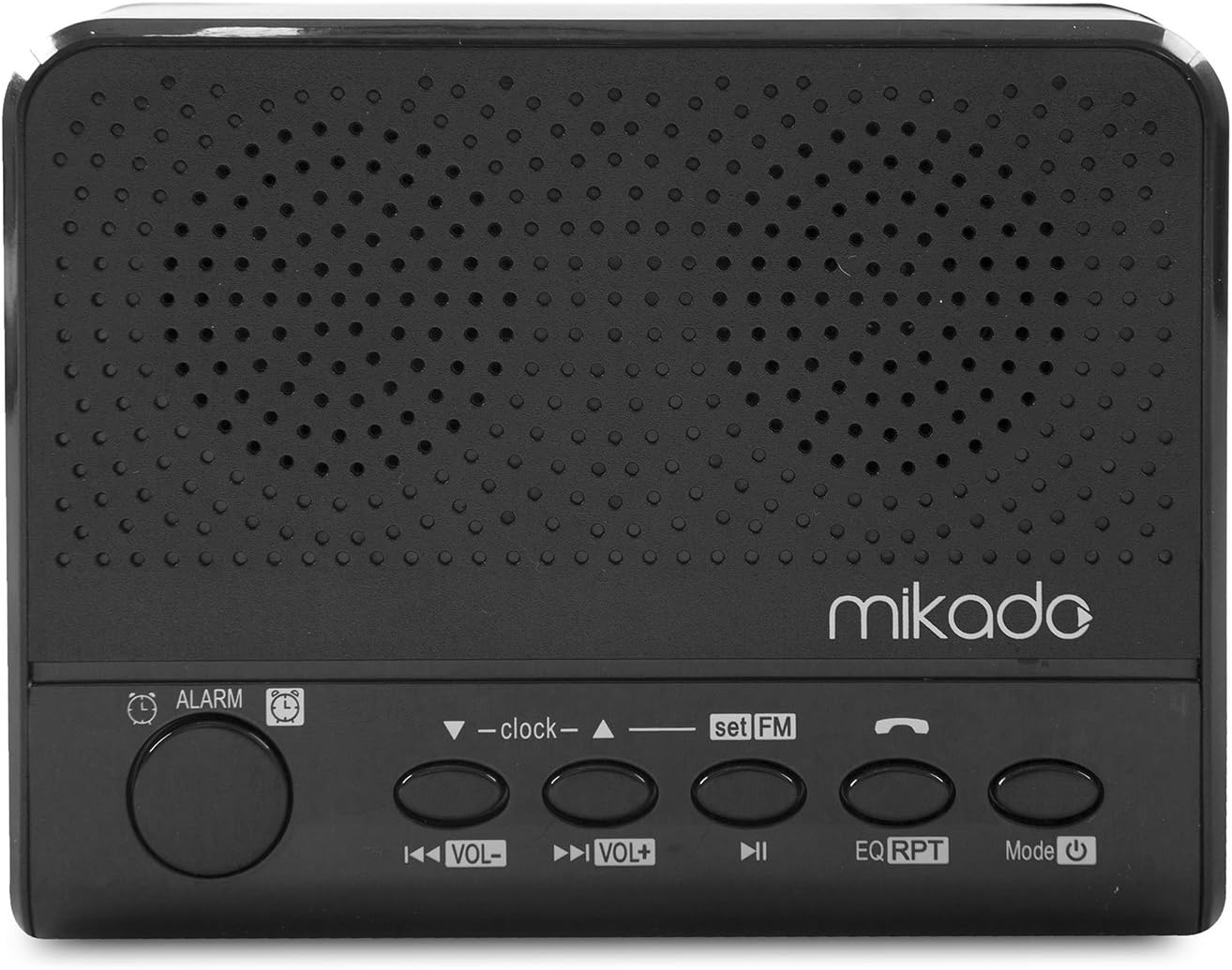
Image 2: Top control panel with various function buttons.
4.3 Rear View
The rear of the device includes the TF (Micro SD) card slot and product information.

Image 3: Rear view with labeled TF Card Input.
4.4 Battery Compartment
The battery compartment is located at the bottom of the device, secured by a cover.

Image 4: Bottom view revealing the battery compartment.
5. Setup
5.1 Charging the Device
- Connect the provided USB charging cable to the DC 5V input port on the side of the speaker.
- Connect the other end of the USB cable to a USB power adapter (not included) or a computer's USB port.
- The LED display will indicate charging status. A full charge typically takes 4-6 hours.
- Disconnect the cable once fully charged to preserve battery life.
5.2 Setting the Time
- Press and hold the CLOCK button (often labeled with a clock icon) on the top panel.
- While holding, use the VOL- and VOL+ buttons (or arrow buttons) to adjust the hour.
- Press the CLOCK button again to switch to minute adjustment.
- Use the VOL- and VOL+ buttons to adjust the minutes.
- Press the CLOCK button one more time to confirm and exit time setting mode.
6. Operation
6.1 Power On/Off
Press and hold the POWER button (often labeled with a power icon) on the top panel to turn the device on or off.
6.2 Mode Selection
Press the MODE button repeatedly to cycle through available modes: Bluetooth, FM Radio, USB, SD Card, and AUX (if connected).
6.3 Bluetooth Pairing
- Turn on the speaker. It will automatically enter Bluetooth pairing mode if no other mode is selected, or select Bluetooth mode using the MODE button. The display will show a Bluetooth icon or a pairing indicator.
- Enable Bluetooth on your mobile device (smartphone, tablet, etc.).
- Search for available devices and select "MD-A24" from the list.
- Once paired, the speaker will emit a confirmation sound, and the Bluetooth indicator will become solid.
6.4 USB/SD Card Playback
- Insert a USB flash drive into the USB port or a TF (Micro SD) card into the SD card slot.
- The speaker will automatically switch to USB or SD card mode and begin playing audio files. If not, press the MODE button to select the correct source.
- Use the PREVIOUS/VOL- and NEXT/VOL+ buttons to skip tracks.
- Press the PLAY/PAUSE button to pause or resume playback.
6.5 FM Radio Operation
- Press the MODE button to select FM Radio mode.
- Press and hold the PLAY/PAUSE button to initiate an automatic station scan. The speaker will scan and save available FM stations.
- Use the PREVIOUS/VOL- and NEXT/VOL+ buttons to navigate through the saved stations.
- For manual tuning, short press the PREVIOUS/VOL- or NEXT/VOL+ buttons.
6.6 Alarm Function
- Press and hold the ALARM button (often labeled with an alarm clock icon).
- Use the VOL- and VOL+ buttons to set the alarm hour.
- Press the ALARM button again to switch to minute adjustment.
- Use the VOL- and VOL+ buttons to set the alarm minutes.
- Press the ALARM button one more time to confirm and activate the alarm. An alarm icon will appear on the display.
- To disable the alarm, press the ALARM button briefly until the alarm icon disappears.
6.7 Volume Control
Press the VOL- button to decrease volume and the VOL+ button to increase volume.
7. Maintenance
- Keep the device dry. Do not expose it to water or excessive moisture.
- Clean the device with a soft, dry cloth. Do not use abrasive cleaners or solvents.
- Avoid exposing the device to direct sunlight or extreme temperatures.
- Do not attempt to open the device or perform repairs yourself, as this may void the warranty and cause damage. Refer to qualified service personnel.
- If storing for a long period, charge the battery periodically to maintain its health.
8. Troubleshooting
| Problem | Possible Cause | Solution |
|---|---|---|
| Device does not power on. | Battery is depleted. | Charge the device using the provided USB cable. |
| No sound. | Volume is too low; incorrect mode selected; device not paired (Bluetooth). | Increase volume; press MODE button to select correct source; re-pair Bluetooth device. |
| Bluetooth pairing fails. | Speaker is not in pairing mode; device is too far; interference. | Ensure speaker is in Bluetooth mode; move devices closer; turn off other Bluetooth devices. |
| FM radio reception is poor. | Weak signal; environmental interference. | Move the speaker to a different location; perform an auto-scan again. |
| USB/SD card not playing. | Incorrect file format; card/drive not inserted correctly; corrupted files. | Ensure files are in supported format (e.g., MP3); reinsert card/drive; try a different card/drive. |
| Battery life is short. | Battery degradation over time; high volume usage. | Ensure full charge before use; reduce volume; consider battery replacement if significantly degraded (contact support). |
9. Specifications
| Feature | Detail |
|---|---|
| Model Number | MD-A24 |
| Brand | Mikado |
| Color | Black |
| Connectivity Technology | Bluetooth, AUX, USB |
| Special Features | Bluetooth, Portable, Alarm Clock, FM Radio, USB, SD Card Support |
| Power Source | Battery Powered |
| Battery Capacity | 2000 mAh (rechargeable) |
| Usage Time | Approximately 6 hours |
| Audio Output Power | 3 Watt |
| Mounting Type | Tabletop |
| Item Weight | 0.1 Kilogram |
| Country of Origin | China |
10. Warranty and Support
10.1 Warranty Information
This product comes with a Warranty Certificate included in the package. Please refer to the certificate for specific warranty terms and conditions, including coverage period and service procedures. Keep your proof of purchase for warranty claims.
10.2 Customer Support
If you encounter any issues not covered in the troubleshooting section or require further assistance, please contact Mikado customer support. Contact details can typically be found on the product packaging, warranty certificate, or the official Mikado website.
For online resources, you may visit the manufacturer's website: www.segment.com.tr