Sony WH-CH700N Wireless Bluetooth Noise Cancelling Headphones
Instruction Manual
Introduction
This manual provides detailed instructions for the setup, operation, maintenance, and troubleshooting of your Sony WH-CH700N wireless noise cancelling headphones. These headphones feature Bluetooth connectivity and support noise cancellation, designed for an enhanced audio experience.
Image: Front view of the Sony WH-CH700N Wireless Noise Cancelling Headphones.
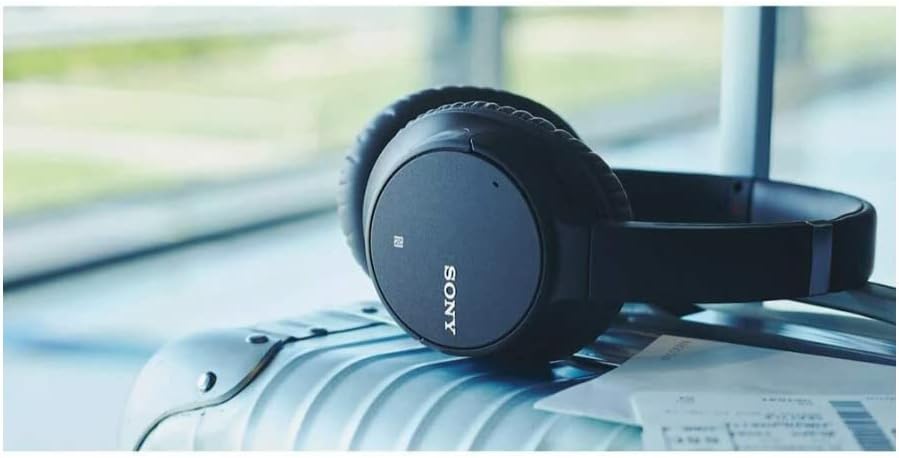
Image: Sony WH-CH700N headphones resting on luggage, illustrating portability.
1. Setup
1.1 Unboxing and Initial Charge
Upon unboxing, ensure all components are present, including the headphones and the supplied cable. Before first use, fully charge the headphones. Connect the supplied USB cable to the headphone's USB port and to a powered USB charging source. The charging indicator will illuminate during charging and turn off when complete. A full charge provides up to 35 hours of battery life.
Image: Sony WH-CH700N headphones shown with their included charging and audio cables.
1.2 Bluetooth Pairing
Power On: Press and hold the power button on the headphones until the indicator light flashes blue.
Pairing Mode: If this is the first time pairing, the headphones will automatically enter pairing mode. If not, press and hold the power button for approximately 7 seconds until the indicator flashes blue and red alternately.
Device Connection: On your Bluetooth-enabled device (smartphone, tablet, computer), go to Bluetooth settings and select "WH-CH700N" from the list of available devices.
Confirmation: Once connected, the indicator light will slowly flash blue.
1.3 NFC One-Touch Pairing
For NFC-compatible devices, simply touch the NFC-enabled device to the N-Mark on the left earcup of the headphones. Follow any on-screen prompts to complete the pairing process.
2. Operating the Headphones
2.1 Controls Overview
The headphones feature intuitive physical buttons for easy control of playback, volume, calls, and noise cancellation. These controls are located on the earcups.
Image: Close-up side view of the Sony WH-CH700N headphones, highlighting the power button, noise cancellation switch, volume controls, and audio input port.
Power Button: Press and hold to power on/off. Short press to check battery level.
NC (Noise Cancelling) Button: Activates or deactivates the noise cancelling function.
Microphone: Built-in for hands-free calls and voice assistant use.
Image: A person wearing Sony WH-CH700N headphones, demonstrating comfortable fit for extended use.
2.2 Noise Cancellation
The noise cancellation feature actively reduces ambient noise, allowing for a more immersive listening experience. Press the NC button to toggle this feature on or off. The headphones automatically adjust noise cancellation to your environment.
2.3 Voice Assistant Integration
Utilize your device's voice assistant (e.g., Google Assistant, Siri, Alexa) by pressing and holding the multi-function button. Speak your command clearly into the built-in microphone.
2.4 Sony | Headphones Connect App
Download the "Sony | Headphones Connect" app for Android/iOS to customize your sound settings, including equalizer adjustments, and manage other headphone features.
3. Maintenance
Cleaning: Wipe the headphones with a soft, dry cloth. Do not use alcohol, benzene, thinner, or other chemical solvents, as they may damage the finish.
Earpads: The earpads are designed for comfort and durability. If they become worn or damaged, contact Sony support for replacement options.
Storage: When not in use, store the headphones in a cool, dry place away from direct sunlight and extreme temperatures. Avoid placing heavy objects on them.
Water Resistance: These headphones are rated as waterproof. However, avoid prolonged exposure to water and ensure all ports are dry before charging.
4. Troubleshooting
No Power: Ensure the headphones are fully charged. Connect to a power source using the USB cable.
Cannot Pair:
Ensure Bluetooth is enabled on your device.
Place the headphones in pairing mode (indicator flashes blue and red alternately).
Move the headphones closer to your device.
Delete "WH-CH700N" from your device's Bluetooth list and attempt to pair again.
No Sound/Low Volume:
Check the volume levels on both the headphones and your connected device.
Ensure the headphones are properly connected via Bluetooth.
Noise Cancellation Not Working:
Press the NC button to ensure the feature is activated.
Ensure the earcups are properly seated over your ears to create a good seal.
5. Specifications
Brand
Sony
Model Number
WH-CH700N/H
Color
Grey
Ear Placement
Over Ear
Noise Control
Active Noise Cancellation
Connectivity Technology
Bluetooth 4.1, Wireless
Bluetooth Version
4.1
Battery Average Life
35 Hours
Frequency Range
20Hz - 20,000Hz
Audio Driver Type
Dynamic Driver
Item Weight
1 Pound
Material
Plastic
Water Resistance Level
Waterproof
6. Warranty Information
The Sony WH-CH700N headphones come with a 90-day limited warranty. Please retain your proof of purchase for any warranty claims. For detailed terms and conditions, refer to the warranty card included with your product or visit the official Sony support website.
7. Customer Support
For further assistance, technical support, or to inquire about replacement parts, please visit the official Sony support website or contact their customer service. You can find contact information and FAQs on the Sony website.