
1. Introduction
The Sinometer BM380 is a non-contact infrared thermometer designed for safe and accurate temperature measurement from a distance. It utilizes laser targeting for precise aiming and offers a wide temperature range, making it suitable for various applications including industrial, automotive, HVAC, and home use. This manual provides detailed instructions for the proper use, maintenance, and troubleshooting of your BM380 thermometer.
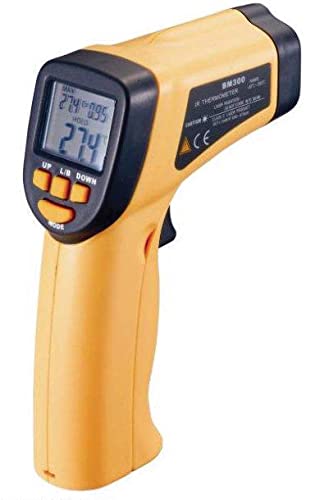
Figure 1: The Sinometer BM380 Laser Infrared Thermometer. This image shows the front view of the device, highlighting its ergonomic design and the laser targeting mechanism.
2. Safety Information
Please read all safety warnings and instructions carefully before using this device. Failure to follow these instructions may result in electric shock, fire, or serious injury.
- Laser Safety: This device emits a Class 2 laser. DO NOT stare directly into the laser beam or direct it at other people's eyes. Avoid prolonged exposure.
- Electrical Safety: Do not use the device near live electrical circuits or in wet conditions.
- Temperature Extremes: Do not expose the device to extreme temperatures or humidity.
- Maintenance: Do not attempt to disassemble or modify the device. Refer all servicing to qualified personnel.
- Battery Safety: Ensure correct battery polarity. Remove batteries if the device is not used for an extended period. Dispose of batteries properly.
3. Product Features
The Sinometer BM380 offers a range of features for efficient and accurate temperature measurement:
- Non-Contact Measurement: Safely measure temperatures from a distance.
- Wide Temperature Range: Measures from -32°C to 550°C (-25.6°F to 1022°F).
- High Accuracy: Provides reliable readings with a resolution of 0.1°C.
- Fast Response Time: Delivers readings in approximately 0.5 seconds.
- Laser Targeting: Built-in laser pointer for precise aiming at the target.
- Adjustable Emissivity: Allows adjustment from 0.1 to 1.0 for improved accuracy on various surfaces.
- Distance to Spot Ratio (D:S): 12:1 for accurate measurements from a reasonable distance.
- High/Low Temperature Alarm: User-configurable alarms for temperatures exceeding 320°C or falling below -32°C.
- Automatic Data Hold: Holds the last measurement reading on the display.
- Backlit LCD Display: Easy to read in various lighting conditions.
- Automatic Power Off: Conserves battery life.
4. Setup
4.1. Battery Installation
The BM380 thermometer requires one 9V (6F22) battery for operation.
- Locate the battery compartment cover on the handle of the device.
- Open the battery compartment by sliding or lifting the cover.
- Insert a new 9V (6F22) battery, ensuring the correct polarity (+ and - terminals match the markings inside the compartment).
- Close the battery compartment cover securely.
Note: If the low battery indicator appears on the display, replace the battery immediately to ensure accurate readings.
5. Operating Instructions
5.1. Taking a Measurement
- Hold the thermometer by its handle and point the infrared sensor towards the target object.
- Press and hold the trigger button. The laser pointer will activate (if enabled) to help you aim.
- The temperature reading will appear on the LCD display instantly.
- Release the trigger button to hold the measurement on the display. The device will automatically power off after a period of inactivity to save battery.
5.2. Distance to Spot Ratio (D:S)
The BM380 has a D:S ratio of 12:1. This means that at a distance of 12 units, the measurement spot diameter will be 1 unit. For example, if you are 12 inches away from the target, the measurement area will be a 1-inch circle. To ensure accurate readings, make sure the target area is larger than the spot size.
5.3. Emissivity Adjustment
Emissivity is the ability of a material to emit thermal energy. Different materials have different emissivity values. The BM380 allows you to adjust the emissivity from 0.1 to 1.0 for more accurate readings on various surfaces. Consult an emissivity table for common materials or adjust the emissivity until the reading is stable and accurate (e.g., by comparing with a contact thermometer on a known surface).
5.4. Unit Selection (°C/°F)
The device allows you to switch between Celsius (°C) and Fahrenheit (°F) temperature units. Refer to the device's buttons (usually a dedicated °C/°F button or a mode button) to toggle between these units.
6. Maintenance
6.1. Cleaning the Device
- Lens Cleaning: The infrared lens is the most critical part of the thermometer. Clean it gently with a soft, damp cloth or a cotton swab. Do not use abrasive cleaners or solvents.
- Housing Cleaning: Clean the device housing with a damp cloth and mild soap. Do not immerse the device in water.
6.2. Storage
Store the thermometer in a cool, dry place, away from direct sunlight and extreme temperatures. Remove the battery if the device will not be used for an extended period to prevent leakage.
7. Troubleshooting
| Problem | Possible Cause | Solution |
|---|---|---|
| Device does not turn on. | Dead or incorrectly installed battery. | Replace the 9V battery, ensuring correct polarity. |
| Inaccurate readings. | Incorrect emissivity setting, dirty lens, or target too small/far. | Adjust emissivity, clean the lens, ensure target is within D:S ratio. |
| Laser not working. | Laser function disabled or fault. | Check if the laser is enabled via the mode button. If not, contact support. |
| "LO" or "HI" displayed. | Temperature is outside the measurement range. | Ensure the target temperature is within -32°C to 550°C. |
8. Specifications
| Parameter | Value |
|---|---|
| Measurement Range | -32°C to 550°C (-25.6°F to 1022°F) |
| Resolution | 0.1°C (0.1°F) |
| Accuracy (20°C~550°C) | ±2% or ±2°C (±3.6°F) |
| Accuracy (-32°C~20°C) | ±3.0°C (±5.4°F) |
| Distance to Spot Ratio (D:S) | 12:1 |
| Response Time | 0.5 seconds |
| Spectral Response | 8~14µm |
| Emissivity | Adjustable 0.1 to 1.0 |
| Laser Output | <1mW (Class 2) |
| High Temperature Alarm | 320°C |
| Low Temperature Alarm | -32°C |
| Power Supply | 9V Battery (6F22) |
| Weight | 270g |
| Manufacturer | Sinometer |
9. Warranty and Support
For warranty information and technical support, please refer to the documentation provided with your purchase or contact your retailer. Keep your proof of purchase for any warranty claims.