
1. Introduction
Thank you for choosing the Grundig GCDP 8000 GDR1400 Portable CD Player. This device is designed for convenient playback of audio CDs, MP3, and WMA files. It features an easy-to-read LCD display, a preset 5-band digital equalizer for enhanced audio, and a digital anti-shock system to ensure uninterrupted listening. Please read this manual carefully before use to ensure proper operation and to maximize your listening experience.
2. Safety Information
- Do not expose the unit to rain, moisture, or direct sunlight.
- Avoid placing the unit near heat sources such as radiators or stoves.
- Do not disassemble the unit. Refer all servicing to qualified personnel.
- Use only the specified power adapter (if applicable) and battery type.
- Listening at high volume levels for extended periods can cause permanent hearing damage.
3. Package Contents
- Grundig GCDP 8000 GDR1400 Portable CD Player (1 unit)
- User Manual
Note: Additional accessories such as headphones or a power adapter may be sold separately or included depending on your specific package.
4. Product Overview
Familiarize yourself with the controls and features of your portable CD player.
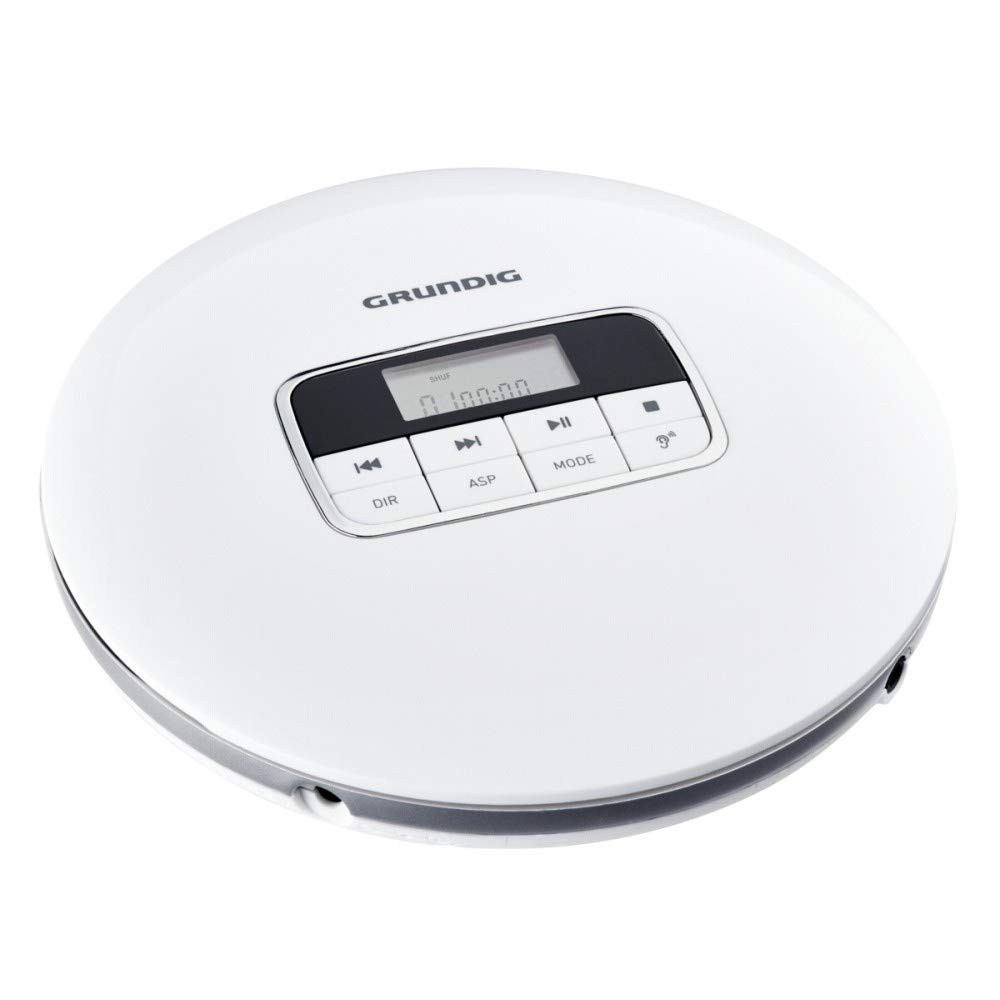
Figure 4.1: Top View with Controls and Display
This image displays the top surface of the Grundig GCDP 8000 GDR1400 portable CD player, highlighting the central control panel with its LCD screen and various function buttons. The buttons include Play/Pause, Stop, Skip Forward/Backward, DIR (directory), ASP (anti-shock protection), and MODE. The Grundig logo is visible at the top.
Controls and Indicators:
- LCD Display: Shows track number, time, playback mode, and other information.
- Play/Pause (►/‖): Starts or pauses playback.
- Stop (■): Stops playback.
- Skip Forward (►►): Skips to the next track or fast forwards during playback.
- Skip Backward (◄◄): Skips to the previous track or fast reverses during playback.
- DIR (Directory): Used for navigating folders on MP3/WMA discs.
- ASP (Anti-Shock Protection): Activates or deactivates the anti-shock feature.
- MODE: Selects playback modes (e.g., Repeat One, Repeat All, Random).

Figure 4.2: Side View with Ports
This image shows a side profile of the Grundig GCDP 8000 GDR1400 portable CD player. Clearly visible are the 3.5 mm headphone jack, labeled 'PHONES', and the DC power input port, indicated by a power symbol.
Ports:
- PHONES (3.5mm Jack): Connect your headphones here.
- DC IN: Connect an external power adapter (not included) here.

Figure 4.3: Battery Compartment Area
This image provides another side view of the Grundig GCDP 8000 GDR1400 portable CD player, likely indicating the location of the battery compartment or a similar access panel. The smooth, white casing and silver trim are visible.
5. Setup
5.1 Powering the Device
The GCDP 8000 GDR1400 can be powered by batteries or an external DC power adapter.
- Battery Installation: Open the battery compartment (refer to Figure 4.3 for general location). Insert 1 Lithium-ion battery (not included) according to the polarity markings. Close the compartment securely.
- External Power: Connect a compatible DC power adapter (not included) to the DC IN port (refer to Figure 4.2). Plug the adapter into a wall outlet.
5.2 Connecting Headphones
Plug your 3.5mm stereo headphones into the PHONES jack on the side of the unit (refer to Figure 4.2).
5.3 Inserting a CD
- Gently press the 'OPEN' button or slide the latch to open the CD compartment lid.
- Place the CD with the label side facing up onto the center spindle.
- Gently press the CD down until it clicks into place.
- Close the CD compartment lid firmly until it latches.
6. Operating
6.1 Basic Playback
- Play: Press the Play/Pause (►/‖) button to start playback. The LCD will display the track number and elapsed time.
- Pause: Press the Play/Pause (►/‖) button during playback to pause. Press again to resume.
- Stop: Press the Stop (■) button to stop playback.
- Skip Track: Press Skip Forward (►►) to go to the next track. Press Skip Backward (◄◄) to go to the beginning of the current track, or press twice to go to the previous track.
- Fast Forward/Reverse: Press and hold Skip Forward (►►) or Skip Backward (◄◄) during playback to fast forward or reverse.
6.2 MP3/WMA Playback
When playing a disc with MP3 or WMA files, the player will automatically detect the format. Use the DIR button to navigate between folders on the disc.
6.3 Playback Modes (MODE Button)
Press the MODE button repeatedly to cycle through different playback modes:
- Repeat One: Repeats the current track.
- Repeat All: Repeats all tracks on the disc.
- Random (SHUF): Plays tracks in a random order.
- Intro: Plays the first few seconds of each track.
6.4 Equalizer (EQ)
The player features a preset 5-band digital equalizer. Press the EQ button (often integrated with MODE or ASP, refer to your specific unit's button layout) to cycle through different sound presets like Pop, Jazz, Rock, Classic, and Bass Boost, or to turn the equalizer off.
6.5 Digital Anti-Shock System (ASP)
The digital anti-shock system helps prevent audio skipping during movement. This feature is typically enabled by default. Press the ASP button to toggle the anti-shock protection on or off. The LCD will indicate its status.
6.6 Volume Control
Adjust the volume using the volume control dial, usually located on the side of the unit. Turn clockwise to increase volume and counter-clockwise to decrease.
7. Maintenance
7.1 Cleaning the Unit
- Wipe the exterior of the unit with a soft, dry cloth.
- Do not use abrasive cleaners, waxes, or solvents.
- To clean the lens inside the CD compartment, use a specialized CD lens cleaner disc. Do not touch the lens directly.
7.2 Battery Care
- Remove batteries if the unit will not be used for an extended period.
- Dispose of used batteries responsibly according to local regulations.
8. Troubleshooting
| Problem | Possible Cause | Solution |
|---|---|---|
| No power | Batteries are depleted or incorrectly inserted; power adapter not connected. | Replace batteries or ensure correct polarity. Connect power adapter securely. |
| No sound | Headphones not connected; volume too low; disc error. | Ensure headphones are fully plugged in. Increase volume. Try another disc. |
| Disc skipping | Disc is dirty or scratched; unit is moving excessively; ASP is off. | Clean or replace disc. Place unit on a stable surface. Ensure ASP is enabled. |
| Disc not playing | Disc inserted incorrectly; disc is unreadable format; lid not closed. | Reinsert disc correctly. Ensure disc is CD-Audio, MP3, or WMA. Close lid firmly. |
9. Specifications
| Feature | Specification |
|---|---|
| Model Number | GCDP 8000 GDR1400 |
| Brand | Grundig |
| Product Dimensions | 14.3 x 14.3 x 3.2 cm |
| Item Weight | 203 Grams |
| Supported Audio Formats | MP3, WMA |
| Display | LCD Display |
| Special Features | Preset 5-band Digital Equalizer, Digital Anti-Shock System |
| Headphone Jack | 1 (3.5 mm) |
| Power Source | 1 Lithium-ion battery (required), DC power input |
| Connectivity Technology | Wired (no wireless connectivity) |
10. Warranty and Support
Grundig products are manufactured to high quality standards. For information regarding warranty terms and conditions, please refer to the warranty card included with your purchase or visit the official Grundig website. For technical support or service inquiries, please contact Grundig customer service through their official channels.
Please retain your proof of purchase for warranty purposes.