
MUSKY DY-28 Plus
MUSKY DY 28 Plus Bluetooth Speaker Night Light User Manual
Model: DY-28 Plus
Introduction
Thank you for purchasing the MUSKY DY 28 Plus Bluetooth Speaker Night Light. This versatile device combines a high-fidelity Bluetooth speaker, a multi-level adjustable LED night light, and an alarm clock function. It is designed for both indoor and outdoor use, offering portable audio and lighting solutions. Please read this manual carefully before use to ensure proper operation and to maximize the product's lifespan.
Safety Information
- Do not expose the device to extreme temperatures, direct sunlight, or high humidity.
- Keep the device away from water and other liquids, despite its waterproof rating, to prevent damage to internal components.
- Do not disassemble, repair, or modify the device yourself. Refer all servicing to qualified personnel.
- Use only the provided charging cable or a certified equivalent.
- Keep out of reach of children.
Package Contents
Please check the package for the following items:
- MUSKY DY 28 Plus Bluetooth Speaker Night Light
- USB Charging Cable
- 3.5mm Audio Cable (AUX Cable)
- User Manual
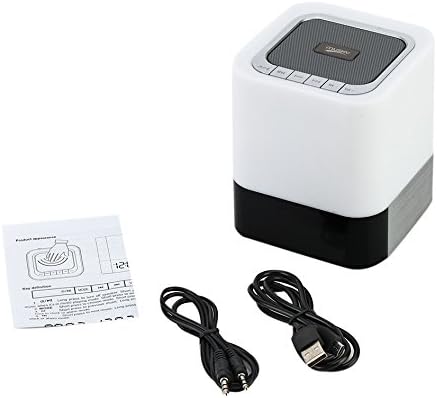
Image: The MUSKY DY 28 Plus speaker, along with its USB charging cable, 3.5mm audio cable, and user manual.
Product Overview
Familiarize yourself with the various parts and controls of your MUSKY DY 28 Plus speaker.

Image: A detailed diagram showing the front and top views of the speaker with labels for its buttons, ports, and features, including Power On/Off, Charging Port, Aux input, USB Input, Micro SD Slot, Touch Sensor, Play/Pause, Previous, Volume Down, Mode, Next, and Volume Up buttons.
Controls and Ports:
- Power On/Off Button: Located on the side, used to turn the device on or off.
- Charging Port (USB DC): For connecting the USB charging cable.
- AUX Input: 3.5mm jack for wired audio connection.
- USB Input (USB HOST): For playing music from a USB flash drive.
- Micro SD Slot: For playing music from a Micro SD card (TF card).
- Touch Sensor: Located on the top metal cover, used to adjust light brightness.
- Play/Pause Button: To control music playback.
- Previous/Volume Down Button: Short press for previous track, long press for volume down.
- Next/Volume Up Button: Short press for next track, long press for volume up.
- Mode Button: To switch between Bluetooth, AUX, TF card, and USB modes.
Setup
1. Charging the Device
Before first use, fully charge the speaker. Connect the provided USB charging cable to the USB DC port on the speaker and the other end to a USB power adapter (not included) or a computer's USB port. The charging indicator light will show the charging status.
- A full charge provides approximately 6-8 hours of music playback or 10 hours of lighting time.
2. Powering On/Off
- To turn on, slide the Power On/Off switch to the "ON" position.
- To turn off, slide the Power On/Off switch to the "OFF" position.
Operating Instructions
1. Bluetooth Mode
The speaker uses advanced Bluetooth 4.0 technology for seamless wireless connection.
- Turn on the speaker. It will automatically enter Bluetooth pairing mode, indicated by a flashing LED light.
- Enable Bluetooth on your smartphone, tablet, or other Bluetooth-enabled device.
- Search for "DY 28 Plus" in the list of available devices and select it to pair.
- Once successfully paired, the speaker will emit a confirmation sound, and the LED light will stop flashing.
- You can now play music wirelessly from your device.

Image: The MUSKY DY 28 Plus speaker displaying the time, with various smartphones floating above it, illustrating its compatibility with Bluetooth-enabled devices for wireless music playback.
2. MP3 Player Mode (TF Card / U Disk / AUX)
The speaker supports playing music directly from a TF card (Micro SD), U disk (USB flash drive), or via a 3.5mm AUX cable.

Image: A close-up of the MUSKY DY 28 Plus speaker's side panel, highlighting the Micro SD, USB HOST, AUX, and USB DC ports, with a USB stick and a 3.5mm audio cable connected, demonstrating its MP3 player capabilities.
- TF Card / U Disk: Insert a TF card (up to 32GB) or a U disk into the respective slot. The speaker will automatically detect the storage device and begin playing MP3/WAV/WMA format files. Use the "Mode" button to switch to this input if it doesn't auto-detect.
- AUX Input: Connect one end of the 3.5mm audio cable to the AUX port on the speaker and the other end to the audio output jack of your device (e.g., smartphone, laptop). The speaker will automatically switch to AUX mode.
3. Light Function (Night Light)
The integrated LED light offers three levels of brightness, controlled by the touch sensor.
- Gently tap the metal cover on the top of the speaker to turn on the light to its dimmest setting.
- Tap again to switch to the intermediate brightness level.
- Tap a third time for the brightest setting.
- Tap a fourth time to turn the light off.
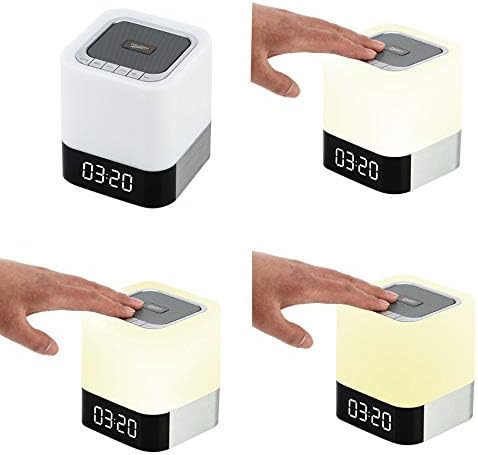
Image: A sequence of four images demonstrating the touch-controlled light function of the MUSKY DY 28 Plus speaker, showing the light off, then progressively increasing in brightness from dim to intermediate to bright with each tap on the top surface.
4. Alarm Clock Function
Set an alarm and even customize your alarm sound.
- Setting the Alarm: Refer to the specific instructions in the included quick start guide for detailed steps on setting the time and alarm. (Note: Specific button presses for alarm setting are not detailed in the provided product description, so a general reference is made.)
- Custom Alarm Sound: To use your favorite song as an alarm, create a folder named 'ALARM' on your TF card or U disk. Place your desired MP3/WAV/WMA alarm file inside this folder. Insert the TF card or U disk into the speaker, and it will automatically use your custom alarm sound instead of the default.
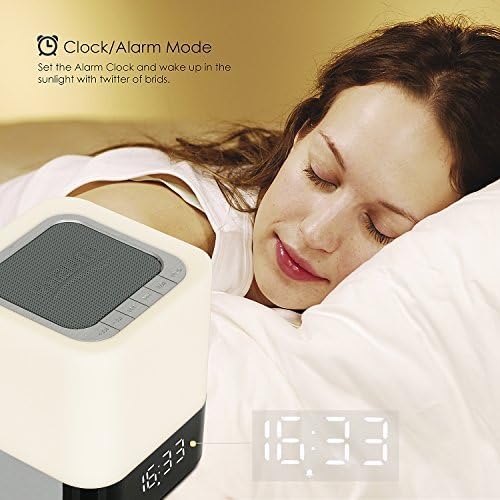
Image: The MUSKY DY 28 Plus speaker displaying the time, positioned on a bedside table next to a person sleeping, illustrating its use as an alarm clock.
5. Hands-free Calling
When connected via Bluetooth, the speaker can be used for hands-free phone calls.
- Answering/Ending Calls: Press the Play/Pause button to answer an incoming call or to end an ongoing call.
- Rejecting Calls: Long press the Play/Pause button to reject an incoming call.
Maintenance
- Cleaning: Use a soft, dry cloth to clean the surface of the speaker. Do not use abrasive cleaners or solvents.
- Storage: When not in use for extended periods, store the speaker in a cool, dry place away from direct sunlight and extreme temperatures.
- Battery Care: To prolong battery life, avoid fully discharging the battery frequently. Charge the device regularly, even if not in use.
Troubleshooting
| Problem | Possible Cause | Solution |
|---|---|---|
| Speaker does not turn on. | Battery is low or depleted. | Charge the speaker fully. |
| Cannot pair with Bluetooth device. | Speaker is not in pairing mode; device is too far; Bluetooth is off on source device. | Ensure speaker is in pairing mode (flashing LED). Move device closer. Turn on Bluetooth on your source device. Forget "DY 28 Plus" on your device and try pairing again. |
| No sound from speaker. | Volume is too low; incorrect mode selected; audio cable not fully inserted. | Increase volume on both speaker and source device. Press the "Mode" button to select the correct input (Bluetooth, AUX, TF, USB). Ensure cables are securely connected. |
| Light function not working. | Battery is low; touch sensor not activated correctly. | Charge the speaker. Ensure you are tapping the metal cover on the top of the speaker. |
| Custom alarm not playing. | Incorrect folder name or file format; TF card/U disk not inserted. | Ensure the folder is named 'ALARM' and the file is MP3/WAV/WMA. Verify the TF card or U disk is properly inserted. |
Specifications
| Feature | Detail |
|---|---|
| Model Number | DY-28 Plus |
| Brand | MUSKY |
| Connectivity Technology | Bluetooth 4.0 |
| Wireless Range | Up to 30 feet (approx. 9 meters) |
| Audio Output Mode | Stereo |
| Speaker Maximum Output Power | 10 Watts |
| Battery Capacity | 4000mAh |
| Music Playback Time | 6-8 hours (approx.) |
| Lighting Time | 10 hours (approx.) |
| Supported Audio Formats | MP3, WAV, WMA |
| TF Card Support | Up to 32GB |
| Compatible Devices | Laptop, Tablet, Smartphone |
| Material | Plastic |
| Product Dimensions (L x W x H) | 10.01 x 10.01 x 11 cm (approx. 4 x 4 x 4.3 inches) |
| Item Weight | 558 Grams (approx. 1.23 lbs) |
| Waterproof | Yes (as per specifications, but general caution advised) |
Warranty and Support
This product is covered by a standard manufacturer's warranty. For detailed warranty terms and conditions, please refer to the warranty card included with your purchase or contact the retailer. For technical support or customer service inquiries, please reach out to the MUSKY customer support team through the contact information provided on the product packaging or the official MUSKY website.
Related documentsDY-28 Plus


Ask a question about this manual
Ask about setup, troubleshooting, compatibility, parts, safety, or missing instructions. Manuals+ will review the question and use this page’s manual context to help answer it.