
1. Introduction
The NOYITO CH375 CH375B is a versatile USB bus interface chip designed for seamless integration with various microcontrollers, DSPs, MCUs, and MPUs. It provides an 8-bit data bus along with read, write, chip select control lines, and interrupt output, facilitating easy connection to system buses. In USB host mode, the CH375 CH375B also supports serial communication, enabling connection to microcontrollers via serial input, serial output, and interrupt output lines. This module is ideal for applications requiring U-disk read and write capabilities.

Figure 1: NOYITO CH375 CH375B U-Disk Read Write Module overview.
2. Features
- Universal USB Interface Chip: Integrates CH375 CH375B for USB bus communication.
- Microcontroller Compatibility: Easily connects to 51, AVR (64, 128), DSPs, MCUs, and MPUs.
- Data Bus: Features an 8-bit data bus for efficient data transfer.
- Control Lines: Includes read, write, chip select, and interrupt output control lines.
- Operating Modes: Supports both parallel and serial modes, selectable via jumper cap.
- Connectivity: 2x8 pins for straightforward MCU connection.
- Status Indicator: Equipped with a USB status indicator LED.
- Power Supply: Onboard 3.3V LDO 1117 regulator provides up to 800mA. Designed for 5V power supply from the target board.
- Clock Source: Utilizes a 12MHz crystal for stable operation.
2.1. CH375 vs. CH374 Comparison
The CH375 module simplifies U-disk read/write operations compared to the CH374. While both may require a file system library for file mode, the CH375 supports UART and parallel port interfaces, offering a more streamlined approach. The CH374 typically demands more microcontroller resources (approx. 13KB FLASH, 700 bytes RAM) and supports parallel port and SPI interface.
3. Setup and Connection
This section details the physical setup and connection of the CH375 CH375B module to your microcontroller.
3.1. Power Supply
- The module requires a 5V power supply, typically provided by the target microcontroller board.
- The onboard 3.3V LDO 1117 regulator generates the necessary 3.3V for the CH375 chip, capable of supplying up to 800mA.
3.2. Mode Selection (Parallel/Serial)
The operating mode (parallel or serial) is selected using a jumper cap on the module. Refer to the module's silkscreen for specific jumper positions.
3.3. Pin Connections
Connect the 2x8 pins of the CH375 CH375B module to your microcontroller according to the wiring diagram and pin description table below. Ensure correct voltage levels and signal integrity.
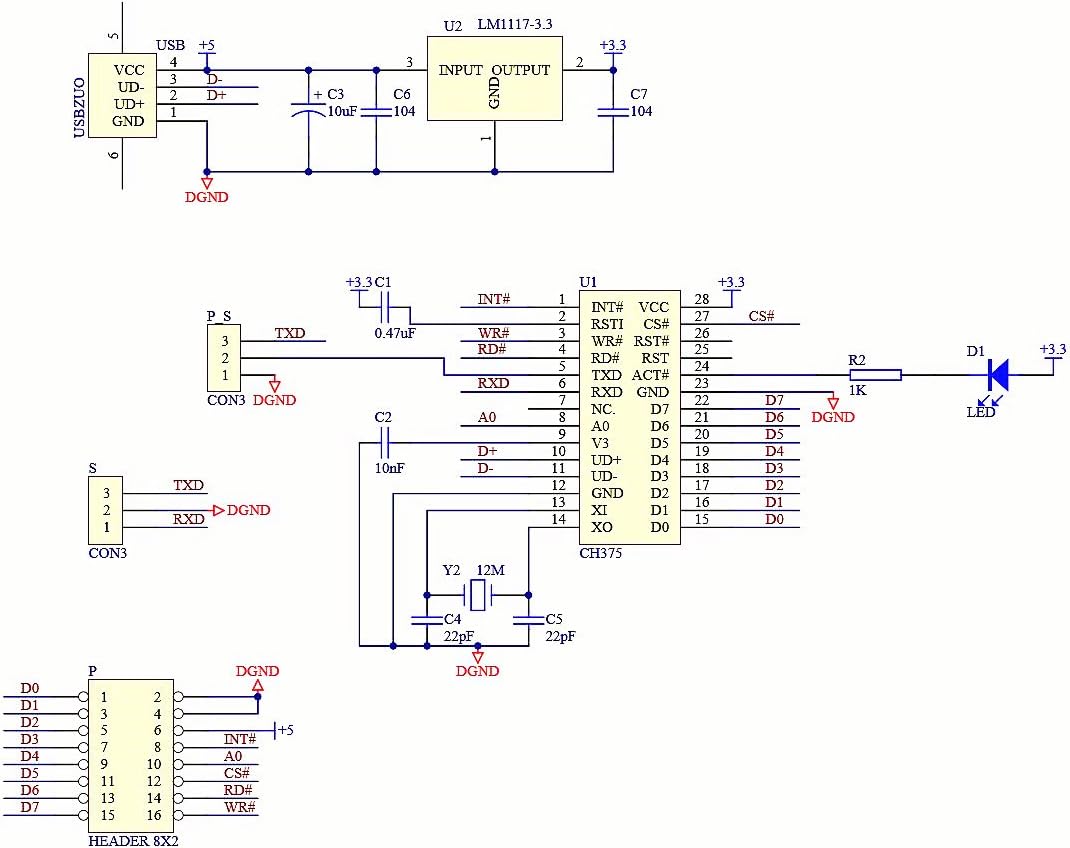
Figure 2: Schematic diagram of the CH375 CH375B module, showing power, USB, and microcontroller connections.

Figure 3: Wiring Pins Description for CH375 module with 51 and AVR microcontrollers.
| CH375 Pin | 51 Microcontroller | AVR Microcontroller (64/128) |
|---|---|---|
| D0~D7 | P00~P07 | PD0~PD7 |
| INIT | P32 | PG0 |
| AO | P21 | PG1 |
| CS | P20 | PG2 |
| RD | P37 | PG3 |
| WR | P36 | PG4 |
4. Operating Instructions
The CH375 CH375B module functions as a USB host, allowing your microcontroller to interact with USB devices, primarily U-disks, for read and write operations.
4.1. U-Disk Read/Write Operations
- To perform file-level read and write operations on a U-disk, your microcontroller will need to load a compatible file system library. This library handles the complexities of file allocation tables (FAT) and directory structures.
- The module provides an 8-bit data bus for parallel data transfer, or can operate in serial mode for simpler connections.
- The USB status indicator LED provides visual feedback on the USB connection status.
4.2. Serial Communication (USB Host Mode)
When operating in USB host mode, the CH375 CH375B module can also facilitate serial communication. This allows for data exchange with the microcontroller via dedicated serial input (RXD), serial output (TXD), and interrupt output lines. This can be useful for debugging or for applications where a full 8-bit parallel bus is not required or feasible.
5. Maintenance
To ensure the longevity and reliable operation of your NOYITO CH375 CH375B U-Disk Read Write Module, follow these maintenance guidelines:
- Environmental Conditions: Operate and store the module in a dry environment, away from moisture, dust, and extreme temperatures.
- Handling: Handle the module with care to avoid physical damage to components or pins. Avoid touching the integrated circuits directly to prevent electrostatic discharge (ESD).
- Cleaning: If necessary, gently clean the module with a soft, dry brush or compressed air to remove dust. Do not use liquid cleaners.
- Power Supply: Always ensure the correct 5V input voltage is supplied to prevent damage to the module or connected devices.
6. Troubleshooting
If you encounter issues with your CH375 CH375B module, consider the following troubleshooting steps:
- No Power/Module Not Responding:
- Verify that the 5V power supply from your target board is correctly connected and stable.
- Check for proper grounding connections.
- USB Device Not Detected:
- Ensure the USB device (U-disk) is properly inserted into the module's USB port.
- Check the USB status indicator LED. If it's not lit or behaving unexpectedly, there might be a connection issue.
- Confirm that the CH375 module is correctly initialized in your microcontroller's firmware.
- Test with a different USB device to rule out a faulty U-disk.
- Read/Write Errors:
- Verify that the correct file system library is loaded and properly configured in your microcontroller's code.
- Check the data bus (D0-D7) and control line (RD, WR, CS, AO, INIT) connections for continuity and correct wiring as per the wiring diagram (Figure 3).
- Ensure the jumper cap for parallel/serial mode is set correctly for your application.
- Communication Issues (Serial Mode):
- Confirm RXD and TXD lines are correctly connected to your microcontroller's UART.
- Verify baud rates and other serial communication parameters match between the module and microcontroller.
7. Specifications
| Feature | Detail |
|---|---|
| Model Number | NOCH375B |
| Brand | NOYITO |
| Compatible Devices | Microcontrollers (51, AVR), DSPs, MCUs, MPUs |
| Connector Type | USB (Host), 2x8 Pin Header |
| Input Voltage | 5 Volts (from target board) |
| Onboard Regulator Output | 3.3V LDO 1117, up to 800mA |
| Nominal Power | 4 Watts |
| Current Rating | 800 Milliamps |
| Item Dimensions (L x W x H) | 1.89 x 1.1 x 0.59 inches |
| Item Weight | 10 Grams |
| Color | Blue |
| UPC | 667797749583 |
8. Warranty Information
The NOYITO CH375 CH375B U-Disk Read Write Module comes with a Manufacturer's One-year After-sale Warranty. This warranty covers defects in materials and workmanship under normal use. Please retain your proof of purchase for warranty claims. For specific terms and conditions, please contact NOYITO customer support.
9. Support
For additional technical support, documentation, or inquiries regarding the NOYITO CH375 CH375B U-Disk Read Write Module, please refer to the following resources:
- Online Documentation: Access schematic diagrams and test programs via the official link: CH375 U-Disk Read Write Module Schematic Test Program
- Manufacturer Website: Visit the NOYITO official website for product updates and further information.
- Customer Service: Contact NOYITO customer service for direct assistance with product issues or questions.