
1. Introduction
The AODELAN SRR-PEBBLE is a wireless camera shutter release system designed for Sony cameras. It consists of a transmitter and a receiver, enabling remote control of your camera's shutter functions. This system utilizes 2.4GHz wireless transmission, providing a reliable operating distance of approximately 80 meters (262 feet).
The transmitter allows for various shooting modes including autofocus, single shot, 3-second delayed release, continuous release, and long exposure (BULB). The receiver can also function independently as a wired shutter remote for autofocus, single shot, and continuous release.
This manual provides detailed instructions for setting up, operating, and maintaining your AODELAN SRR-PEBBLE remote control.
2. Product Overview
2.1 Components
- Transmitter: The handheld unit used to send commands wirelessly.
- Receiver: The unit connected to the camera, which receives commands from the transmitter or acts as a wired remote.
- Connection Cables: Cables to connect the receiver to your camera's remote port.
- Wrist Straps: For securing the units.

Figure 2.1: AODELAN SRR-PEBBLE Kit Contents
2.2 Key Features
- Wireless and Wired Operation: Use the transmitter wirelessly or the receiver as a wired remote.
- Long Operating Distance: Approximately 80m (262 ft) wireless range.
- Multiple Shooting Modes: Supports autofocus, single shot, 3-second delay, continuous shooting, and Bulb mode.
- Reduced Camera Shake: Minimizes vibrations for sharper images.
- Compatibility: Designed for a wide range of Sony Alpha, RX, and HX series cameras.

Figure 2.2: Key Features Overview
3. Setup
3.1 Battery Installation
The transmitter requires one CR2032 battery. The receiver requires two AAA-type or Ni-MH batteries (not included).
- Open the battery compartment cover on the back of both the transmitter and receiver.
- Insert the batteries according to the polarity indicators (+/-).
- Close the battery compartment covers securely.

Figure 3.1: Battery Compartments and Controls
3.2 Connecting the Receiver to Your Camera
The receiver connects to your camera via a shutter release cable. Ensure you use the correct cable for your specific Sony camera model.
- Identify the appropriate connection cable for your camera. The receiver has a 2.5mm input plug.
- Connect one end of the cable to the 2.5mm input port on the receiver.
- Connect the other end of the cable to your camera's remote control terminal. This port is typically labeled with a remote control icon.
- For wireless operation, you can mount the receiver onto your camera's hot shoe (optional, as the connection is via cable, not hot shoe).
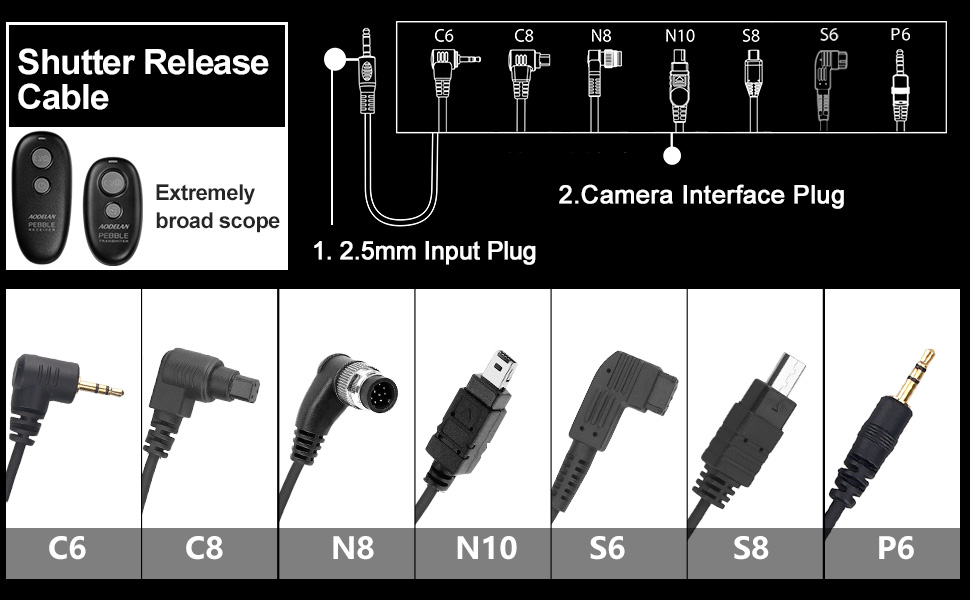
Figure 3.2: Shutter Release Cable Connections
3.3 Pairing (Wireless Operation)
The AODELAN SRR-PEBBLE transmitter and receiver units are typically pre-paired at the factory. No manual pairing process is usually required for initial use.
To confirm connection, turn on both the transmitter and receiver. The LED indicator on both units should illuminate, indicating they are ready for operation.
4. Operating Instructions
The AODELAN SRR-PEBBLE offers both wired and wireless operation. The basic shutter functions are controlled by the main shutter button on both the transmitter and receiver.
4.1 Basic Shutter Operation
- Autofocus: Half-press the shutter button (on either transmitter or receiver) to activate your camera's autofocus.
- Take Photo: Fully press the shutter button to take a picture.
4.2 Shooting Modes (Wireless Transmitter)
The transmitter provides additional control over shooting modes:
- Single Shot: Press the shutter button fully to take a single photograph.
- 3-Second Delayed Release: Press the delay button (often marked with a timer icon) on the transmitter. The camera will trigger after a 3-second delay.
- Continuous Shooting: Activate continuous shooting mode on your camera. Then, press and hold the shutter button on the transmitter to capture a series of images.
- Bulb Shooting: For long exposures, set your camera to Bulb mode. Press the shutter button on the transmitter to open the shutter, and press it again to close the shutter.

Figure 4.1: Continuous Shooting Mode

Figure 4.2: Delayed Shooting

Figure 4.3: Bulb Setting
4.3 Wired Operation (Receiver Only)
The receiver can be used as a wired remote control without the transmitter. Simply connect the receiver to your camera using the appropriate cable. The shutter button on the receiver will then function for autofocus, single shot, and continuous release (if set on camera).

Figure 4.4: Wired vs. Wireless Operation
5. Maintenance
- Keep the remote control clean and dry. Avoid exposure to moisture, dust, and extreme temperatures.
- Use a soft, dry cloth to clean the surfaces. Do not use abrasive cleaners or solvents.
- Remove batteries if the device will not be used for an extended period to prevent leakage.
- Store the remote control in a protective case when not in use to prevent damage.
6. Troubleshooting
6.1 Remote Not Functioning After Initial Use
If the remote works initially but then stops pairing or responding:
- Check Batteries: Ensure both the transmitter and receiver have fresh batteries and are inserted with correct polarity.
- Check Settings: Verify that the remote is switched to the correct mode (photo or video, if applicable) and that your camera's drive mode is set to a remote-compatible option (e.g., Self-timer: 10sec/Remote).
6.2 Remote Works for Video but Not Still Pictures
If the remote triggers video recording but fails to take still photos:
- Remote Mode: Confirm the remote's mode is set to "photo" rather than "video."
- Camera Drive Mode: Ensure your camera's drive mode is set to "Self-timer: 10sec/Remote" or a similar remote-compatible setting.
6.3 Receiver Connection to Camera
The receiver connects to the camera via the shutter release cable. The hot shoe mount is optional and does not establish the electrical connection for shutter release.
- Cable Connection: Ensure the shutter release cable is securely connected to both the receiver's 2.5mm input and the camera's remote port.
- Hot Shoe: The hot shoe is for mounting purposes only; it does not transmit the shutter signal.
7. Specifications
| Model Number | SRR-PEBBLE |
| Wireless Frequency | 2.4GHz |
| Operating Distance | Approx. 80m (262 ft) |
| Transmitter Battery | 1 x CR2032 battery |
| Receiver Battery | 2 x AAA-type or Ni-MH batteries (not included) |
| Product Dimensions | 4.53 x 4.53 x 1.38 inches |
| Item Weight | 0.004 ounces |
| Compatible Devices | Sony ILCA-77M2, 99M2, 99V; SLT-A33, A35, A37, A55, A57, A65, A67, A77, A99; DSLR-A100, A200, A300, A350, A400, A450, A500, A550, A560, A580, A700, A850, A900; Konica Minolta DIMAGE A2, A1, 9, 7Hi, 7i, 7, 5, 4, 3, DYNAX 7D, 5D; Sony ZV-1, ILCE-1, ILCE-A9, A9M2, A7, A7II, A7M3, 7M3K, A7R, A7RII, A7RM3, A7RM4, A7S, A7SM2, A7SM3, 6600, 6600M, 6100, 6100L, 6100Y, 6400, 6400L, 6400M, 6500, 6500G, 6500M, 6500Z, 6300, 6000, 6000L, 6000Y, 6000Z, 5000, 5100, 5100L, 5100Y, 3000, 3500, QX1; RX100III, RX100M, RX100II, RX100M4, RX100M5, RX100M6, RX100M5A, RX10, RX10M2, RX10M3, RX10M4, RX1RM2, RX0, RXOM2, HX99, HX400V, HX300, HX350, HX400, HX50, HX50V, HX60, HX60V, HX95, HX90, HX90V, HX80, QX30, WX500, WX700, WX800; SLT-A58, A68; NEX-3N. |
8. Warranty and Support
AODELAN products are designed for reliability and performance. For any technical assistance or inquiries regarding your SRR-PEBBLE remote control, please contact AODELAN customer support through their official channels or the retailer where the product was purchased.
Please retain your proof of purchase for warranty claims. Specific warranty terms and conditions may vary by region and retailer.