1. Introduction and Overview
The AeroGarden Harvest Elite 360 is an indoor hydroponic gardening system designed to grow plants in water, eliminating the need for soil. This system allows for year-round cultivation of herbs, vegetables, and flowers. It features a compact design, an integrated LED grow light, and an intuitive control panel to simplify the gardening process.
This model is capable of growing up to 6 plants simultaneously, reaching heights of up to 12 inches. The full-spectrum 20W LED grow light promotes rapid plant growth, up to 5 times faster than traditional soil gardening. The control panel provides reminders for water and plant food additions, and includes a vacation mode feature.
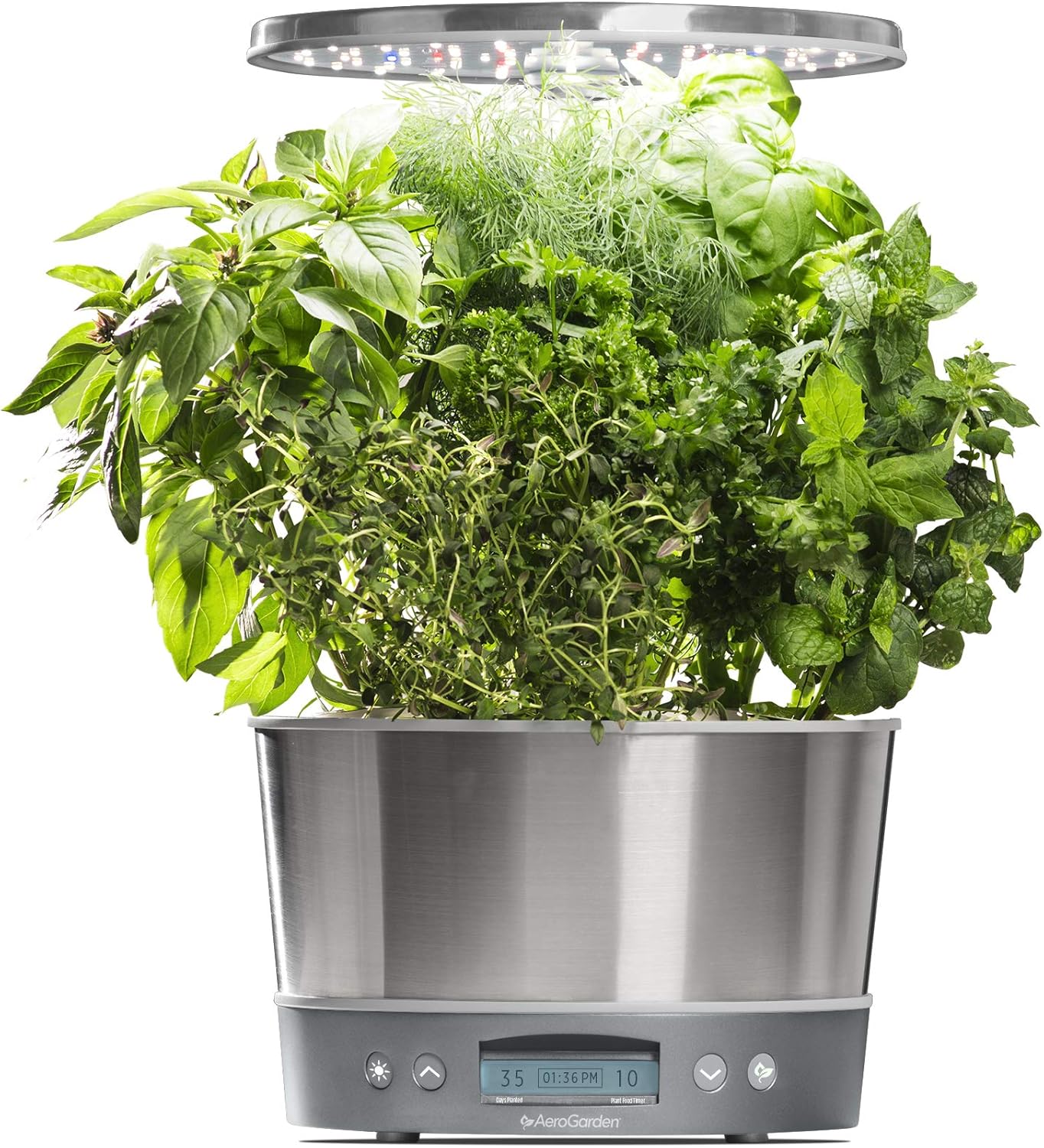
Image 1.1: The AeroGarden Harvest Elite 360 with a variety of mature herbs.
2. What's Included
Upon unboxing your AeroGarden Harvest Elite 360, verify that all components are present:
- AeroGarden Harvest Elite 360 Base Unit (Stainless Steel)
- 20W LED Grow Light System
- Power Adapter
- 3 oz. Bottle of Liquid Plant Food
- Gourmet Herb Seed Pod Kit (includes Genovese Basil, Curly Parsley, Dill, Thyme, Thai Basil, and Mint)

Image 2.1: Internal view of the AeroGarden Harvest Elite 360 showing water level and seed pod placement.
3. Setup Instructions
Follow these steps to set up your AeroGarden Harvest Elite 360:
- Unpack Components: Carefully remove all items from the packaging.
- Assemble Grow Light: Insert the grow light hood into the main unit. Ensure it is securely seated.
- Position the Garden: Place your AeroGarden on a flat, stable surface near an electrical outlet. Avoid placing it in direct sunlight or near heat sources.
- Add Water: Fill the water bowl with fresh tap water up to the 'Fill To Here' line. Do not use distilled or softened water.
- Add Plant Food: Refer to the plant food bottle for specific dosage instructions. Typically, you will add the recommended amount of liquid plant food directly into the water bowl.
- Insert Seed Pods: Place the seed pods into the openings on the grow deck. Ensure the labels are facing upwards. Cover any unused openings with the included grow domes to prevent algae growth and maintain humidity.
- Connect Power: Plug the power adapter into the AeroGarden and then into a standard electrical outlet. The unit will power on and the control panel will illuminate.
- Adjust Grow Light Height: Initially, set the grow light to its lowest position, approximately 1-2 inches above the seed pods. As plants grow, adjust the light upwards to maintain this distance.

Image 3.1: Visual guide for the three primary setup steps: adjusting light, adding water/food, and inserting pods.
4. Operating Instructions
4.1. Control Panel Functions
The touch-sensitive control panel manages the AeroGarden's functions and provides important notifications:
- Light Button: Manually turns the grow light on or off. The automatic timer will resume at the next scheduled cycle.
- Plant Food Reminder: An illuminated icon indicates when it's time to add plant food. Press the button to reset the reminder after adding food.
- Water Level Indicator: An illuminated icon indicates when the water level is low. Refill the water bowl to the 'Fill To Here' line.
- Vacation Mode: Activates a reduced light cycle to conserve water and nutrients, ideal for when you are away for an extended period. Refer to the full user manual for activation details.
- Display: Shows the current time, days since planting, and other system information.
4.2. Grow Light Operation
The 20W LED grow light operates on an automatic timer, mimicking natural sunlight cycles. It is pre-programmed for optimal plant growth. Avoid manually overriding the light cycle unless necessary, as consistent light exposure is crucial for plant health.
4.3. Adjusting Grow Light Height
As your plants grow, regularly adjust the height of the LED grow light. The light should always be positioned approximately 1-2 inches above the tallest plants to ensure they receive adequate light without scorching. The extendable lamp post allows for adjustments up to 12 inches of grow height.
5. Maintenance
5.1. Watering
The AeroGarden will alert you when the water level is low. Refill the water reservoir with fresh tap water up to the indicated fill line. Avoid overfilling.
5.2. Plant Food
The control panel will remind you when to add liquid plant food. Follow the instructions on the plant food bottle for the correct dosage and frequency. Typically, plant food is added every two weeks.
5.3. Pruning
Regular pruning is essential for healthy plant growth and maximizing yields. Trim plants to prevent them from touching the grow light, which can cause scorching. Prune regularly to encourage bushier growth and prevent overcrowding.
5.4. Cleaning
Periodically, it is recommended to perform a thorough cleaning of your AeroGarden, especially between planting cycles. This involves emptying the reservoir, cleaning the pump and grow deck, and wiping down the unit. Refer to the full user manual for detailed cleaning instructions.
6. Troubleshooting
If you encounter issues with your AeroGarden Harvest Elite 360, consider the following common solutions:
- Plants Not Growing: Ensure the grow light is positioned correctly (1-2 inches above plants), plant food is added regularly, and the water level is maintained. Verify seed pods are correctly inserted.
- Algae Growth: Algae can form if light reaches the water reservoir. Ensure all unused grow deck openings are covered with grow domes. Clean the reservoir thoroughly during maintenance.
- Pump Not Working: Check that the power adapter is securely connected. Ensure the pump is not obstructed by roots or debris.
- Control Panel Issues: If the display is blank or unresponsive, try unplugging the unit for 30 seconds and then plugging it back in to reset.
For more detailed troubleshooting steps and specific error codes, please consult the official PDF user manual: AeroGarden Harvest Elite 360 PDF Manual.
7. Specifications
| Feature | Detail |
|---|---|
| Product Dimensions | 9.25 x 9.25 x 17.4 inches (23.5 x 23.5 x 44.2 cm) |
| Item Weight | 6.47 pounds (2.93 kg) |
| Model Number | 100693-BSS |
| Grow Light | 20W Full-Spectrum LED |
| Plant Capacity | Up to 6 pods |
| Max Grow Height | 12 inches (30.5 cm) |
| Manufacturer | AeroGarden |

Image 7.1: Dimensions of the AeroGarden Harvest Elite 360.
8. Warranty and Support
For information regarding product warranty, returns, or to contact customer support, please visit the official AeroGarden website or refer to the documentation included with your product. You can also find additional resources and frequently asked questions on the AeroGarden store page:
Visit the AeroGarden Store on Amazon
For a comprehensive guide, download the official user manual: