Introduction
This user manual provides comprehensive instructions for the WEYMIC Professional Mixer F4-Bluetooth. It covers essential information regarding setup, operation, maintenance, and troubleshooting to ensure optimal performance and longevity of your device. Please read this manual thoroughly before using the mixer.
The WEYMIC F4-Bluetooth is a versatile 4-channel, 2-bus mixer designed for various audio applications, including recording, DJing, stage performances, and karaoke. It features USB input, 48V phantom power, and Bluetooth connectivity.
Product Overview
The WEYMIC F4-Bluetooth mixer integrates multiple functionalities into a compact design. Key components include:
- Input Channels: Two mic/line inputs with XLR/TRS combo jacks and two stereo line inputs (channels 3/4).
- Gain Control: Individual gain controls for each input channel.
- EQ Section: High, Mid, and Low equalization controls per channel.
- Phantom Power: +48V phantom power for condenser microphones.
- USB Interface: For direct connection to computers (Mac/PC) for recording and playback.
- Bluetooth Connectivity: For wireless audio streaming.
- Main Output: Stereo RCA outputs for connecting to amplifiers or powered speakers.
- Headphone Output: For monitoring audio.
- Digital MP3 Player: Integrated player with USB port.

Figure 1: Top-down view of the WEYMIC F4-Bluetooth Professional Mixer. This image displays the layout of all input channels, gain controls, EQ sections, faders, and the main output section, including the integrated digital MP3 player and USB port.
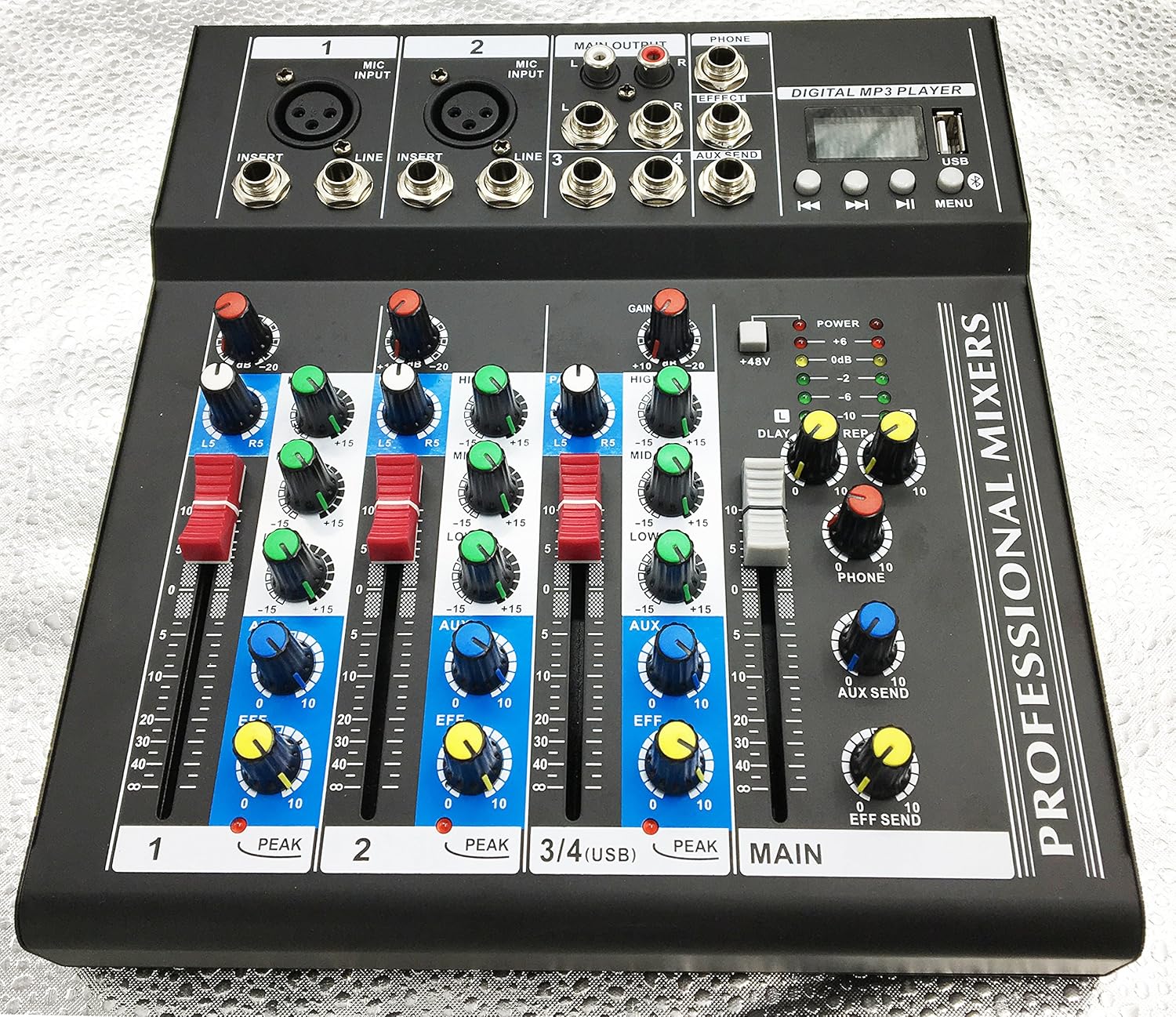
Figure 2: Angled view of the WEYMIC F4-Bluetooth Professional Mixer. This perspective provides a clearer look at the individual channel controls, including gain, high, mid, low EQ knobs, pan, AUX, EFF, and channel faders.
Setup Guide
1. Unpacking and Inspection
Carefully remove the mixer from its packaging. Inspect the unit for any signs of damage during transit. Ensure all components listed below are present:
- WEYMIC F4-Bluetooth Mixer Unit
- 110V Power Adapter
- User Manual (this document)

Figure 3: WEYMIC F4-Bluetooth Professional Mixer with its included 110V power adapter. This image shows the mixer alongside its power supply, which is essential for operation.
2. Power Connection
- Ensure the mixer's power switch is in the OFF position.
- Connect the provided 110V power adapter to the DC input jack on the rear of the mixer.
- Plug the power adapter into a standard electrical outlet.
3. Audio Connections
Refer to the rear panel diagram for input and output locations.

Figure 4: Rear view of the WEYMIC F4-Bluetooth Professional Mixer. This image highlights the various input and output ports, including MIC/LINE inputs, MAIN OUTPUT, PHONE output, and the power input.
- Microphones/Instruments: Connect microphones or instruments to the MIC INPUT (XLR) or LINE INPUT (TRS) jacks on channels 1 and 2. For condenser microphones, activate the +48V Phantom Power switch.
- Stereo Line Inputs: Use channels 3/4 for stereo line-level devices such as keyboards or media players.
- Main Output: Connect the MAIN OUTPUT (RCA L/R) to your amplifier, powered speakers, or recording device.
- Headphones: Plug your headphones into the PHONE jack for monitoring.
- USB Connection: Connect the USB port to your computer for audio interface functionality.
Operating Instructions
1. Basic Operation
- Turn on the mixer using the power switch.
- Set all channel GAIN knobs to their minimum position.
- Set all channel faders and the MAIN fader to their minimum position.
- Connect your audio sources.
- Gradually increase the GAIN knob for the active channel until the PEAK LED occasionally flashes.
- Slowly raise the channel fader to the '0' mark.
- Gradually increase the MAIN fader to achieve the desired overall volume.
2. Equalization (EQ)
Each channel features a 3-band EQ (HIGH, MID, LOW) to shape the tone of your audio source. Adjust these knobs to cut or boost frequencies as needed.
- HIGH: Adjusts treble frequencies (e.g., cymbals, vocal clarity).
- MID: Adjusts mid-range frequencies (e.g., vocal presence, instrument body).
- LOW: Adjusts bass frequencies (e.g., kick drum, bass guitar).
3. Phantom Power (+48V)
The +48V phantom power switch provides power to condenser microphones. Ensure phantom power is OFF before connecting or disconnecting microphones to prevent damage.
- Connect your condenser microphone.
- Turn on the +48V phantom power switch.
- When finished, turn off the +48V switch before disconnecting the microphone.
4. USB Audio Interface
Connect the mixer's USB port to your computer. The mixer will be recognized as an audio input/output device. You can use it for recording audio from the mixer or playing back audio from your computer through the mixer.
5. Bluetooth Connectivity
To connect a Bluetooth device:
- Ensure the mixer is powered on.
- Activate Bluetooth on your mobile device or computer.
- Search for available devices and select "F4-Bluetooth" (or similar name).
- Once paired, audio from your device will play through the mixer.
Maintenance
Proper maintenance ensures the longevity and reliable operation of your mixer.
- Cleaning: Use a soft, dry cloth to clean the exterior of the mixer. Do not use liquid cleaners or abrasive materials.
- Storage: Store the mixer in a cool, dry place away from direct sunlight and extreme temperatures.
- Ventilation: Ensure proper ventilation around the mixer to prevent overheating. Do not block ventilation openings.
- Power Off: Always turn off the mixer and disconnect the power adapter when not in use for extended periods.
Troubleshooting
| Problem | Possible Cause | Solution |
|---|---|---|
| No power | Power adapter not connected; Power outlet faulty; Mixer power switch off. | Check power adapter connection; Try a different outlet; Ensure power switch is ON. |
| No sound output | Main fader or channel fader too low; Incorrect input/output connections; Muted channel; Faulty cables. | Increase fader levels; Verify all cable connections; Check if any channels are muted; Test with new cables. |
| Microphone not working | Phantom power off (for condenser mics); Gain too low; Faulty microphone or cable. | Activate +48V phantom power; Increase channel GAIN; Test with a different microphone or cable. |
| Bluetooth not connecting | Mixer not in pairing mode; Device too far; Interference. | Ensure mixer's Bluetooth is active; Move device closer; Reduce interference from other wireless devices. |
Specifications
| Model | F4-Bluetooth |
| Brand | WEYMIC |
| Number of Channels | 4 |
| Phantom Power | +48V |
| Connectivity | USB, Bluetooth |
| Item Weight | 2.86 pounds (1.3 Kilograms) |
| Package Dimensions | 9.84 x 9.45 x 1.97 inches (250mm x 240mm x 50mm) |
| Power Input | External 110V Power Adapter |
| ASIN | B07CK15N42 |
| UPC | 022500864227 |
Warranty and Support
For warranty information and technical support, please contact WEYMIC customer service. Refer to the product packaging or the official WEYMIC website for the most current contact details.
When contacting support, please have your product model (F4-Bluetooth) and ASIN (B07CK15N42) available.


