
1. Introduction
This instruction manual provides essential information for the proper installation, operation, and maintenance of your Kludi O-CEAN Ceramic Joystick Cartridge, model 7494700-00. Please read this manual thoroughly before beginning any installation or maintenance procedures to ensure safe and correct usage. Retain this manual for future reference.
2. Product Overview
The Kludi O-CEAN Ceramic Joystick Cartridge (Model: 7494700-00) is a high-quality replacement component designed for Kludi O-CEAN series single-lever faucets. This cartridge is the core mechanism responsible for controlling both water flow and temperature. It features durable ceramic sealing discs, which provide smooth operation and a long service life, preventing drips and ensuring precise control over your water supply.
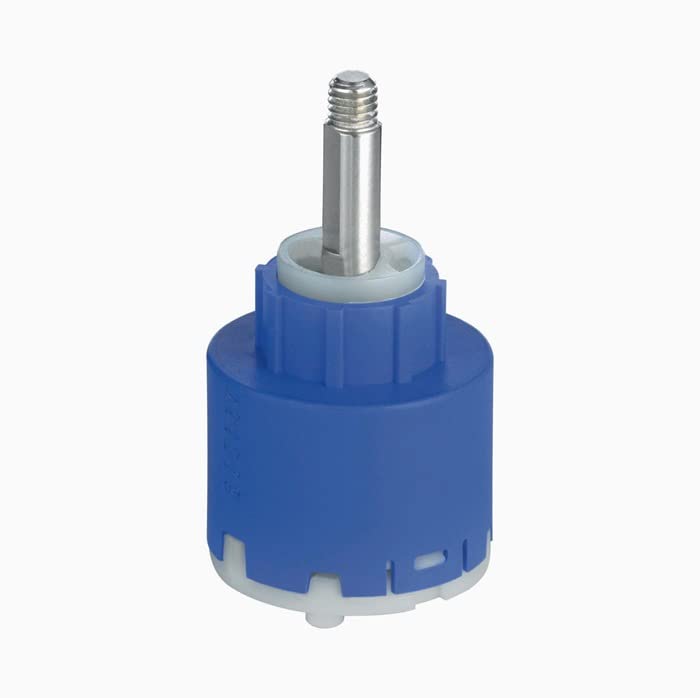
Image 1: Kludi O-CEAN Ceramic Joystick Cartridge, model 7494700-00. This image displays the complete cartridge unit, a vital component for single-lever faucet functionality.
3. Installation
Safety Warning: Before starting any installation, ensure the main water supply to the faucet is turned off. Failure to do so may result in water damage or personal injury. It is recommended to have a qualified plumber perform the installation if you are unsure.
- Prepare the Work Area: Clear the area around the faucet. Place a towel or bucket under the faucet to catch any residual water.
- Turn Off Water Supply: Locate the shut-off valves for the hot and cold water lines under the sink and turn them off completely. Turn on the faucet to drain any remaining water pressure.
- Remove Faucet Handle: Carefully remove the decorative cap (if present) on the faucet handle. Unscrew the handle screw and lift off the handle.
- Access the Cartridge: Depending on your faucet model, you may need to remove a retaining nut, collar, or dome cap to expose the old cartridge. Use an adjustable wrench if necessary.
- Remove Old Cartridge: Gently pull the old cartridge straight up and out of the faucet body. Note its orientation for correct installation of the new cartridge.
- Clean Faucet Body: Inspect the faucet body for any debris or mineral deposits. Clean the cartridge housing thoroughly to ensure a proper seal with the new cartridge.
- Install New Cartridge: Insert the new Kludi O-CEAN Ceramic Joystick Cartridge into the faucet body, ensuring it is correctly oriented and seated firmly. The alignment pins or notches on the cartridge must match the slots in the faucet body.
- Reassemble Faucet: Reattach any retaining nuts, collars, or dome caps. Securely fasten the faucet handle back in place. Do not overtighten.
- Restore Water Supply: Slowly turn on the hot and cold water supply valves.
- Test Faucet: Turn on the faucet and check for proper water flow, temperature control, and any leaks around the handle or base.
4. Operation
The Kludi O-CEAN Ceramic Joystick Cartridge facilitates the operation of your single-lever faucet. Once installed, the faucet handle directly controls the cartridge's ceramic discs to regulate water flow and temperature:
- Water Flow: Moving the handle up or down typically controls the volume of water.
- Temperature Control: Moving the handle left or right typically adjusts the water temperature, blending hot and cold water as desired.
The ceramic discs ensure a smooth, precise, and drip-free operation, allowing for fine-tuning of both flow and temperature with minimal effort.
5. Maintenance
The Kludi O-CEAN Ceramic Joystick Cartridge is designed for long-term, maintenance-free operation. However, general faucet maintenance can prolong its life and ensure optimal performance:
- Regular Cleaning: Clean the exterior of your faucet regularly with a soft cloth and mild soap. Avoid abrasive cleaners or harsh chemicals, as these can damage the finish and potentially affect internal components.
- Check for Leaks: Periodically inspect the faucet for any signs of leaks around the handle or spout. Early detection can prevent minor issues from becoming major problems.
- Water Quality: In areas with hard water, mineral deposits can build up over time. While ceramic discs are resistant, extreme mineral buildup in the faucet body can affect performance. Consider installing a water softener if you experience frequent issues due to hard water.
6. Troubleshooting
If you encounter issues with your Kludi O-CEAN faucet after cartridge replacement, refer to the following common problems and solutions:
| Problem | Possible Cause | Solution |
|---|---|---|
| Faucet Leaks from Handle/Spout | Cartridge not seated correctly, damaged O-rings, or faulty cartridge. | Ensure cartridge is fully seated and retaining nut is tightened. Check O-rings for damage. If problem persists, the cartridge may be faulty and require replacement. |
| Stiff Faucet Handle | Mineral buildup or incorrect installation. | Disassemble and clean the faucet body and cartridge housing. Ensure the cartridge is installed correctly without obstruction. |
| Inconsistent Water Temperature | Improper cartridge installation or issues with water supply. | Verify the cartridge is correctly oriented. Check hot and cold water supply lines for blockages or pressure issues. |
| Low Water Flow | Aerator clogged, water supply partially off, or debris in cartridge. | Clean or replace the faucet aerator. Ensure water supply valves are fully open. Check cartridge for debris. |
If these troubleshooting steps do not resolve the issue, please contact Kludi customer support or a qualified plumber.
7. Specifications
- Brand: Kludi
- Model Number: 7494700-00
- Product Type: Ceramic Joystick Cartridge with Ceramic Sealing Discs
- Weight: Approximately 200 g
- Compatible Faucets: Kludi O-CEAN series single-lever faucets
- ASIN: B07CHWQKCM
- Manufacturer: Kludi
8. Warranty Information
Kludi products are manufactured to high-quality standards and come with a manufacturer's warranty. The specific terms and duration of the warranty may vary by region and product type. Please refer to the official Kludi website or your purchase documentation for detailed warranty information. Keep your proof of purchase for any warranty claims.
For warranty service, please contact Kludi customer support with your model number and purchase details.
9. Customer Support
For further assistance, technical support, or spare parts, please contact Kludi directly:
- Kludi Official Website: www.kludi.com (Please check the website for regional contact information)
- Contact Information: Refer to the "Contact" or "Support" section on the official Kludi website for phone numbers, email addresses, or service centers in your area.
When contacting support, please have your product model number (7494700-00) and purchase date ready.