
Camlockbox 700
Instruction Manual: Theft-Deterrent Powder-Coated Steel Security Box
Model: 700 | Brand: Camlockbox
Product Overview
The Camlockbox Security Box is designed to protect your Browning Trail Cameras from environmental elements, theft, and damage by animals. Constructed from heavy 16-gauge steel, this high-quality box ensures durability and a precise fit for your camera. Its design allows for easy camera removal and installation without repositioning, maintaining the original camera angle.

Figure 1: Front view of the Camlockbox Security Box, designed for Browning Trail Cameras.
The box features a powder-coated finish with a Camo Break-up paint application, providing both protection against nature's elements and camouflage in outdoor environments. It offers multiple attachment options for secure placement.
Setup and Installation
Follow these steps to properly install your Camlockbox Security Box and secure your trail camera:
- Prepare the Camera: Ensure your Browning trail camera is ready for deployment, with batteries installed and settings configured as desired.
- Insert Camera into Box: Carefully slide your Browning trail camera into the Camlockbox Security Box. The precise fit ensures the camera is snug and aligned correctly.
- Choose Attachment Method: The security box can be attached to a tree or post using one of the following methods:
- Lag Bolting: Use lag bolts through the designated holes on the back of the box to secure it directly to a tree. Ensure sufficient clearance for large-headed bolts.
- Belting or Bungeeing: Utilize straps or bungee cords through the provided slots to fasten the box around a tree or post.
- Python Cable Lock: For public land or situations where defacing trees is not permitted, a 5/16 inch Python cable lock can be threaded through the box and around the tree. The box is fully compatible with these locks.
- Secure the Box: Once the box is attached to the tree, the camera can be inserted or removed without needing to reposition the box, ensuring the camera points back to its original spot.
- Add Additional Security (Optional): The Camlockbox is lockable with ordinary padlocks for enhanced security. Thread a padlock through the designated hole on the front of the box.
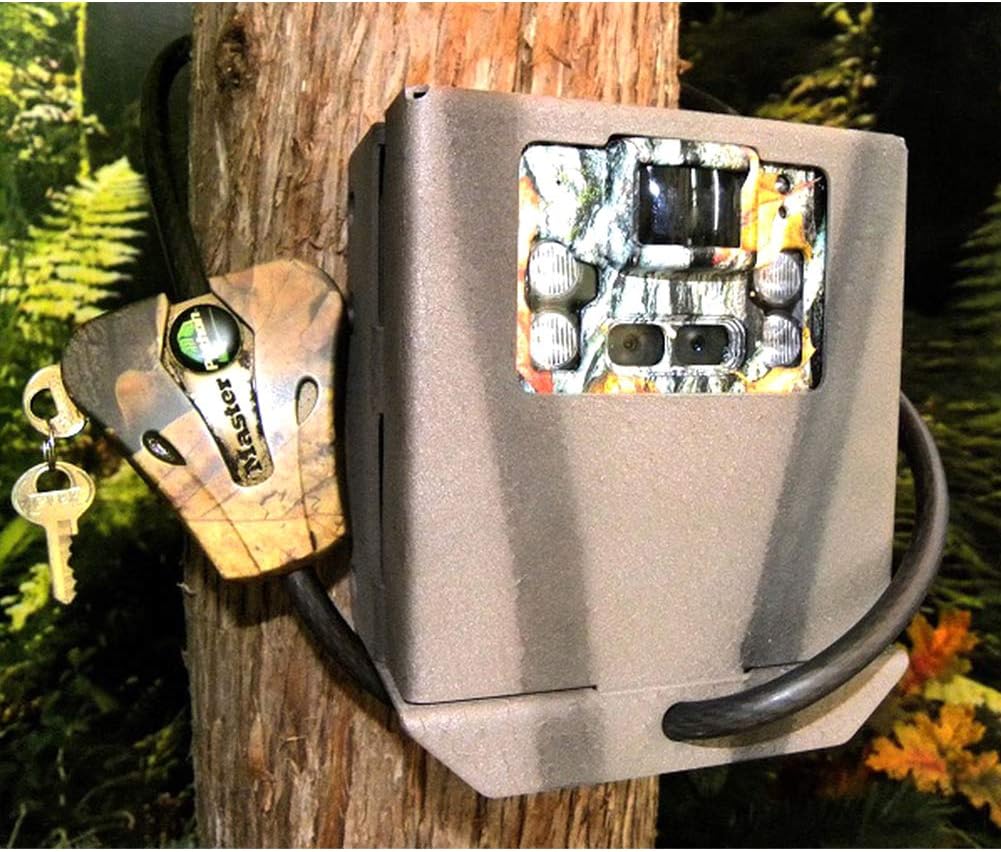
Figure 2: The security box installed on a tree, demonstrating the use of a cable lock for added security.
Operation
The Camlockbox Security Box is designed for straightforward operation in conjunction with your trail camera:
- Camera Access: The box's design allows for easy insertion and removal of the trail camera. Once the box is mounted, the camera can be taken in or out without disturbing the box's position, ensuring consistent camera alignment.
- External Power Hookup: Holes are strategically cut into the box to facilitate external power hookup to your trail camera, allowing for continuous operation without opening the box.
- Theft Deterrence: The robust steel construction and compatibility with various locking mechanisms (padlocks, Python cable locks) significantly deter theft and unauthorized access to your trail camera.
- Protection from Elements and Animals: The durable powder coating and solid steel construction protect your camera from harsh weather conditions and prevent damage from chewing animals.

Figure 3: Interior view of the security box, highlighting the precise fit for trail cameras.
Maintenance
To ensure the longevity and continued performance of your Camlockbox Security Box, consider the following maintenance guidelines:
- Regular Inspection: Periodically inspect the security box for any signs of wear, damage, or corrosion, especially after prolonged exposure to harsh weather conditions.
- Cleaning: Wipe down the exterior of the box with a damp cloth to remove dirt, dust, or debris. Avoid abrasive cleaners that could damage the powder-coated finish.
- Lock Mechanism Check: If using a padlock or cable lock, ensure the locking mechanism operates smoothly. Lubricate if necessary according to the lock manufacturer's instructions.
- Mounting Stability: Verify that the box remains securely mounted to its chosen surface (tree, post). Tighten any bolts or adjust straps as needed to maintain stability.
Troubleshooting
While the Camlockbox Security Box is designed for durability and reliability, here are some common considerations and their resolutions:
- Difficulty Inserting/Removing Camera: Ensure the camera is correctly aligned with the box's opening. The fit is precise, so gentle, straight insertion is required. Do not force the camera.
- Box Feels Loose After Installation: Re-check all attachment points. If using lag bolts, ensure they are fully tightened. If using straps or bungees, ensure they are taut and securely fastened.
- Corrosion or Paint Chipping: While powder-coated for durability, extreme conditions can cause wear. Minor chips can be touched up with rust-inhibiting paint. For significant corrosion, consider replacement.
- Locking Mechanism Issues: If a padlock or cable lock is stiff or jammed, refer to the lock's specific troubleshooting guide. Ensure the lock is not obstructed by debris.
Specifications
| Feature | Detail |
|---|---|
| Brand | Camlockbox |
| Model Number | 700 |
| Material | Heavy 16-Gauge Steel |
| Color | Khaki (Camo Break-up paint applied) |
| Compatibility | Browning Pro XD Trail Cameras |
| Locking Options | Standard Padlocks, 5/16 inch Python Cable Locks |
| Recommended Use | Security for Trail Cameras |
| Package Dimensions (L x W x H) | 9.29 x 6.1 x 3.58 inches |
| Package Weight | 0.76 Kilograms |
| UPC | 641427818061 |
Warranty and Support
Camlockbox products are manufactured to high standards. For specific warranty information regarding your security box, please refer to the documentation provided at the time of purchase or visit the official Camlockbox website.
For technical support, product inquiries, or assistance with installation, please contact Camlockbox directly through their official customer service channels. Contact information can typically be found on the manufacturer's website or product packaging.
Ask a question about this manual
Ask about setup, troubleshooting, compatibility, parts, safety, or missing instructions. Manuals+ will review the question and use this page’s manual context to help answer it.