
1. Important Safeguards
When using electrical appliances, basic safety precautions should always be followed, including:
- Read all instructions before operating.
- Do not touch hot surfaces. Use handles or knobs.
- To protect against electric shock, do not immerse cord, plugs, or the main unit in water or other liquid.
- Close supervision is necessary when any appliance is used by or near children.
- Unplug from outlet when not in use and before cleaning. Allow to cool before putting on or taking off parts.
- Do not operate any appliance with a damaged cord or plug, or after the appliance malfunctions or has been damaged in any manner.
- The use of accessory attachments not recommended by the appliance manufacturer may cause injuries.
- Do not use outdoors.
- Do not let cord hang over edge of table or counter, or touch hot surfaces.
- Do not place on or near a hot gas or electric burner, or in a heated oven.
- Extreme caution must be used when moving an appliance containing hot oil or other hot liquids.
- Always attach plug to appliance first, then plug cord into the wall outlet. To disconnect, turn any control to "off", then remove plug from wall outlet.
- Do not use appliance for other than intended use.
- This appliance is for household use only.
- Ensure the appliance is placed on a stable, level surface.
- An automatic shut-off feature is included for safety.
2. Product Overview
The Power Air Fryer Oven is a versatile kitchen appliance designed for air frying, roasting, baking, grilling, and dehydrating with minimal to no added oil. It features a digital control panel for easy operation and precise temperature control.

Figure 2.1: Front view of the Power Air Fryer Oven, showcasing its digital control panel and sleek design.
Components:
- Main Unit with Digital Control Panel
- Removable Drip Tray
- Internal Cooking Chamber
- Power Cord
Digital Control Panel:
The intuitive one-touch digital panel allows for easy selection of cooking functions, temperature adjustment, and time setting. It includes 8 preset programs for common dishes.
3. Included Accessories
Your Power Air Fryer Oven comes with a comprehensive set of accessories to enhance your cooking experience:

Figure 3.1: All included accessories for the Power Air Fryer Oven.
- 3 Air Flow Racks: For multi-level cooking and optimal air circulation.
- Rotating Mesh Basket: Ideal for fries, nuts, and other foods that require tumbling for even cooking.
- Rotisserie Spit with Shaft and Forks: For roasting whole chickens or other large cuts of meat.
- Rotisserie Fetch Tool: Safely remove the rotisserie spit from the oven.
- Drip Tray: Collects excess oil and food particles for easy cleaning.
- 10 Skewers: For preparing kebabs or other skewered dishes.
4. Before First Use
- Remove all packaging materials, stickers, and labels.
- Wash all accessories (air flow racks, mesh basket, rotisserie parts, skewers, drip tray) with warm, soapy water. Rinse thoroughly and dry completely.
- Wipe the inside and outside of the main unit with a clean, damp cloth.
- Before cooking, run the appliance for 10-15 minutes on an empty cycle at 350°F (175°C) to burn off any manufacturing residue. A slight odor may be present, which is normal. Ensure good ventilation.
5. Setup
- Place the Power Air Fryer Oven on a stable, level, heat-resistant surface. Ensure there is adequate space (at least 6 inches) around the unit for proper air circulation.
- Insert the Drip Tray at the bottom of the cooking chamber.
- Place the desired cooking accessory (e.g., air flow rack) into the oven.
- Plug the power cord into a grounded electrical outlet. The digital display will illuminate.
6. Operating Instructions
General Operation:
- Prepare your food and place it on the appropriate accessory (e.g., air flow rack, mesh basket).
- Slide the accessory into the oven.
- Press the Power Button to turn on the unit.
- Select a preset program or manually set the temperature and time using the digital controls.
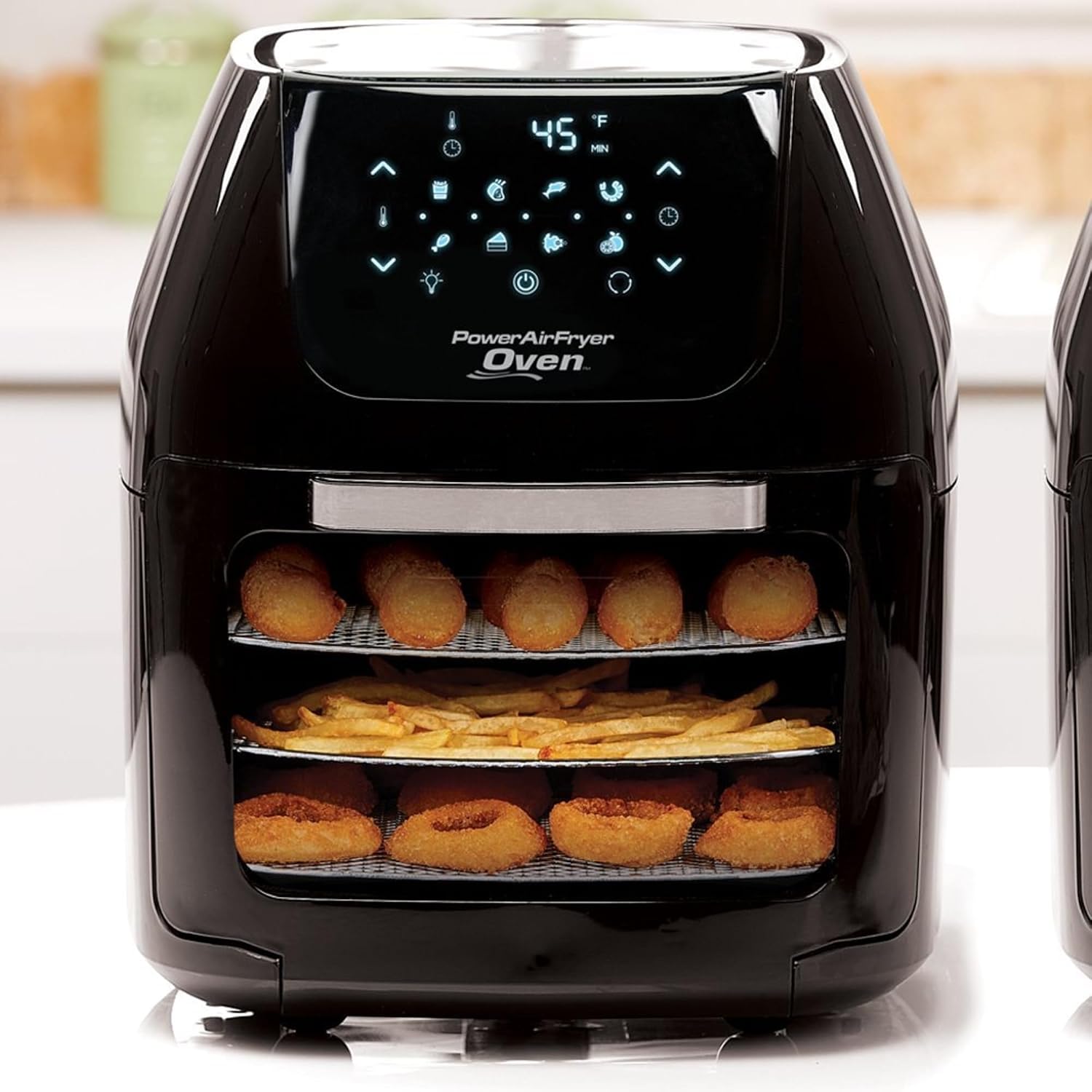
Figure 6.1: Example of cooking multiple items simultaneously using the air flow racks.
- Press the Start/Pause button to begin cooking.
- The oven will automatically shut off when the timer reaches zero.
- Carefully remove cooked food using heat-resistant gloves or the rotisserie fetch tool for rotisserie items.
Preset Programs:
The oven includes 8 convenient preset programs:
- French Fries
- Steaks/Chops
- Fish
- Shrimp
- Chicken
- Baking
- Rotisserie
- Dehydrator
Refer to the recipe guide (if included) for specific cooking times and temperatures for each preset.
Using the Rotisserie Function:
- Securely attach the food (e.g., whole chicken) to the Rotisserie Spit using the forks.
- Insert the Rotisserie Spit into the designated slots inside the oven.
- Select the "Rotisserie" preset or set manual temperature and time.
- Press the Rotisserie Rotation button (if available on your model) to activate rotation.

Figure 6.2: A whole chicken being roasted using the rotisserie function.
- When cooking is complete, use the Rotisserie Fetch Tool to carefully remove the hot spit.
7. Cleaning and Maintenance
Proper cleaning ensures the longevity and optimal performance of your Power Air Fryer Oven.
Before Cleaning:
- Always unplug the appliance from the power outlet and allow it to cool down completely before cleaning.
Cleaning the Main Unit:
- Wipe the exterior with a damp cloth and mild detergent. Do not use abrasive cleaners.
- Clean the interior with a damp cloth and a non-abrasive liquid soap. For stubborn grease, use a soft brush.
- Do not immerse the main unit in water or any other liquid.
Cleaning Accessories:
- All removable accessories (air flow racks, mesh basket, rotisserie parts, skewers, drip tray) can be washed by hand with warm, soapy water.
- Note: The product specifications state "Is Dishwasher Safe: No". Therefore, accessories are NOT dishwasher safe.
- Rinse thoroughly and dry completely before storing.
8. Troubleshooting
If you encounter any issues with your Power Air Fryer Oven, please refer to the following common problems and solutions:
| Problem | Possible Cause | Solution |
|---|---|---|
| Appliance does not turn on. | Not plugged in; Power button not pressed. | Ensure power cord is securely plugged into a grounded outlet. Press the Power button. |
| Food is not cooked evenly. | Overcrowding; Incorrect temperature/time; Food not rotated. | Do not overcrowd the racks. Adjust temperature/time as needed. For best results, rotate or flip food halfway through cooking. |
| White smoke coming from the appliance. | Excess oil/grease in drip tray; Fatty foods cooking. | Clean the drip tray after each use. For very fatty foods, place a small amount of water in the drip tray to prevent smoke. |
| Food is not crispy. | Not enough oil (for air frying); Overcrowding; Moisture in food. | Lightly mist food with oil for crispier results. Ensure food is not overcrowded. Pat dry moist foods before cooking. |
9. Specifications
| Feature | Detail |
|---|---|
| Model Number | PAFO |
| Capacity | 6 Quarts (5.68 Liters) |
| Power Output | 1700 Watts |
| Control Method | Touch Control Digital Panel |
| Special Features | Automatic Shut-Off, 8 Preset Programs |
| Construction Material | Plastic (Exterior), Stainless Steel (Inner Material) |
| Dimensions (L x W x H) | 12.7" x 13.3" x 14.4" |
| Item Weight | 23.8 lbs |
| Cord Length | 36 inches |
| UPC | 752356821999 |
10. Warranty and Support
For information regarding product warranty, returns, or technical support, please refer to the documentation included with your purchase or contact the manufacturer directly. Specific warranty details are not provided in this manual.


