
Introduction
This manual provides detailed instructions for the safe and efficient use of your Sunbeam Flexible Neck LED Desk Lamp. Please read this manual thoroughly before operating the product and retain it for future reference.
The Sunbeam Flexible Neck LED Desk Lamp is designed to provide adjustable, eye-caring illumination for various tasks, featuring a flexible neck for precise light positioning and multiple brightness settings.
Safety Information
- Ensure the lamp is placed on a stable, flat surface to prevent tipping.
- Do not expose the lamp to water or excessive moisture.
- Do not attempt to disassemble or modify the lamp. There are no user-serviceable parts inside.
- Keep the lamp away from heat sources and direct sunlight.
- Use only the power adapter supplied with the lamp.
- Unplug the lamp from the power outlet before cleaning or if it will not be used for an extended period.
- This lamp contains integrated LED components. Do not attempt to replace the LED bulbs.

Image: ETL Intertek certification logo, indicating product safety compliance.
Package Contents
Verify that all items are present in your package:
- Sunbeam Flexible Neck LED Desk Lamp (Quantity: 2)
- Power Adapter (Quantity: 2)
- Instruction Manual (This document)

Image: Two Sunbeam Flexible Neck LED Desk Lamps, as included in the package.
Setup
- Unpack the Lamp: Carefully remove the lamp and all components from the packaging.
- Position the Lamp: Place the lamp base on a stable, flat surface where you intend to use it.
- Adjust the Neck: Gently bend the flexible neck to position the lamp head as desired. Avoid excessive force or sharp bends.
- Connect Power: Insert the small end of the power adapter into the power port located on the back of the lamp base. Plug the other end of the power adapter into a standard electrical outlet.

Image: A single Sunbeam Flexible Neck LED Desk Lamp, illustrating its typical setup.
Operating Instructions
The Sunbeam Flexible Neck LED Desk Lamp features a touch-sensitive control for power and brightness adjustment.
- Power On/Off: Lightly touch the power icon (⏻) on the lamp base to turn the lamp on or off.
- Adjust Brightness: The lamp offers three brightness levels. After turning the lamp on, repeatedly touch the power icon (⏻) to cycle through the brightness settings:
- First touch: Low brightness
- Second touch: Medium brightness
- Third touch: High brightness
- Fourth touch: Lamp turns off
- Adjust Light Direction: Use the flexible neck to direct the light precisely where needed. The neck can be bent and twisted to achieve various angles and heights.
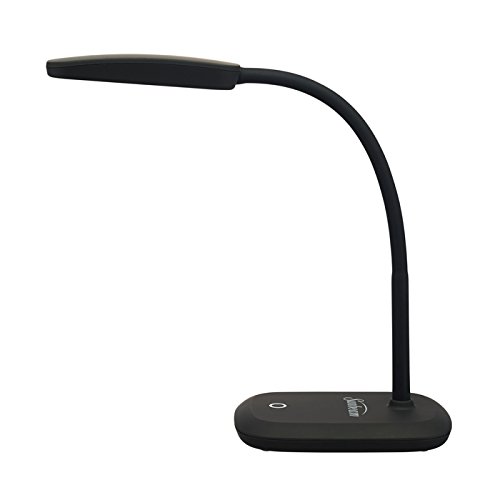
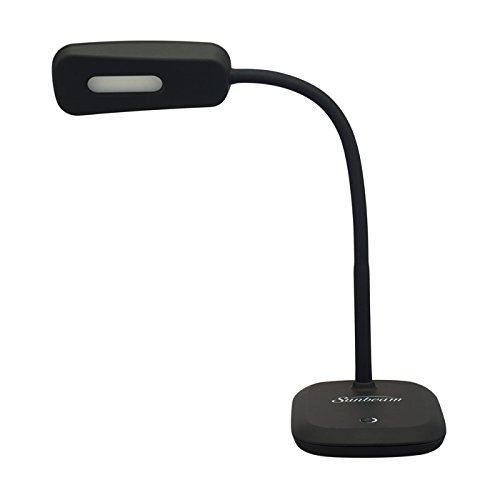
Image: Two views of the Sunbeam Flexible Neck LED Desk Lamp demonstrating the flexibility of its neck for light direction adjustment.
Maintenance
- Cleaning: Disconnect the lamp from the power source before cleaning. Wipe the lamp with a soft, dry cloth. Do not use abrasive cleaners, solvents, or harsh chemicals.
- Storage: If storing the lamp for an extended period, unplug it and store it in a cool, dry place, away from direct sunlight.
- LED Lifespan: The integrated LED light source is designed for long-term use (approximately 36,000 hours) and does not require replacement.
Troubleshooting
| Problem | Possible Cause | Solution |
|---|---|---|
| Lamp does not turn on. |
|
|
| Lamp flickers or light is inconsistent. |
|
|
| Touch control is unresponsive. |
|
|
Specifications
| Model Number | SG_B07C953LP6_US |
| Brand | Sunbeam |
| Lamp Type | LED Desk Lamp |
| Light Source | Integrated LED (Non-replaceable) |
| Brightness Levels | 3 Dimmable Levels |
| Lifespan | Approximately 36,000 hours |
| Finish Type | Black Painted / Black Lacquered |
| Base Material | Plastic |
| Power Consumption | Uses only 6.6 Watts of Energy |
| Certification | Energy Star Certified, ETL Intertek Listed |
| Package Dimensions | 13.3 x 11.89 x 5.04 inches |
| Weight | 3.26 Pounds (for the set of 2) |
Warranty and Support
For warranty information or technical support, please refer to the warranty card included with your product or visit the official Sunbeam website. Keep your purchase receipt as proof of purchase.
Manufacturer: Sunbeam
Date First Available: March 25, 2018
For further assistance, please contact Sunbeam customer service.