
1. Introduction
This manual provides essential information for the setup, operation, and maintenance of your Sennheiser EW 100 G4-935-S Wireless Dynamic Cardioid Microphone System. Please read these instructions carefully to ensure safe and optimal performance of your equipment.

Figure 1: Sennheiser EW 100 G4-935-S Wireless Microphone System, showing the EM 100 G4 rackmount receiver and the SKM 100 G4-S handheld microphone.
2. Included Components
Your Sennheiser EW 100 G4-935-S system includes the following:
- 1 x SKM 100 G4-S Handheld Microphone with Mute Switch
- 1 x e 935 Microphone Capsule (Cardioid, Dynamic)
- 1 x EM 100 G4 Rackmount Receiver
- 1 x GA3 Rack Kit
- 1 x RJ10 Linking Cable
- 1 x Microphone Clip
- 2 x AA Batteries (1.5 V)

Figure 2: The e 935 dynamic cardioid microphone capsule, designed for vocal performance.
3. Setup Instructions
3.1. Receiver Setup (EM 100 G4)
- Placement: Position the EM 100 G4 receiver in a stable location, ideally within line-of-sight of the transmitter for optimal signal reception. If rackmounting, use the included GA3 rack kit.
- Antenna Connection: Connect the two included antennas to the 'Antenna A' and 'Antenna B' ports on the rear of the receiver. Ensure they are securely fastened.
- Power Connection: Connect the power supply to the DC input on the receiver and then to a power outlet.
- Audio Output: Connect the receiver's audio output (XLR or 1/4" jack) to your mixer or sound system.

Figure 3: Front panel of the EM 100 G4 receiver, displaying frequency, signal strength, and battery status.
3.2. Transmitter Setup (SKM 100 G4-S)
- Battery Installation: Unscrew the bottom part of the SKM 100 G4-S handheld microphone to reveal the battery compartment. Insert the two supplied 1.5V AA batteries, observing correct polarity. Alternatively, use a compatible Sennheiser BA 2015 accupack.

Figure 4: The SKM 100 G4-S handheld microphone with its battery compartment open, showing where to insert AA batteries.
- Microphone Capsule: Ensure the e 935 microphone capsule is securely attached to the top of the handheld transmitter.
3.3. Frequency Synchronization
To establish a wireless connection, the transmitter and receiver must be tuned to the same frequency. The EW 100 G4 system features infrared synchronization for easy setup:
- Scan for Frequencies: On the EM 100 G4 receiver, use the menu controls to initiate a frequency scan. The receiver will find an interference-free frequency.
- Initiate Sync: Once a frequency is selected on the receiver, press the 'Sync' button on the receiver.
- Align IR Ports: Hold the SKM 100 G4-S handheld microphone with its IR port facing the IR port on the receiver. The ports should be a few centimeters apart.
- Confirm Sync: The receiver will transmit the frequency information to the transmitter. A confirmation message will appear on both displays once synchronization is complete.
Video 1: This video provides a general overview of Sennheiser EW G4 system components and setup, including bodypack and handheld transmitters, and receiver synchronization. While it features the EW 112P G4-A model, the core setup principles for the G4 series are similar and applicable to the EW 100 G4-935-S.
4. Basic Operation
4.1. Powering On/Off
- Receiver: Press the power button on the EM 100 G4 receiver to turn it on or off.
- Transmitter: Press and hold the power button on the SKM 100 G4-S handheld microphone to turn it on or off. The display will illuminate.
4.2. Mute Function
The SKM 100 G4-S handheld microphone features an integrated mute switch. Slide the switch to mute or unmute the microphone. The display will indicate the mute status.
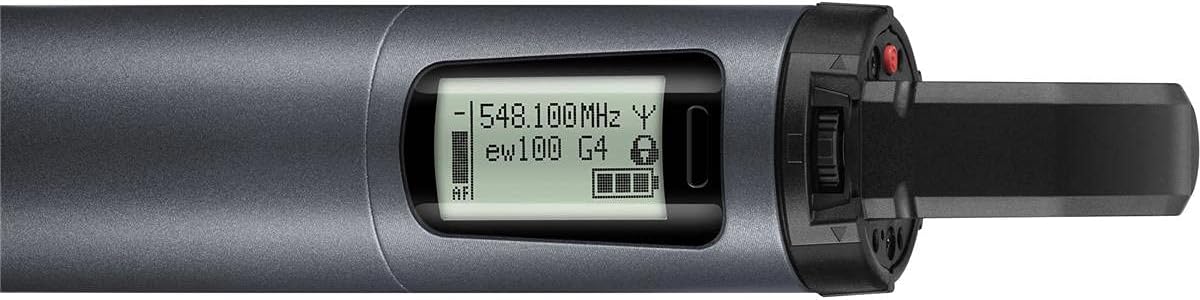
Figure 5: The display and mute switch on the SKM 100 G4-S handheld microphone, showing operational status.
5. Maintenance
5.1. Battery Care
- Replace batteries when the low battery indicator appears on the transmitter or receiver display.
- Remove batteries from the transmitter if it will not be used for an extended period to prevent leakage.
- If using rechargeable accupacks, follow the manufacturer's guidelines for charging and care.
5.2. Cleaning
- Clean the microphone and receiver with a soft, dry cloth.
- Do not use liquid cleaners or solvents, as they may damage the components.
6. Troubleshooting
| Problem | Possible Cause | Solution |
|---|---|---|
| No audio output | Transmitter or receiver not powered on; incorrect frequency synchronization; audio cables disconnected. | Ensure both units are powered on. Perform frequency synchronization. Check all audio cable connections. |
| Interference/Dropouts | Other wireless devices on the same frequency; excessive distance between transmitter and receiver; obstacles blocking signal. | Perform a new frequency scan to find a clear channel. Reduce distance between units. Ensure clear line-of-sight. |
| Low battery indicator | Batteries are low. | Replace with fresh AA batteries or a fully charged BA 2015 accupack. |
| Microphone muted | Mute switch engaged. | Disengage the mute switch on the handheld microphone. |
7. Specifications
- Model: 100 G4-935-S
- Frequency Range: A Band (516 - 558 MHz)
- Microphone Capsule: e 935 (Cardioid, Dynamic)
- Transmission Range: Up to 100 meters / 300 feet (line of sight)
- Compatible Channels: Up to 20
- Signal-to-Noise Ratio: 110 dB
- Power Source (Transmitter): 2 AA batteries, 1.5 V or BA 2015 accupack
- Item Weight: 5.5 Pounds
- Material: Aluminum
- Dimensions: 15.9 x 13.78 x 2.87 inches
8. Warranty and Support
For detailed warranty information, technical support, or service inquiries, please refer to the official Sennheiser website or contact your local Sennheiser dealer. Keep your proof of purchase for warranty claims.
Sennheiser Official Website: www.sennheiser.com