
1. Introduction
Thank you for choosing the SKMEI 1228 LED and Pointer Display Multifunctional Waterproof Sports Watch. This watch combines classic analog timekeeping with modern digital functions, designed for an active lifestyle. Please read this manual carefully to understand the full capabilities of your watch and ensure proper operation and maintenance.
2. Product Overview
The SKMEI 1228 features a robust design with both analog hands and a digital display. It is equipped with multiple functions to support various activities.

Front view of the SKMEI 1228 watch, showcasing its dual LED and pointer display, with orange accents on the bezel and hands.

Angled view of the SKMEI 1228 watch, highlighting the textured case and the four control buttons.
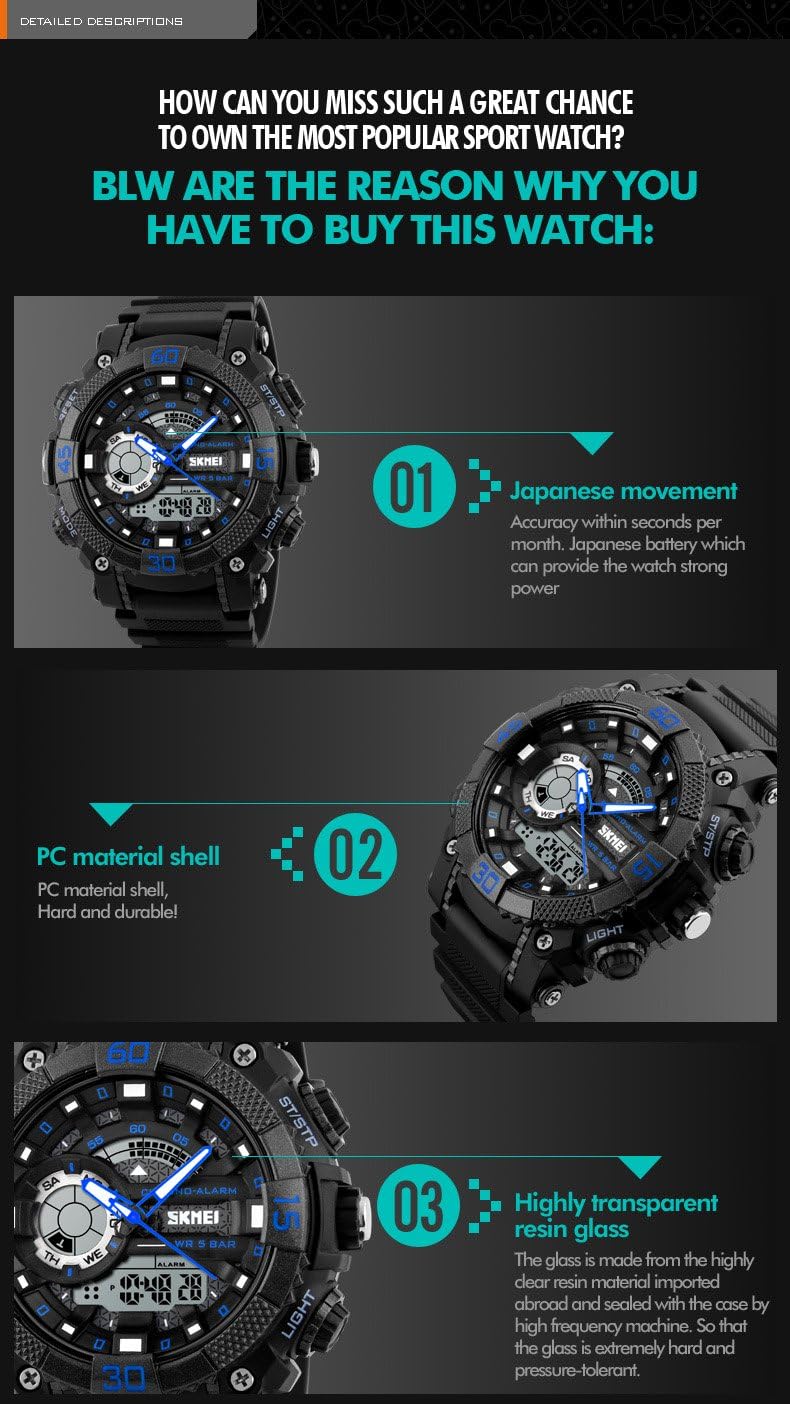
Diagram illustrating the functions of each button on the SKMEI 1228 watch: RESET, START/STOP, ALARM, LIGHT, and MODE.
3. Key Features
- Dual Display: Combines traditional analog hands with a clear digital LED display.
- Water Resistance: 5ATM (50 meters) water resistant, suitable for daily use, hand washing, rain, and swimming (do not press buttons underwater).
- Multifunctional: Includes time display (12h/24h format), date, day of week, alarm, stopwatch, and chronograph.
- EL Backlight: Electro-Luminescent backlight for easy readability in low-light conditions.
- Durable Construction: Features a plastic alloy case and PU band for sport and outdoor activities.
- Accurate Movement: Equipped with a reliable Japanese movement for precise timekeeping.
4. Setup and Basic Operation
Your watch has four buttons: MODE (bottom left), LIGHT (top right), START/STOP (top right), and RESET (top left).
4.1 Setting Analog Time
The analog hands are set independently. Pull out the crown (small knob on the right side of the watch case) and rotate it to adjust the hour and minute hands. Once set, push the crown back in to secure the time.
4.2 Setting Digital Time and Date
- From the normal time display mode, press the MODE button repeatedly until the seconds start flashing. This indicates you are in time setting mode.
- Press the RESET button to cycle through the settings: seconds → hour → minute → month → date → day of week.
- Use the START/STOP button to adjust the flashing value. Hold it down to increase values quickly.
- Once all settings are adjusted, press the MODE button to exit the setting mode and return to the normal time display.
- To switch between 12-hour and 24-hour format, while in the hour setting, press the START/STOP button until "A" (AM) or "P" (PM) appears for 12-hour, or "H" for 24-hour.
4.3 Using the EL Backlight
Press the LIGHT button (top right) to illuminate the digital display for a few seconds, allowing for easy viewing in dark conditions.
5. Operating Instructions
5.1 Stopwatch Function
- From the normal time display, press the MODE button once to enter Stopwatch mode. The display will show "00:00:00".
- Press the START/STOP button to start the stopwatch.
- Press START/STOP again to pause the stopwatch.
- To resume, press START/STOP again.
- To reset the stopwatch to zero, press the RESET button while the stopwatch is paused.
- Press the MODE button to return to the normal time display.
5.2 Alarm Function
- From the normal time display, press the MODE button twice to enter Alarm mode. The display will show the alarm time.
- Press the RESET button to toggle the alarm ON/OFF. An alarm icon will appear when the alarm is active.
- To set the alarm time, press and hold the RESET button until the hour digits flash.
- Press the START/STOP button to adjust the hour.
- Press the MODE button to move to the minute setting.
- Press the START/STOP button to adjust the minutes.
- Press the RESET button to confirm and exit alarm setting.
- When the alarm sounds, press any button to stop it.
6. Maintenance and Care
6.1 Water Resistance
This watch is 5ATM (50 meters) water resistant. This means it is suitable for:
- Daily use and hand washing.
- Exposure to rain and splashes.
- Showering (avoid hot water and steam).
- Swimming in shallow water.
IMPORTANT: Do NOT press any buttons while the watch is submerged in water. Doing so can compromise the water resistance and damage the internal components.

Visual representation of the watch's 50M water resistance, showing suitability for washing hands, rain, and swimming, with a clear warning not to press buttons underwater.
6.2 Cleaning
Wipe the watch case and band regularly with a soft, damp cloth. For stubborn dirt, a mild soap solution can be used, but ensure to rinse thoroughly with clean water and dry completely. Avoid using chemical cleaners or abrasive materials.
6.3 Battery Replacement
The watch uses a standard watch battery. When the display becomes dim or functions become erratic, it may be time for a battery replacement. It is recommended to have the battery replaced by a qualified watch technician to ensure proper sealing and maintain water resistance.
7. Troubleshooting
| Problem | Possible Cause | Solution |
|---|---|---|
| Digital display is blank or dim. | Low battery. | Replace the battery. |
| Analog hands are not moving. | Crown is pulled out; low battery. | Push the crown back in; replace the battery. |
| Buttons are unresponsive. | Watch is in a locked mode; internal malfunction. | Try pressing the MODE button to cycle through modes; if issue persists, contact support. |
| Water inside the watch. | Buttons pressed underwater; seal compromised. | Immediately take the watch to a professional for inspection and repair to prevent further damage. |
8. Specifications
- Model Number: SKMEI 1228
- Gender: Men
- Style: Sport, Running, Cycling, Climbing, Hiking
- Movement: Digital Movement
- Case Material: Plastic Alloy
- Band Material: PU
- Buckle Type: Buckle Clasp
- Dial Diameter: 51mm
- Case Thickness: 18mm
- Band Width: 24mm
- Wristband Length: 265mm
- Weight: Approx 0.15kg
- Water Resistance Depth: 5ATM (50 meters)
- Functions: Multiple Time Zone, Water Resistant, Stop Watch, Chronograph, Alarm Clock, 12h/24h display, EL Backlight.
- Manufacturer: SKMEI
9. Warranty and Support
For warranty information, please refer to the documentation provided with your purchase or contact the retailer where the watch was acquired. SKMEI products typically come with a manufacturer's warranty covering defects in materials and workmanship.
If you encounter any issues not covered in this manual or require further assistance, please contact SKMEI customer support or visit the official SKMEI brand store for more information: