
Canon 0571C002
Canon EF 70-300mm f/4-5.6 IS II USM Lens User Manual
Model: 0571C002 | Brand: Canon
Introduction
This manual provides essential information for the safe and effective use of your Canon EF 70-300mm f/4-5.6 IS II USM Lens. Please read it thoroughly before using the lens to ensure optimal performance and longevity. This telephoto zoom lens is designed for versatility, offering a broad focal range suitable for various photographic situations, from portraits to distant subjects.

Image: Front view of the Canon EF 70-300mm f/4-5.6 IS II USM Lens, showcasing its compact design, zoom ring, and the integrated digital information display.
Key Features
- NANO USM Technology: Provides high-speed autofocus for still photography and smooth, near-silent autofocus for video recording, ensuring precise and quiet operation.
- Image Stabilization (IS): Built-in optical image stabilization helps to minimize blur caused by camera shake, particularly beneficial when shooting handheld at longer focal lengths or in challenging lighting conditions.
- Lens Information Display: An innovative digital display on the lens barrel provides real-time information such as focal length, focus distance, and depth of field, enhancing user control and awareness.
- UD Lens Element: Incorporates an Ultra-low Dispersion (UD) lens element, strategically placed to effectively reduce chromatic aberrations and deliver images with high contrast and exceptional detail.
- Versatile Zoom Range: The 70-300mm focal length range makes this lens highly adaptable for capturing a wide array of subjects, including distant wildlife, sports action, and compelling portraits.

Image: Side view of the Canon EF 70-300mm f/4-5.6 IS II USM Lens, highlighting the AF/MF switch and the Image Stabilizer ON/OFF switch.
Setup
Attaching the Lens
- Ensure both the camera body and the lens are powered off.
- Remove the rear lens cap and the camera body cap.
- Align the red index mark on the lens barrel with the corresponding red index mark on the camera's lens mount.
- Rotate the lens clockwise until it clicks securely into place.
Detaching the Lens
- Ensure the camera is powered off.
- While pressing the lens release button located on the camera body, rotate the lens counter-clockwise until it stops.
- Carefully remove the lens from the camera body.
- Attach the front and rear lens caps to protect the lens elements.
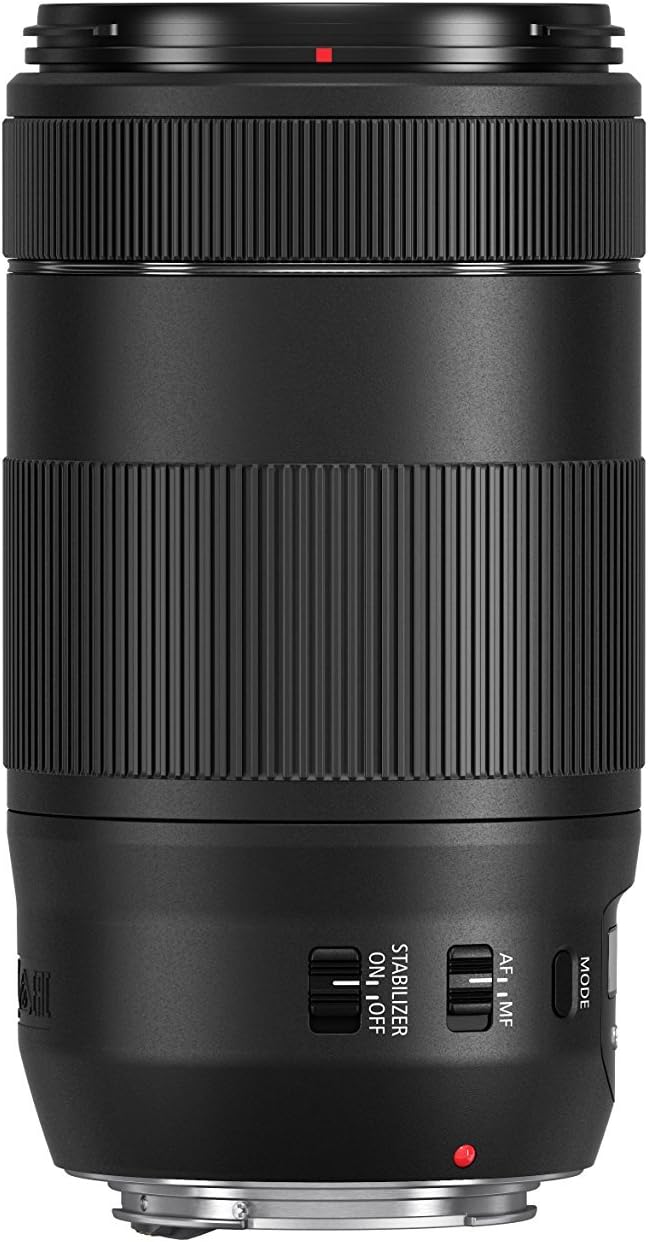
Image: Rear view of the Canon EF 70-300mm f/4-5.6 IS II USM Lens, clearly showing the EF mount and the red index mark for proper alignment during attachment.
Operating Instructions
Autofocus (AF) / Manual Focus (MF)
The lens is equipped with a switch to select between autofocus (AF) and manual focus (MF) modes. For automatic focusing, slide the switch to the "AF" position. This utilizes the lens's NANO USM motor for fast and precise focusing. For manual focusing, set the switch to "MF" and rotate the focusing ring on the lens barrel to adjust focus manually. Manual focus is also possible even when the lens is set for autofocus, allowing for fine adjustments.
Image Stabilization (IS)
To activate the built-in Image Stabilizer, slide the IS switch to the "ON" position. This feature helps to compensate for camera shake, resulting in sharper images, especially when shooting handheld at slower shutter speeds or longer focal lengths. When using a tripod, it is generally recommended to set the IS switch to "OFF" to prevent potential stabilization errors that can occur when the camera is already stable.
Zoom Operation
To change the focal length and adjust your magnification, rotate the wide, textured zoom ring on the lens barrel. The lens features clear markings for common focal lengths (70mm, 100mm, 135mm, 200mm, 300mm) to assist in precise framing. Extend the lens to its maximum 300mm for distant subjects or retract it to 70mm for wider views.
Lens Information Display
The innovative digital display on the lens provides real-time shooting information. Press the "MODE" button located next to the display to cycle through various readouts, including current focal length, approximate focus distance, and depth of field. This feature offers a convenient way to quickly check key parameters without looking through the viewfinder or at the camera's LCD screen.
Maintenance
Cleaning the Lens
- Use a lens blower or a soft brush to remove dust and loose particles from the lens surfaces.
- For smudges, fingerprints, or stubborn dirt, use a clean, soft microfiber lens cloth. Apply a small amount of lens cleaning solution specifically designed for optical surfaces to the cloth, not directly to the lens.
- Wipe gently in a circular motion from the center outwards.
- Never use abrasive materials, paper towels, or harsh chemical cleaners, as these can scratch or damage the lens coatings.
Storage
- When not in use, always attach the front and rear lens caps to protect the lens elements from dust and scratches.
- Store the lens in a cool, dry place, away from direct sunlight, extreme temperatures, and high humidity.
- Consider using a desiccant packet in your storage area to absorb moisture and prevent mold growth, especially in humid climates.
General Care
- Avoid subjecting the lens to strong shocks, vibrations, or sudden impacts.
- Do not leave the lens exposed to direct sunlight for extended periods, as this can damage internal components or cause heat buildup.
- Keep the lens away from strong magnetic fields.
Troubleshooting
| Problem | Possible Cause | Solution |
|---|---|---|
| Lens not focusing automatically | AF/MF switch set to MF (Manual Focus). | Slide the AF/MF switch on the lens to the "AF" position. |
| Images appear blurry when shooting handheld | Image Stabilizer (IS) is turned OFF. | Slide the Image Stabilizer switch to the "ON" position. |
| Images appear blurry when shooting on a tripod | Image Stabilizer (IS) is turned ON (can cause issues on stable platforms). | Slide the Image Stabilizer switch to the "OFF" position. |
| Lens cannot be attached to camera body | Index marks are not aligned correctly. | Ensure the red index mark on the lens aligns with the red index mark on the camera body before rotating to lock. |
| Digital information display is blank or not changing | MODE button not pressed or lens not active. | Press the "MODE" button to cycle through display options. Ensure the camera is powered on and the lens is properly attached. |
Specifications
| Feature | Detail |
|---|---|
| Model Number | 0571C002 |
| Focal Length | 70-300mm |
| Maximum Aperture | f/4-5.6 |
| Image Stabilization | Yes (IS II) |
| Autofocus Motor | NANO USM |
| Filter Size | 67mm |
| Dimensions (Approx.) | 5.7 x 5.7 x 5.7 inches |
| Weight (Approx.) | 2.02 pounds |
| Compatible Mountings | Canon EF |
Warranty and Support
This Canon product is covered by a limited warranty. For detailed warranty terms and conditions, please refer to the warranty card included with your product or visit the official Canon website. The warranty typically covers defects in materials and workmanship under normal use for a specified period from the date of purchase.
For technical support, service, or any inquiries regarding your Canon EF 70-300mm f/4-5.6 IS II USM Lens, please contact Canon customer service. You can find contact information and a comprehensive support portal on their official website, which offers FAQs, driver downloads, and service center locations.
For further assistance, please visit the Official Canon Support Website.
Ask a question about this manual
Ask about setup, troubleshooting, compatibility, parts, safety, or missing instructions. Manuals+ will review the question and use this page’s manual context to help answer it.