1. Product Overview
The Duracell 3000W High Powered Inverter (Model DRINV3000) is designed to convert 12V vehicle power into usable 115V household AC power. This robust inverter provides continuous 3000 watts of power and can handle peak loads of up to 6000 watts, making it suitable for a wide range of applications from entertainment equipment to large appliances and power tools.
It features three 3-prong AC outlets, allowing you to charge and operate multiple devices simultaneously. For convenience, the unit includes 2 x 1.5 ft power cables for direct connection to battery bolt-on posts and an optional remote on/off switch.

Figure 1.1: Duracell 3000W High Powered Inverter, showing the main unit, remote switch, and power cables.
2. Setup and Installation
Proper installation is crucial for the safe and efficient operation of your inverter. Ensure your vehicle's battery system is 12V DC. Always connect the inverter to a well-ventilated area, away from flammable materials.
2.1 Connecting the Power Cables
- Identify the positive (+) and negative (-) terminals on your vehicle's battery or power source.
- Connect the red power cable (positive) to the positive (+) terminal on the inverter and then to the positive (+) terminal on the battery.
- Connect the black power cable (negative) to the negative (-) terminal on the inverter and then to the negative (-) terminal on the battery.
- Ensure all connections are tight and secure. CAUTION: Reversed input will blow fuses and damage the unit.
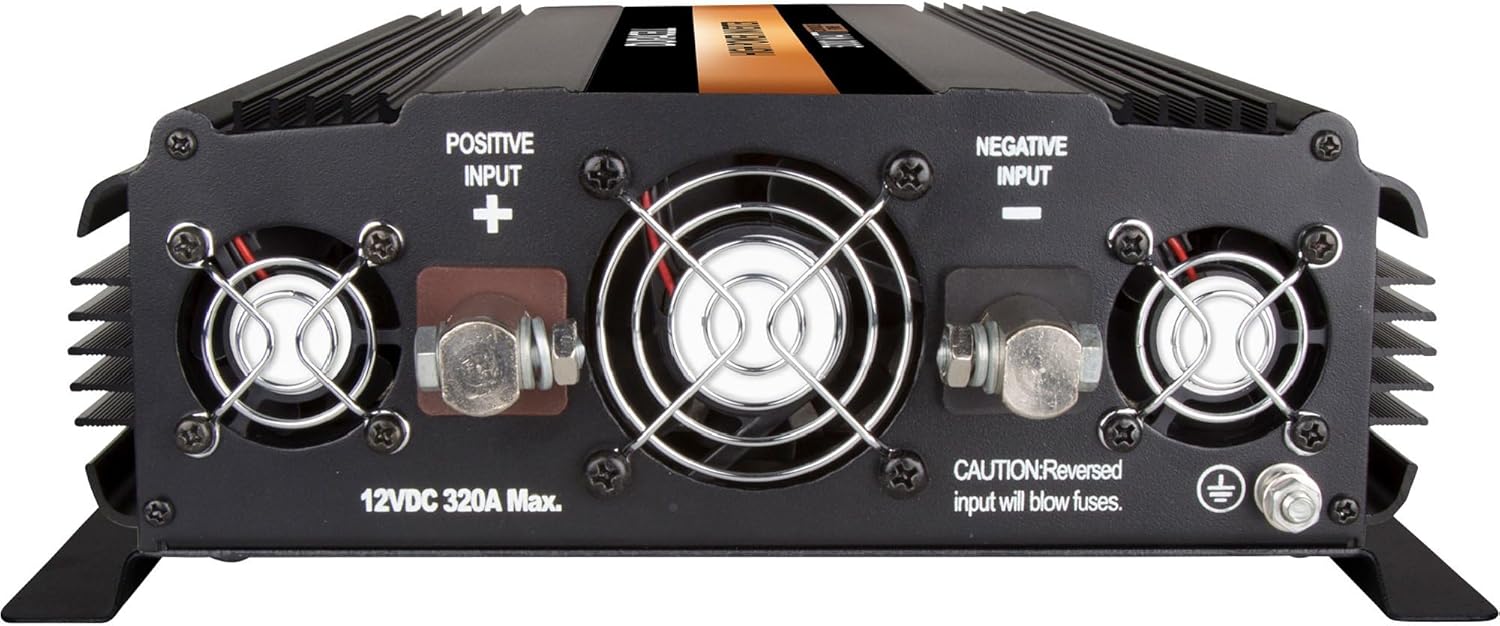
Figure 2.1: Rear panel of the inverter with clearly marked Positive and Negative input terminals.

Figure 2.2: Included 2-foot red (positive) and black (negative) power cables for battery connection.
2.2 Grounding the Inverter
For safety, the inverter must be properly grounded. Connect a grounding wire (not included) from the inverter's ground terminal to a suitable chassis ground point on your vehicle or a dedicated earth ground.
2.3 Installing the Remote On/Off Switch (Optional)
The inverter comes with an optional remote on/off switch for convenient control. Plug the remote switch cable into the designated RJ11 port on the front panel of the inverter.
3. Operation
Once properly installed, operating the Duracell 3000W Inverter is straightforward.
3.1 Powering On/Off
- Locate the main Power-Saving Master on/off switch on the front panel of the inverter.
- Flip the switch to the "ON" position. The "POWER" indicator light should illuminate, and the digital display will show the current voltage.
- To turn off the inverter, flip the switch to the "OFF" position.
- If using the remote switch, ensure the main switch on the inverter is in the "REMOTE" position, then use the remote switch to control power.
3.2 Using AC Outlets and Digital Display
The inverter is equipped with three 3-prong AC outlets. Plug your devices directly into these outlets. The digital display provides real-time information:
- VOLTS: Shows the input DC voltage from your battery.
- WATTS: Shows the total power draw of connected AC devices in watts.
You can toggle between displaying Watts and Volts using the dedicated switch next to the digital display.

Figure 3.1: Front panel of the inverter with AC outlets, digital display, and power/display switches.
Always ensure the total wattage of connected devices does not exceed the inverter's continuous power rating of 3000 watts. Exceeding this limit may trigger overload protection.
4. Maintenance
To ensure the longevity and optimal performance of your Duracell 3000W Inverter, follow these general maintenance guidelines:
- Cleaning: Keep the inverter clean and free from dust and debris. Use a dry, soft cloth for cleaning. Do not use liquid cleaners or solvents.
- Ventilation: Ensure the ventilation openings are clear and unobstructed to prevent overheating. Regularly check the cooling fans for proper operation.
- Connections: Periodically check all electrical connections (battery terminals, AC outlets) to ensure they are secure and free from corrosion.
- Storage: When not in use for extended periods, store the inverter in a cool, dry place, disconnected from the power source.
Refer to the manufacturer's official documentation or website for any specific maintenance procedures or schedules.
5. Troubleshooting
This section provides solutions to common issues you might encounter with your inverter. If the problem persists after attempting these steps, contact customer support.
| Problem | Possible Cause | Solution |
|---|---|---|
| Inverter does not power on. |
|
|
| "FAULT" indicator is illuminated. |
|
|
| No AC output. |
|
|
6. Technical Specifications
| Feature | Detail |
|---|---|
| Manufacturer | Duracell |
| Brand | Battery-Biz |
| Model Name | High Power Inverter |
| Model Number | DRINV3000 |
| Continuous Power Output | 3000 Watts |
| Peak Power Output | 6000 Watts |
| Input Voltage | 12V DC |
| Output Voltage | 115V AC, 60Hz |
| AC Outlets | Three 3-prong outlets |
| Item Weight | 13.3 pounds |
| Product Dimensions (L x W x H) | 16.5 x 10.2 x 3.6 inches |
| Special Features | Digital display (Watts/Volts), Direct Connect AC Terminal, Power-Saving Master on/off switch, Remote on/off switch capability |
| Recommended Uses | Vehicle |
| What's in the Box | High Power Inverter 3000; Remote Control Switch; 2ft Power Cable (2) |
7. Warranty and Support
7.1 Warranty Information
Specific warranty details for the Duracell 3000W High Powered Inverter are provided by the manufacturer, Battery-Biz. Please refer to the warranty card included with your product or visit the official Duracell or Battery-Biz website for the most current and complete warranty terms and conditions.
7.2 Customer Support
For technical assistance, troubleshooting beyond this manual, or warranty claims, please contact Duracell customer support. You can often find contact information (phone, email, or support portal) on the product packaging, the manufacturer's website, or through the official Duracell store on Amazon:
Visit the Duracell Store on Amazon
When contacting support, please have your product model number (DRINV3000) and purchase information readily available.