
1. Introduction
This manual provides instructions for the proper setup, operation, and maintenance of your gtdiffusion GENIUS KILO TX2 JLC remote control. This device is designed for controlling gates and garage doors. Please read this manual carefully before use to ensure safe and efficient operation.
Important Note: This remote control is not compatible with collective residential systems or public parking access systems.
2. Safety Information
- Keep the remote control out of reach of children to prevent accidental operation.
- Do not expose the remote control to water, excessive moisture, or extreme temperatures.
- Avoid dropping the remote control or subjecting it to strong impacts.
- If the remote control is damaged, do not attempt to repair it yourself. Contact qualified personnel.
- Dispose of used batteries responsibly according to local regulations.
3. Product Overview
The GENIUS KILO TX2 JLC is a compact remote control designed for ease of use. It typically features two buttons for controlling different functions (e.g., opening/closing a gate, opening/closing a garage door).
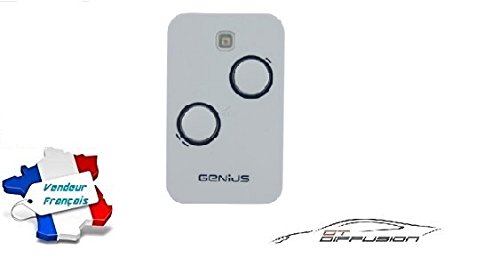
Figure 1: Image of the GENIUS KILO TX2 JLC remote control, typically used for gates and garage doors. The remote is compact and features two control buttons.
Components:
- Control Buttons: Used to activate the gate or garage door.
- LED Indicator: Illuminates during transmission.
- Battery Compartment: Located on the back or side for battery access.
4. Setup and Programming
Programming the GENIUS KILO TX2 JLC remote control typically involves a learning process with your gate or garage door receiver. The exact steps may vary depending on your specific receiver model. Always refer to the receiver's manual for detailed programming instructions.
General Programming Steps (Consult Receiver Manual for specifics):
- Access the Receiver: Locate the programming button on your gate or garage door opener's receiver unit. This button is often labeled "PROG," "LEARN," or "MEMO."
- Activate Learning Mode: Press and release the programming button on the receiver. An LED on the receiver will usually illuminate or flash, indicating it is in learning mode.
- Transmit from Remote: Within a few seconds (usually 10-30 seconds), press and hold the desired button on your new GENIUS KILO TX2 JLC remote control.
- Confirmation: The receiver's LED will typically change its state (e.g., flash rapidly, turn solid, or turn off) to confirm successful programming. Release the remote control button.
- Test Operation: Wait a few seconds, then press the programmed button on your remote control to test its functionality.
If programming fails, repeat the steps. Ensure the remote control is within range of the receiver during programming.
5. Operating Instructions
Once programmed, operating your GENIUS KILO TX2 JLC remote control is straightforward:
- To Open/Close: Press the programmed button on the remote control. The gate or garage door will activate.
- Range: Ensure you are within effective operating range of your receiver. Obstacles can reduce the range.
- LED Indicator: The LED on the remote control will light up when a button is pressed, indicating that a signal is being transmitted.
6. Maintenance
Battery Replacement:
The remote control is supplied with an Alkaline battery. When the LED indicator on the remote control becomes dim or fails to light up, or if the operating range decreases significantly, it's time to replace the battery.
- Locate the battery compartment on the remote control. This may require opening the casing with a small screwdriver or by sliding a cover.
- Carefully remove the old battery.
- Insert a new battery of the same type (e.g., 27A, A23, or CR2032, depending on the model) ensuring correct polarity (+/-).
- Close the battery compartment securely.
- Test the remote control's operation.
Cleaning:
Clean the remote control with a soft, dry cloth. Do not use abrasive cleaners or solvents, as these can damage the casing or internal components.
7. Troubleshooting
| Problem | Possible Cause | Solution |
|---|---|---|
| Remote control does not work. | Dead or low battery. Remote not programmed. Out of range. Receiver malfunction. | Replace battery. Reprogram the remote control (refer to Section 4). Move closer to the receiver. Check receiver power and functionality. |
| Reduced operating range. | Low battery. Interference. Obstructions. | Replace battery. Move away from sources of interference (e.g., large metal objects, other radio devices). Ensure a clear line of sight if possible. |
| LED on remote does not light up. | Dead battery. Internal fault. | Replace battery. Contact support if battery replacement does not resolve the issue. |
8. Specifications
- Brand: gtdiffusion
- Model Number: GENIUS KILO TX2 JLC
- Battery Type: Alkaline (non-rechargeable)
- Color: Subject to availability (as per original product listing)
- ASIN: B07C31CDJQ
- Manufacturer: gtdiffusion
- Spare Parts Availability: Information unavailable
- Software Updates Guaranteed Until: Information not available
9. Warranty and Support
For warranty information, please refer to the terms and conditions provided at the time of purchase. This product is sold by gt Diffusion.
If you encounter issues that cannot be resolved using the troubleshooting guide, or for further assistance, please contact the seller directly. The seller's contact email provided in the product listing is: sarl.gtdiffusion@gmail.com.
Please have your model number (GENIUS KILO TX2 JLC) and purchase details ready when contacting support.