
Product Overview
The Belker 45W Universal AC/DC Adapter is a versatile power supply designed for a wide range of household electronics. It features multiple voltage outputs and interchangeable DC tips to ensure compatibility with various devices.
This adapter supports output voltages of 5V, 6V, 7.5V, 9V, 12V, 13.5V, and 15V, with a maximum output power of 45W and a maximum current of 3A. It is an ideal replacement for original adapters with lower wattage (e.g., 24W, 30W) or lower amperage (e.g., 100mA to 2A).
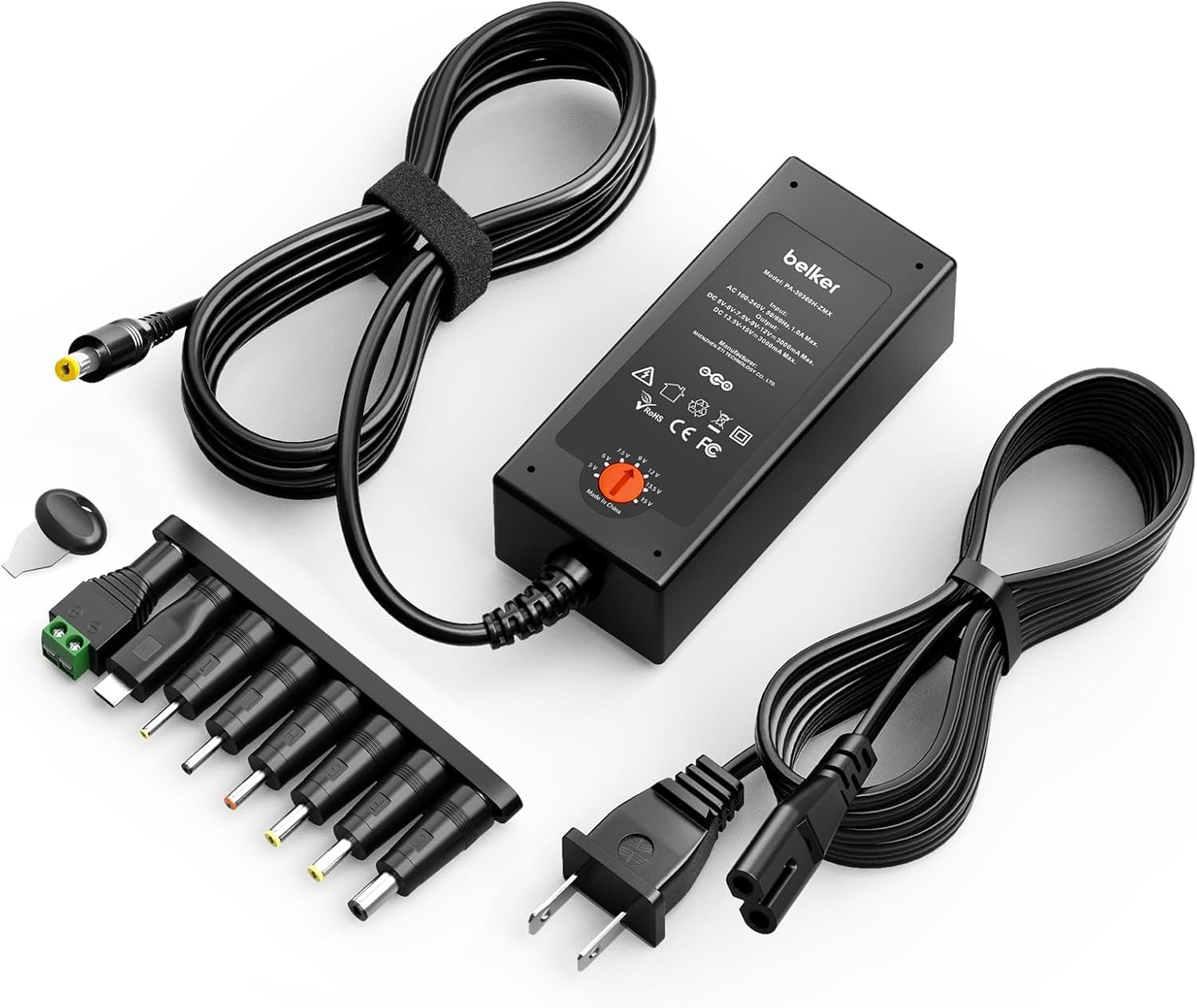
Image: Complete set of the Belker 45W Universal AC/DC Adapter, including the main unit, power cord, and multiple DC connector tips.
Package Contents
- 1 x Belker 45W Universal AC/DC Adapter
- 1 x AC Power Cord
- Multiple DC Connector Tips (including Micro USB and LED Terminal Connector)
- 1 x User Guide (this document)
Setup Instructions
- Identify Device Voltage and Polarity: Before connecting, check your device's power input requirements. Note the required voltage (e.g., 5V, 9V, 12V) and polarity (center positive [+] or center negative [-]). This adapter's default polarity is center positive, outer negative. If your device requires center negative, a polarity reversed cable (sold separately, search "B07PM24TKV" on Amazon) is necessary.
- Select the Correct DC Connector Tip: Choose the appropriate DC connector tip from the provided set that matches your device's input port. The kit includes various sizes and types, such as standard barrel connectors, Micro USB, and an LED Terminal Connector.
- Attach the Selected Tip: Firmly attach the chosen DC connector tip to the output cable of the universal adapter.
- Set the Output Voltage: Locate the voltage selector switch on the adapter unit. Use the included key or a small flat-head tool to rotate the switch to the desired voltage (5V, 6V, 7.5V, 9V, 12V, 13.5V, or 15V). Ensure the voltage matches your device's requirements precisely to prevent damage.
- Connect to Power Outlet: Plug the AC power cord into the adapter and then into a standard 100-240V AC wall outlet.

Image: A selection of interchangeable DC connector tips, including various barrel sizes, a Micro USB tip, and an LED terminal connector.

Image: The main adapter unit showing the voltage selector dial with options from 5V to 15V.
Operating Instructions
- Connect to Device: After setting the correct voltage and attaching the appropriate tip, connect the DC output cable to your electronic device.
- Power On Device: Turn on your device. The adapter should now be supplying power.
- Compatibility: This adapter is suitable for devices such as routers, LED strip lights, CCTV cameras, webcams, USB hubs, Android tablets, and Bluetooth speakers.

Image: The universal adapter connected to a power strip, demonstrating its use with a tablet and a smartphone.
Maintenance and Care
- Keep the adapter and tips clean and dry.
- Avoid exposing the adapter to extreme temperatures or humidity.
- Do not attempt to open or repair the adapter. Refer to qualified service personnel.
- Store the adapter and tips in a safe place when not in use to prevent loss or damage.
Troubleshooting
- No Power Output:
- Ensure the adapter is securely plugged into a working power outlet.
- Verify that the correct voltage is selected on the adapter.
- Check that the DC connector tip is firmly attached and correctly inserted into your device.
- Confirm the polarity setting is correct for your device.
- Device Not Charging/Working Properly:
- Double-check that the selected voltage and current rating match your device's requirements. Using an incorrect voltage can damage your device.
- Ensure the DC connector tip is making proper contact with the device's port.
- If your device requires center negative polarity, ensure you are using a compatible polarity reversed cable.
- Adapter Overheating:
- Disconnect the adapter immediately.
- Ensure the adapter is used in a well-ventilated area and not covered.
- Verify that the device's power requirements do not exceed the adapter's maximum output (45W, 3A).
Specifications
| Feature | Detail |
|---|---|
| Model | PA-30360H-ZMX |
| Input Voltage | 100-240V AC |
| Output Voltage | 5V, 6V, 7.5V, 9V, 12V, 13.5V, 15V DC (Adjustable) |
| Max Output Power | 45W |
| Max Output Current | 3A (3000mA) |
| DC Output Polarity | Center Positive [+], Outer Negative [-] |
| Product Dimensions | 7 x 3 x 1.8 cm |
| Item Weight | 110 g |
| Compatible Devices | Routers, LED Strip Lights, CCTV Cameras, Webcams, USB Hubs, Android Tablets, BT Speakers, Printers |
| UPC | 607595800086 |
Warranty and Support
This Belker Universal AC/DC Adapter comes with a 12-month worry-free warranty. For any product inquiries, technical support, or warranty claims, please contact Belker customer service.
Manufacturer Contact Information: ShenZhen, GuangDong 518000, CN
Safety Information
- Always ensure the correct voltage and polarity are selected before connecting to a device.
- Do not use the adapter if it is damaged or if the cables are frayed.
- Keep out of reach of children.
- For indoor use only.