
PEAKPULSE LE600AG(Slope)
PEAKPULSE LE600AG Golf Rangefinder User Manual
Model: LE600AG(Slope)
Introduction
Thank you for choosing the PEAKPULSE LE600AG Golf Rangefinder. This device is designed to provide accurate distance measurements for golf, featuring slope compensation, flagpole locking with vibration, and a fast focus system. Please read this manual carefully before using the product to ensure proper operation and to maximize its performance and lifespan.

Image: The PEAKPULSE LE600AG Golf Rangefinder, a compact white and black device with optical lenses.
Package Contents
Upon opening the package, please verify that all the following items are included:
- PEAKPULSE LE600AG Golf Rangefinder
- Product Manual
- Storage Bag
- Lanyard
- CR2 Battery (The product comes with two batteries.)
- Lens Cloth

Image: A visual representation of the items included in the product box: the LE600AG rangefinder, its box, manual, storage bag, lanyard, battery, and lens cloth.
Key Features
- High-Precision Measurement: Ranges from 6 to 650 yards with an error range of ±0.5 meters, achieving ±0.2 meters within 10 meters. Features 6x optical amplification for clear targeting.
- Tournament Legal Slope Function: Built-in slope technology provides adjusted distances based on incline/decline. The slope function can be easily turned on or off via a switch, making the device legal for tournament play when disabled.
- Fast Focus with Vibration Technology: Flag Acquisition Technology allows for easy flag locking. The device provides a short vibration to confirm successful flag acquisition. Vibration can also be turned off.
- Ergonomic Design & Tripod Compatibility: Designed for comfortable handling. Includes a screw hole at the bottom for tripod mounting, which helps prevent hand shaking and is useful for stable measurements, especially during activities like hunting.
- Long Battery Life: Powered by a CR2-3V battery, capable of approximately 5000 measurements at room temperature. The rangefinder automatically shuts down after 8 seconds of inactivity to conserve battery power.

Image: An infographic highlighting key features such as 650 yards range, 0.5s fast focus, flagpole lock, ±0.5m accuracy, slope compensation, 5000 measurements, slope switch, vibration reminder, and screw hole.

Image: The rangefinder shown with a visual representation of its tournament-legal slope compensation feature and the physical slope switch.

Image: An illustration emphasizing the long battery life of the CR2 battery, capable of 5000 measurements.
Setup
1. Battery Installation
The PEAKPULSE LE600AG requires one CR2-3V battery. To install or replace the battery:
- Locate the battery compartment cover, typically on the side or bottom of the device.
- Twist or slide the cover to open the compartment.
- Insert the CR2 battery, ensuring the positive (+) and negative (-) terminals are aligned correctly according to the markings inside the compartment.
- Close the battery compartment cover securely.
If the battery is low, please replace it promptly to ensure accurate readings and consistent performance. The product comes with two batteries.
2. Focus Adjustment
To achieve a clear view through the eyepiece:
- Look through the eyepiece.
- Rotate the diopter adjustment ring (usually located near the eyepiece) until the display and the target appear sharp and clear.
Operating Instructions
1. Power On/Off
- To power on the device, press the Power/Measurement button (usually located on the top).
- The device will automatically shut down after 8 seconds of inactivity to save battery power.
2. Mode Selection
The LE600AG offers different measurement modes. Press the Mode button (usually located near the Power/Measurement button) to cycle through available modes. The LE600AG primarily features a mode combining Linear Distance, Flag Locked, and Slope Compensation.

Image: A diagram illustrating the calculation of linear distance and slope-adjusted distance for golf shots.
3. Measuring Distance
- Aim the reticle (crosshairs) at your desired target.
- Press the Power/Measurement button once. The distance will be displayed in the eyepiece.
- For continuous scanning, press and hold the Power/Measurement button. The distance will update as you scan across targets.
4. Slope Function (On/Off)
The LE600AG features a physical switch to enable or disable the slope compensation function. This allows the device to be tournament legal when the slope function is turned off.
- Locate the slope switch on the side of the rangefinder.
- Slide the switch to the desired position:
- Slope ON: Provides slope-adjusted distance (recommended for practice).
- Slope OFF: Provides linear distance only (required for tournament play).
5. Flagpole Locking and Vibration
The Flag Acquisition Technology helps you lock onto the flag quickly and accurately.
- Aim the rangefinder at the flagstick.
- Press and hold the Power/Measurement button.
- Once the flag is locked, the device will provide a short vibration feedback, confirming the target acquisition. The distance to the flag will be displayed.
The vibration feature can also be turned off if preferred.

Image: A view through the rangefinder's eyepiece showing the flagpole lock feature with vibration feedback, indicating a successful target acquisition.
6. Unit Switching (Yards/Meters)
To switch between yards and meters, typically press and hold the Mode button for a few seconds while the device is powered on. The unit displayed in the eyepiece will change.
Maintenance
1. Cleaning
- Use the provided lens cloth or a soft, clean, lint-free cloth to gently wipe the lenses.
- For stubborn dirt or smudges, a small amount of lens cleaning fluid can be applied to the cloth (not directly to the lens).
- Do not use abrasive materials or harsh chemicals.
- Clean the body of the rangefinder with a soft, damp cloth.
2. Storage
- When not in use, store the rangefinder in its protective storage bag to prevent scratches and dust accumulation.
- Store in a cool, dry place, away from direct sunlight and extreme temperatures.
- If storing for an extended period, it is recommended to remove the battery to prevent leakage.
3. Battery Replacement
If the battery indicator in the eyepiece shows low power, or if the device fails to power on, replace the CR2-3V battery as described in the "Battery Installation" section under Setup.
Troubleshooting
| Problem | Possible Cause | Solution |
|---|---|---|
| Device does not power on. | Battery is dead or incorrectly installed. | Replace the battery with a new CR2-3V battery, ensuring correct polarity. |
| Inaccurate readings or difficulty locking onto target. | Unstable aiming (shaky hands), dirty lenses, or target is too small/far. | Ensure a steady aim. Use a tripod if necessary. Clean the lenses with the provided cloth. Ensure the target is within the device's range and is large enough for detection. |
| Display is blurry or unclear. | Diopter adjustment is incorrect. | Rotate the diopter adjustment ring until the display and target appear sharp. |
| No vibration feedback. | Vibration feature is turned off, or target not properly locked. | Check if the vibration switch is enabled. Ensure the flag is properly acquired. |
Specifications
| Feature | Detail |
|---|---|
| Model Number | LE600AG(Slope) |
| Product Dimensions | 11.43 x 3.81 x 7.62 cm (4.5 x 1.5 x 3 inches) |
| Item Weight | 250 g |
| Colour | Le600ag (White/Black) |
| Material | Plastic |
| Sport | Golf |
| Battery Type | 1 x CR2-3V Lithium Manganese Dioxide |
| Measurement Range | 6 to 650 yards |
| Accuracy | ±0.5 m (within 10 meters: ±0.2 m) |
| Magnification | 6x |
| Water Resistance Level | Waterproof |
| Automatic Shut-off | After 8 seconds of inactivity |
Warranty and Support
PEAKPULSE offers a 1-Year Quality Guarantee for this product. If you encounter any issues or have questions regarding your PEAKPULSE Rangefinder, please do not hesitate to contact our customer service team.
We provide 24-hour online service to assist you with any inquiries or support needs.
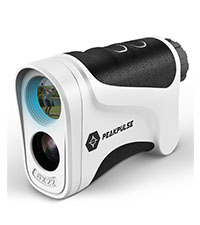
Image: An icon representing 24-hour customer service availability.
Ask a question about this manual
Ask about setup, troubleshooting, compatibility, parts, safety, or missing instructions. Manuals+ will review the question and use this page’s manual context to help answer it.