
1. Introduction
This manual provides instructions for the AIDITIYMI BN59-01199S replacement remote control. This remote is designed to function as a direct replacement for various Samsung Smart TV LED HDTV models, offering seamless operation without the need for complex programming.
2. Safety Information
- Always use new, high-quality AAA alkaline batteries. Do not mix old and new batteries, or different types of batteries.
- Ensure batteries are inserted with correct polarity (+/-) as indicated in the battery compartment.
- Remove batteries if the remote control will not be used for an extended period to prevent leakage.
- Keep the remote control away from moisture, direct sunlight, and extreme temperatures.
3. Package Contents
- 1 x AIDITIYMI BN59-01199S IR Remote Control
- Note: Batteries and user manual are not included in the package.
4. Product Overview and Button Functions

This image displays the front of the AIDITIYMI BN59-01199S remote control, highlighting the layout of all functional buttons including power, number pad, volume, channel, navigation, and special function keys like Smart Hub and Menu.
Key Button Functions:
- Power (⏻): Turns the TV on or off.
- SOURCE: Selects the input source (HDMI, AV, etc.).
- Number Pad (0-9): Directly enters channel numbers.
- PRE-CH: Returns to the previous channel.
- VOL (+/-): Adjusts the volume level.
- MUTE: Mutes or unmutes the TV sound.
- CH (⏶/⏷): Changes channels up or down.
- CH LIST: Displays the channel list.
- MENU: Opens the TV's main menu.
- SMART HUB: Accesses the Samsung Smart Hub for apps and streaming services.
- GUIDE: Displays the electronic program guide.
- INFO: Shows information about the current program.
- Navigation Buttons (Up, Down, Left, Right, Enter): Navigates through menus and selects options.
- RETURN: Returns to the previous screen or menu.
- EXIT: Exits the current menu or application.
- Colored Buttons (A, B, C, D): Functionality varies by application or TV menu.
- E-MANUAL: Accesses the TV's electronic manual.
- PIC SIZE: Adjusts the picture size/aspect ratio.
- Media Control Buttons (Play, Pause, Stop, Fast Forward, Rewind): Controls media playback.
5. Setup
5.1 Battery Installation
- Locate the battery compartment on the back of the remote control.
- Slide the battery cover downwards or press the latch and lift to open.
- Insert two (2) new 1.5V AAA alkaline batteries, ensuring the positive (+) and negative (-) terminals match the markings inside the compartment.
- Replace the battery cover by sliding it back into place until it clicks securely.
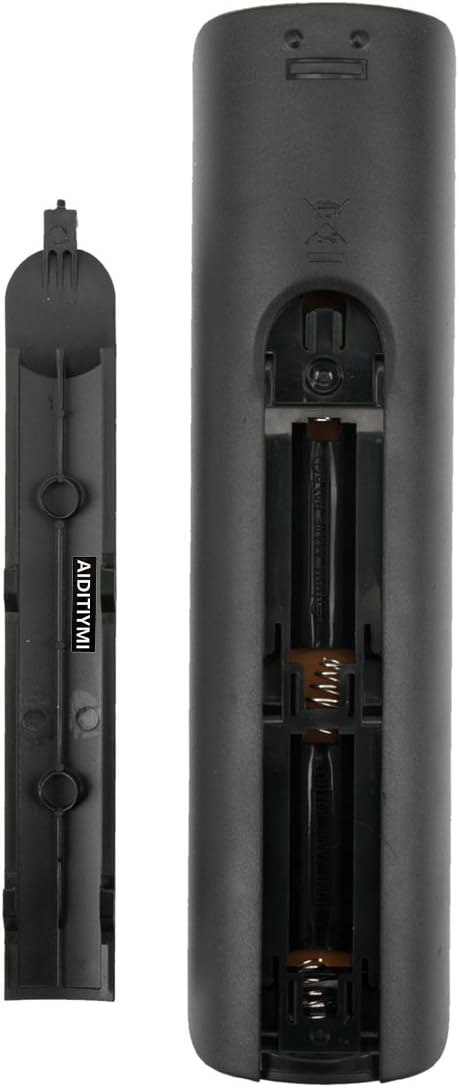
This image illustrates the rear of the remote control with the battery compartment open, indicating where to insert two AAA batteries. Note the positive (+) and negative (-) terminals for correct battery orientation.
5.2 Initial Use
This replacement remote control does not require any programming or pairing. Once the batteries are correctly installed, it is ready for immediate use with compatible Samsung Smart TVs.
6. Operating Instructions
Point the remote control directly at the infrared receiver on your Samsung TV. Ensure there are no obstructions between the remote and the TV. Press the desired button to perform the corresponding function.
- Turning On/Off: Press the Power button.
- Changing Channels: Use the CH ⏶/⏷ buttons or the number pad.
- Adjusting Volume: Use the VOL +/- buttons.
- Accessing Smart Hub: Press the SMART HUB button to open your TV's smart features.
- Navigating Menus: Use the directional arrows and the Enter button to browse and select options within the TV's menus.
7. Maintenance
- Cleaning: Wipe the remote control with a soft, dry cloth. Do not use liquid cleaners or abrasive materials.
- Battery Replacement: Replace batteries when the remote's response becomes sluggish or stops working. Always replace both batteries simultaneously.
- Storage: Store the remote in a cool, dry place when not in use for extended periods.
8. Troubleshooting
- Remote not responding:
- Check if the batteries are inserted correctly with the correct polarity.
- Replace old batteries with new AAA alkaline batteries.
- Ensure there are no obstructions between the remote control and the TV's infrared sensor.
- Verify that the remote is pointed directly at the TV.
- Some buttons not working:
- This remote is a replacement and may not support all advanced functions of original Samsung Smart remotes (e.g., voice control, motion control).
- Ensure the button is clean and not stuck.
9. Specifications
| Model Number | BN59-01199S |
| Brand | AIDITIYMI |
| Compatible Devices | Samsung Smart TV LED HDTV |
| Power Source | 2 x AAA Batteries (not included) |
| Dimensions | 7 x 2 x 0.6 inches (approx.) |
| Item Weight | 2.5 ounces (approx.) |
| Color | Black |
Compatible Samsung TV Models:
- UN32J5205
- UN40JU6700
- UN48J6200AF, UN48J6200AFXZA
- UN48JU6700
- UN50J6200AF, UN50J6200AFXZA
- UN55J6200AF, UN55J6200AFXZA
- UN55JU6700
- UN60J6200AF, UN60J6200AFXZA
- UN65J6200AF, UN65J6200AFXZA
- UN65JU6700
- 6200 Series, 6520 Series, 7500 Series, 9500 Series
10. Warranty and Support
Specific warranty information for this replacement remote control is not provided in the product details. For any support inquiries, warranty claims, or further assistance, please contact the seller directly through your purchase platform.