
1. Introduction
This manual provides detailed instructions for the installation, operation, and maintenance of the MENGQI-CONTROL 2-Door Access Control System. This system is designed to manage access for two doors, offering secure entry and exit control through various methods. Please read this manual thoroughly before installation and operation to ensure proper functionality and safety.
2. Product Overview
The MENGQI-CONTROL 2-Door Access Control System is a core component for managing building entry and exit. It features a TCP/IP network access control panel housed within a metal 5A 110V-240V power supply box. The system supports up to 20,000 users and records up to 100,000 events, providing robust security and detailed access logging.

Image 1: The MENGQI-CONTROL 2-Door Access Control System, showing the control board integrated within the power supply box.
Key capabilities include:
- Control of two doors, allowing entry by card swipe and exit by either an exit button or card swipe.
- Support for 2 or 4 Wiegand readers.
- Storage, download, and review of detailed entry records.
- Automatic door opening/closing at pre-set times.
- Configurable authorized access control based on user, door, and time.
- Data retention during power failures.
3. Safety Information
Please observe the following safety guidelines during installation and operation:
- Electrical Safety: This system operates with 110V-240V AC input. Ensure all power connections are made by qualified personnel to prevent electrical shock or damage. Disconnect power before performing any wiring or maintenance.
- Professional Installation: Installation of this hard-wired system is recommended to be performed by a professional technician to ensure correct wiring and optimal performance.
- Ventilation: Ensure the power supply box is installed in a well-ventilated area to prevent overheating.
- Environmental Conditions: Avoid exposing the unit to moisture, extreme temperatures, or corrosive environments.
4. Package Contents
Verify that all components are present upon unpacking:
- 1x MENGQI-CONTROL 2-Door TCP/IP Network Access Control Panel (Control Board)
- 1x Metal 5A 110V-240V Power Supply Box (housing the control board)
- User Manual (this document)
- Detailed Wiring Diagram (typically provided with the product)
Note: Additional components such as card readers, exit buttons, and locks are sold separately and are required for a complete access control system.
5. Setup and Installation
The MENGQI-CONTROL 2-Door Access Control System requires professional hard-wired installation. The control board is integrated within the power supply box, simplifying the core setup.
5.1. Mounting the Power Supply Box
Mount the metal power supply box securely to a wall in a suitable location, ensuring it is protected from environmental hazards and has adequate ventilation. The box provides power to the entire system and houses the control board.

Image 2: Internal view of the power supply box, showing the power distribution board.

Image 3: Front view of the access controller power supply box, secured with a key.
5.2. Wiring the Control Board
The control board features terminals for connecting power, door locks, exit buttons, and card readers. Refer to the detailed wiring diagram provided with your product for specific connection points. Ensure all connections are secure and correctly polarized.
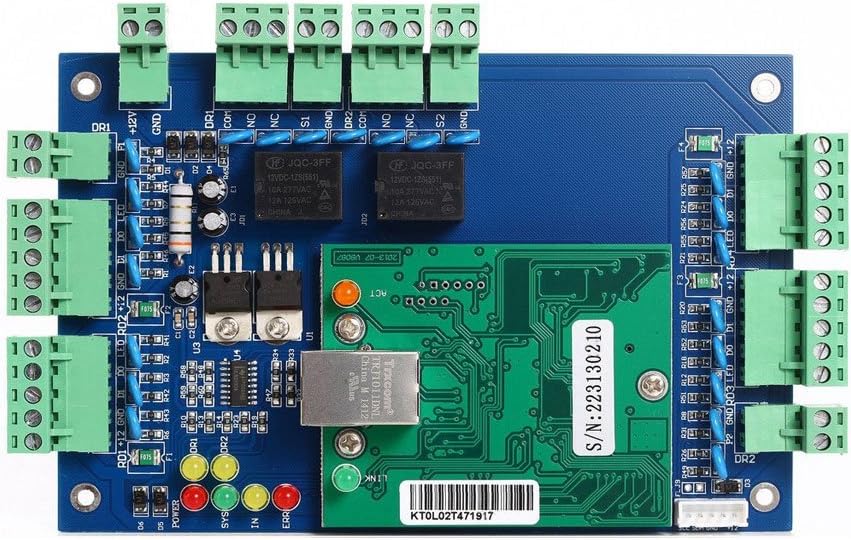
Image 4: Close-up of the 2-door access control board, highlighting the various wiring terminals for readers, locks, and power.
- Power Input: Connect the 110V-240V AC power supply to the designated terminals on the power distribution board within the metal box.
- Reader Connections: Connect Wiegand 26/34 compatible card readers (RFID, Mifare, HID) to the designated reader input terminals (DR1, DR2). The system supports 2 or 4 readers.
- Door Lock Connections: Connect your electronic door locks to the appropriate output terminals (e.g., NO/NC for normally open/normally closed).
- Exit Button Connections: Connect exit buttons to the designated terminals for egress control.
- Network Connection: Connect an Ethernet cable from your network router/switch to the RJ45 port on the control board for TCP/IP communication.
5.3. Initial Power-Up
After all wiring is complete and verified, apply power to the system. Observe the indicator lights on the control board to confirm proper initialization. Refer to the wiring diagram for indicator light meanings.
6. Operating Instructions
Once installed and configured via software, the system operates as follows:
- Card Swipe Entry: Present an authorized access card to the reader for entry.
- Exit Control: Exit can be achieved by pressing an exit button or by swiping an authorized card, depending on configuration.
- Scheduled Access: Doors can be configured to automatically open or close at specific times on any given day.
- Authorized Access: Access can be restricted based on specific users, doors, and time schedules.
- Door Hold Open: Swiping an authorized card four times continuously can be configured to keep a door open.
7. Software Configuration
The MENGQI-CONTROL access control system is managed through dedicated software, which communicates with the control panel via TCP/IP network connection.
- Software Compatibility: The software supports Windows 7, Windows 8, Windows 10, and Windows 11, for both 32-bit and 64-bit operating systems.
- Database Support: The software is compatible with Access and SQL Server databases for managing user data and event records.
- User Management: Add, modify, or delete user credentials (e.g., card numbers).
- Access Permissions: Configure access groups, time zones, and door permissions for individual users.
- Event Monitoring: View real-time access events and generate reports from stored records.
- System Settings: Adjust network parameters, device settings, and other system configurations.
Refer to the software's dedicated user guide and video tutorials for detailed instructions on configuration and management.
8. Maintenance
Regular maintenance ensures the longevity and reliable operation of your access control system:
- Cleaning: Keep the power supply box and control board free from dust and debris. Use a soft, dry cloth for cleaning.
- Connection Checks: Periodically inspect all wiring connections for tightness and signs of wear.
- Software Updates: Ensure your access control software is kept up-to-date with the latest versions provided by MENGQI-CONTROL.
- Backup Data: Regularly back up your access control database to prevent data loss.
9. Troubleshooting
This section provides general guidance for common issues. For complex problems, contact technical support.
- No Power:
- Verify the main power supply to the box is active.
- Check all internal power connections within the box.
- Ensure the power supply unit is functioning correctly.
- Door Not Unlocking:
- Confirm the access card is authorized and valid for the specific door and time.
- Check wiring to the door lock and ensure it is receiving power.
- Inspect the door lock mechanism for any physical obstructions or malfunctions.
- Verify the exit button is correctly wired and functioning.
- Network Connectivity Issues:
- Ensure the Ethernet cable is securely connected to the control board and the network device.
- Check network settings in the software and on the control panel.
- Verify that the network router/switch is operational.
- Software Not Connecting:
- Confirm the control panel's IP address is correct and reachable from the computer running the software.
- Check firewall settings on the computer to ensure the access control software is not blocked.
- Ensure the software version is compatible with the control panel firmware.
10. Specifications
| Feature | Specification |
|---|---|
| Brand | MENGQI-CONTROL |
| Model Number | 2door-ControlPanel box1 |
| Control Method | Remote (via software) |
| Power Source | Corded Electric |
| Voltage Input | 110V-240V AC |
| Power Supply Output | 5A |
| Connectivity Technology | Wired (TCP/IP Network) |
| Compatible Devices | Card readers with Wiegand 26/34 protocol (RFID, Mifare, HID) |
| User Capacity | 20,000 users |
| Record Capacity | 100,000 events |
| Software OS Support | Windows 7/8/10/11 (32 & 64 bit) |
| Software Database Support | Access & SQL Server |
| Item Weight | 5 Pounds |
| Package Dimensions | 11.5 x 10.35 x 4.09 inches |
11. Warranty and Support
MENGQI-CONTROL is committed to providing reliable products and support. While specific warranty details are not provided in this document, the manufacturer has over 20 years of experience in access control systems and offers support for their products.
For technical assistance, detailed wiring diagrams, video guides, or inquiries regarding full access control kits (locks, readers, exit buttons, etc.), please contact MENGQI-CONTROL customer support. Support contact information is typically provided with the product packaging or on the manufacturer's official website.