
AIDITIYMI AIDITIYMI-XHY-386-01
AIDITIYMI Replacement Remote Control for Westinghouse TV User Manual
Model: AIDITIYMI-XHY-386-01
1. Introduction
This manual provides instructions for the AIDITIYMI WD60MB2240RC Replacement Remote Control, designed for various Westinghouse Smart LCD LED HDTV Television models. This remote control functions as a direct replacement and does not require any programming or pairing with your television.

Figure 1: Front view of the AIDITIYMI replacement remote control. The remote is black with various buttons for power, navigation, volume, channel, and dedicated buttons for VUDU, YouTube, and Netflix.
2. Setup and Battery Installation
To begin using your AIDITIYMI replacement remote control, you will need to install two AAA alkaline batteries. No additional programming or pairing steps are required.
- Locate the battery compartment on the back of the remote control.
- Slide the battery compartment cover downwards and remove it.
- Insert two new 1.5V AAA alkaline batteries, ensuring the positive (+) and negative (-) terminals align correctly with the markings inside the compartment.
- Replace the battery compartment cover by sliding it back into position until it clicks securely.
The remote control is now ready for use with your compatible Westinghouse TV.

Figure 2: Back view of the remote control with the battery compartment open, showing the slots for two AAA batteries.
3. Operating the Remote Control
The AIDITIYMI replacement remote control provides full functionality for your Westinghouse TV. Below is a general overview of the buttons and their functions:
- Power Button (⏻): Turns the TV on or off.
- VUDU, YouTube, Netflix Buttons: Direct access to these streaming applications.
- Menu Button (≡): Opens the TV's main menu.
- Navigation Buttons (▲ ▼ ◄ ►): Used to navigate through menus and options.
- OK Button: Confirms selections.
- Back/Return Button (↺): Returns to the previous screen or menu.
- INFO Button: Displays information about the current program or input.
- EXIT Button: Exits the current menu or application.
- Volume Up/Down (VOL +/-): Adjusts the TV's volume.
- Input Button: Cycles through available input sources (HDMI, AV, etc.).
- Channel Up/Down (CH ˆ ˇ): Changes TV channels.
- Playback Controls (⏮ ⏸ ⏭): For media playback (Rewind, Play/Pause, Fast Forward).
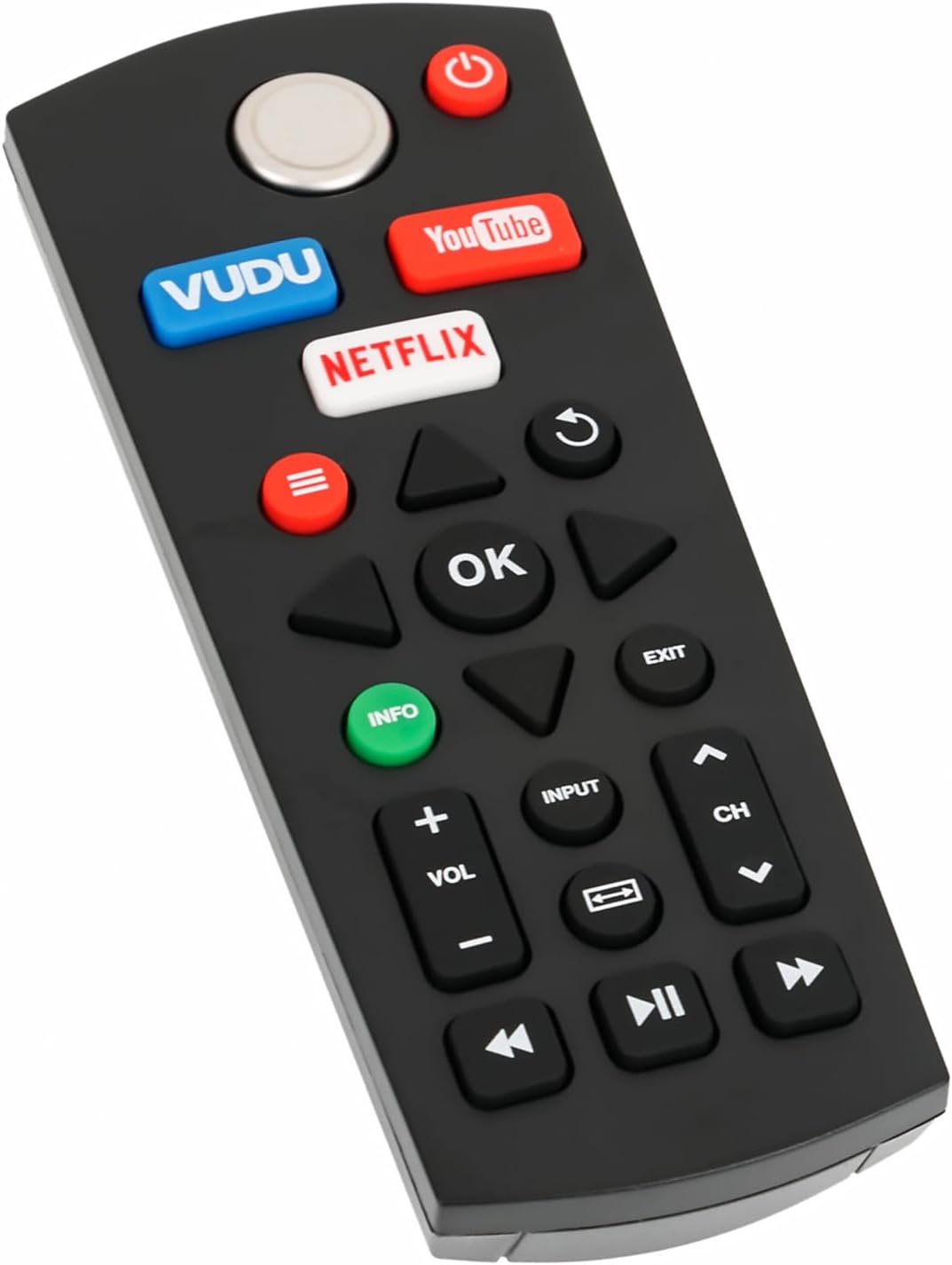
Figure 3: Angled view of the remote control, illustrating the ergonomic design and button placement for easy operation.
4. Maintenance and Care
To ensure the longevity and optimal performance of your remote control, follow these care guidelines:
- Cleaning: Wipe the remote control with a soft, dry cloth. Avoid using liquid cleaners, sprays, or abrasive materials, as these can damage the surface or internal components.
- Battery Replacement: Replace batteries when the remote's response becomes sluggish or stops working. Always replace both batteries at the same time with new 1.5V AAA alkaline batteries.
- Storage: Store the remote in a cool, dry place away from direct sunlight and extreme temperatures.
- Avoid Drops: Protect the remote from physical impact, as drops can damage internal circuitry.
5. Troubleshooting
If you encounter issues with your remote control, refer to the following troubleshooting steps:
- Remote Not Responding:
- Ensure batteries are inserted correctly with the correct polarity (+/-).
- Replace old batteries with new 1.5V AAA alkaline batteries.
- Check for any obstructions between the remote control and the TV's infrared sensor.
- Confirm that the remote is pointed directly at the TV.
- Specific Buttons Not Working:
- This remote is an infrared (IR) remote. Ensure there are no physical blockages on the remote's IR emitter or the TV's IR receiver.
- If only certain buttons are unresponsive, try replacing the batteries.
- TV Not Responding to Remote:
- Verify that your TV model is listed in the compatibility section of this manual.
- Power cycle your TV by unplugging it from the wall outlet for 30 seconds, then plugging it back in.
6. Specifications
| Model Number | AIDITIYMI-XHY-386-01 |
| Product Dimensions | 5.5 x 2 x 0.6 inches (13.97 x 5.08 x 1.52 cm) |
| Item Weight | 1.58 ounces (44.79 grams) |
| Batteries Required | 2 x AAA (1.5V Alkaline) |
| Compatible Devices | Westinghouse Televisions |
| Color | Black |
| Special Feature | Ergonomic Design |

Figure 4: Diagram illustrating the physical dimensions of the remote control: approximately 5.51 inches in length and 2.17 inches in width.
7. Compatible Westinghouse TV Models
This AIDITIYMI replacement remote control is compatible with the following Westinghouse Smart LCD LED HDTV models:
- WD32FC2240
- WD43FC2380
- WD40FW2490
- WD42FB2680
- WD32FC224
- WD60MB2240
- WD60MB224
- WD65MC2240
- WD65MC224
- WD24HB2600
- WD50FB2530
- WD60MB2240RC
- WD32FL2120
If your TV model is not listed, please verify compatibility with the product retailer.
8. Warranty Information
Specific warranty details for this AIDITIYMI product may vary. Please refer to the original purchase documentation or contact the seller directly for information regarding warranty coverage and terms.
9. Customer Support
For further assistance, technical support, or inquiries regarding your AIDITIYMI replacement remote control, please contact the seller or manufacturer through the platform where the product was purchased.
Ask a question about this manual
Ask about setup, troubleshooting, compatibility, parts, safety, or missing instructions. Manuals+ will review the question and use this page’s manual context to help answer it.