
1. Introduction
The Falcon Eyes Bi-Color RX-18TD is a flexible LED photo light designed for professional photography and videography. This kit includes the RX-18TD LED mat, an RX-18OB Extended Softbox, and an RX-18SBHC Honeycomb Grid Softbox, offering versatile lighting solutions. Its flexible design allows for various shapes and applications, making it highly adaptable for different shooting environments. The light features adjustable bi-color temperature and dimming capabilities, controlled via a touch screen or 2.4G wireless remote.

Image: The Falcon Eyes RX-18TD Roll-Flex LED Light demonstrating its flexible and rollable nature, highlighting key features such as stable light brightness, stepless dimming, low light temperature, AC/DC power options, LCD touch screen, and 2.4G wireless remote control.
2. Safety Information
- Do not expose the LED mat or control box to water or high humidity. The material is waterproof, but the electrical components are not designed for submersion.
- Ensure proper ventilation around the control box during operation to prevent overheating.
- Use only the provided power adapter or a compatible V-mount battery.
- Avoid bending the LED mat excessively or sharply, as this may damage the internal circuitry.
- Keep out of reach of children.
- Disconnect power before cleaning or performing any maintenance.
3. Package Contents
Please check the package to ensure all items are present:
- Falcon Eyes RX-18TD Flexible LED Mat
- Control Box (with touch screen)
- Power Adapter
- X-Type Support Bracket
- RX-18OB Extended Softbox
- RX-18SBHC Honeycomb Grid Softbox
- Carrying Bag
- Adhesive Straps (for mounting)

Image: A comprehensive view of all components included in the Falcon Eyes RX-18TD kit, neatly arranged on a flat surface.
4. Setup
- Attach X-Type Support Bracket: Secure the X-type support bracket to the back of the RX-18TD LED mat. This bracket provides rigidity and a mounting point.
- Mount on Light Stand: Attach the assembled LED mat with the X-bracket to a standard light stand. Ensure it is securely fastened.
- Connect Control Box: Connect the cable from the LED mat to the designated port on the control box.
- Power Connection: Connect the power adapter to the control box and then plug it into a power outlet. Alternatively, connect a V-mount battery (not included) to the control box for portable operation.
- Attach Softbox (Optional): For diffused light, attach the RX-18OB Extended Softbox to the front of the LED mat. The softbox uses an adhesive strap design for easy mounting.
- Attach Honeycomb Grid (Optional): For more directional light and spill control, attach the RX-18SBHC Honeycomb Grid Softbox over the softbox.

Image: The RX-18OB Extended Softbox, designed to attach to the flexible LED light for soft, diffused lighting.

Image: A side-by-side comparison illustrating the effect of the honeycomb grid, demonstrating its ability to narrow the light beam and reduce spill.
5. Operating Instructions
5.1 Powering On/Off
The control box features an on/off button with two options: 'i' for V-mount battery power and 'ii' for AC adapter power. Select the appropriate option based on your power source.
5.2 Adjusting Color Temperature and Brightness
The RX-18TD features a touch LED screen for intuitive control. You can adjust the bi-color temperature from 3000K (warm) to 5600K (daylight) and dim the brightness from 0% to 100% using the controls on the screen.

Image: The control panel of the RX-18TD, illustrating the touch screen interface for adjusting brightness (dimming) and color temperature between 3000K and 5600K.
5.3 2.4G Wireless Control
The RX-18TD supports 2.4G wireless control, allowing you to control multiple lights simultaneously. Set all lights to the same group (e.g., Group B as shown in Figure 1 in the diagram below). You can then control all lights in that group through one of them, simplifying multi-light setups.

Image: A diagram demonstrating the 2.4G wireless control functionality, where multiple RX-18TD lights can be mutually controlled from a single unit within a designated group.
5.4 Flexible Applications
The flexible design of the LED mat allows it to be rolled, bent, or shaped to fit various lighting needs. It can be used flat, curved, or even rolled into a cylinder for unique lighting effects.

Image: Examples of the RX-18TD LED light's flexibility, showing it rolled into a cylindrical shape and bent into a curved form.
6. Maintenance
- Cleaning: Use a soft, dry cloth to wipe down the LED mat and control box. For stubborn dirt, a slightly damp cloth can be used, but ensure no moisture enters the electrical components. Do not use harsh chemicals or abrasive cleaners.
- Storage: When not in use, roll the LED mat gently and store it in the provided carrying bag. Avoid sharp folds or placing heavy objects on top of it.
- Cable Care: Handle all cables with care. Avoid sharp bends or kinks, which can damage the internal wires.
7. Troubleshooting
- Light Not Turning On:
- Check if the power adapter is securely connected to both the control box and the power outlet.
- If using a V-mount battery, ensure it is fully charged and properly attached.
- Verify that the on/off switch on the control box is set to the correct power source (i for battery, ii for AC).
- Inconsistent Light Output or Flickering:
- Ensure all cable connections are firm and secure.
- Check the dimming setting on the touch screen; it might be set too low.
- If using battery power, the battery might be low.
- 2.4G Wireless Control Not Working:
- Ensure all lights intended for group control are set to the same group on their respective control boxes.
- Check for potential interference from other 2.4G devices in the vicinity.
8. Specifications
| Feature | Specification |
|---|---|
| Model | RX-18TD |
| Power | 100W |
| Bi-Color Temperature | 3000K - 5600K |
| CRI (Color Rendering Index) | ≥94 |
| LED Chips | 504 pcs |
| Material | Polyvinyl Chloride (PVC) |
| Dimensions (LED Mat) | 610mm x 460mm (2 ft x 1.51 ft) |
| Item Weight (Kit) | 10.83 pounds |
| Power Supply | AC Adapter or V-mount Battery (not included) |
| Control | Touch Screen, 2.4G Wireless Remote |
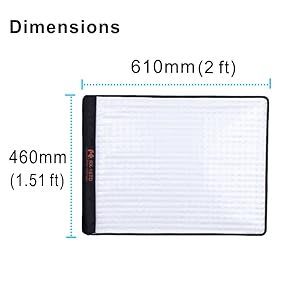
Image: Dimensional diagram of the RX-18TD LED mat, indicating its length and width.
9. Warranty and Support
For warranty information, technical support, or service inquiries, please contact the seller or manufacturer directly. Retain your proof of purchase for any warranty claims.