
1ST PLAYER MK6
1STPLAYER MK6 RGB Mechanical Gaming Keyboard User Manual
Model: MK6
Introduction
Thank you for choosing the 1STPLAYER MK6 RGB Mechanical Gaming Keyboard. This manual provides detailed instructions for setting up, operating, maintaining, and troubleshooting your new keyboard. Please read this manual thoroughly before use to ensure optimal performance and longevity of your device.
Package Contents
- 1STPLAYER MK6 RGB Mechanical Gaming Keyboard
- User Manual (this document)
- Keycap Puller
- Switch Puller
- Extra Switches (quantity may vary)
- Driver Disk (or download link provided)
Setup
- Unpacking: Carefully remove the keyboard and all accessories from the packaging.
- Connection: Connect the USB cable of the keyboard to an available USB port on your computer. The keyboard is plug-and-play and should be recognized automatically by your operating system (Windows).
- Driver Installation (Optional): For advanced customization of RGB lighting and key functions, install the provided software from the driver disk or download it from the official 1STPLAYER website.
Operating Instructions
Basic Keyboard Functions
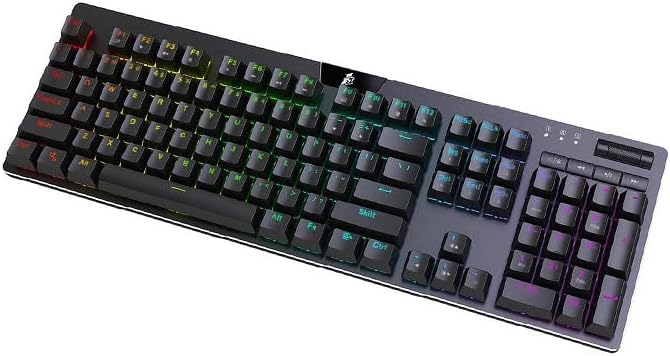
The 1STPLAYER MK6 is a standard 104-key layout keyboard. All standard alphanumeric and function keys operate as expected. The keyboard features Outemu Blue mechanical switches, providing a tactile and audible click feedback.
RGB Lighting Control
The keyboard features dynamic RGB backlighting. You can cycle through various lighting modes and adjust brightness directly on the keyboard or through the dedicated software.
- Changing Lighting Modes: Use the function keys (Fn) combined with specific keys (refer to the keyboard's keycap legends or software for exact combinations) to cycle through pre-set RGB effects.
- Adjusting Brightness: The dedicated roller on the top right of the keyboard can adjust the backlight brightness. Press the button next to the roller to switch its function between volume control and brightness control.
Dedicated Media Control
The MK6 keyboard includes dedicated media keys for convenient control of audio and video playback.
- Volume Control: Use the dedicated roller on the top right to adjust system volume.
- Playback Control: Dedicated buttons for rewind, play/pause, and forward are located next to the volume roller.
Software Customization
For advanced users, the 1STPLAYER software allows for comprehensive customization:
- RGB Effects: Access 19 different lighting modes and customize colors.
- Key Remapping: Reassign key functions.
- Macro Recording: Create and assign macros for complex commands.
- Programmable Game Mode: Highlight specific keys for gaming, optimizing your setup for different titles.
Maintenance
- Cleaning: Use a soft, dry cloth to wipe the keyboard surface. For deeper cleaning, use the provided keycap puller to remove keycaps and clean dust or debris with compressed air or a small brush.
- Switch Replacement: The MK6 features hot-swappable switches. Use the provided switch puller to carefully remove and replace individual switches if needed. Ensure the new switch is aligned correctly before pressing it into place.
- Storage: Store the keyboard in a cool, dry place away from direct sunlight and extreme temperatures.
Troubleshooting
| Problem | Solution |
|---|---|
| Keyboard not responding |
|
| RGB lighting not working |
|
| Specific keys not working |
|
| Software not detecting keyboard |
|
Specifications
- Brand: 1ST PLAYER
- Model: MK6
- Connectivity: USB Wired
- Switch Type: Outemu Blue Mechanical Switches
- Key Count: 104 Keys
- Backlighting: RGB LED
- Material: Acrylonitrile Butadiene Styrene, Aluminum, Metal
- Operating System Compatibility: Windows, PC/Mac (basic functionality)
- Dimensions (LxWxH): 17.24 x 5.35 x 1.42 inches
- Weight: 2.2 pounds
- Special Features: Dedicated Media Control, Hot-swappable Switches, Backlit
Warranty and Support
1STPLAYER products are designed for reliability and performance. For warranty information, please refer to the warranty card included with your purchase or visit the official 1STPLAYER website. For technical support, product inquiries, or service, please contact 1STPLAYER customer support through their official channels.
You can find more information and support resources on the 1STPLAYER Technology Store.