
Introduction
This manual provides detailed instructions for the safe and efficient operation of your Pyle PBMSQG9 Wireless Portable Bluetooth Speaker. Please read this manual thoroughly before using the device and retain it for future reference.
The Pyle PBMSQG9 is a compact and portable audio system featuring Bluetooth wireless streaming, FM radio, USB and Micro SD card playback, and an auxiliary input. It is designed for versatile audio playback with a built-in rechargeable battery.
Package Contents
Verify that all items are present in the package:
- Wireless Tube Speaker (PBMSQG9)
- USB Charging Cable
- Audio Connection Cable (3.5mm AUX)
Product Overview
Familiarize yourself with the speaker's components and controls.

Image 1: Front view of the Pyle PBMSQG9 Portable Bluetooth Speaker, showing the speaker grille and control panel on the left side, with the Pyle logo on the main body and a carry handle.

Image 2: Close-up view of the control panel on the Pyle PBMSQG9 speaker, featuring buttons for power, mode, play/pause, track navigation, and EQ settings.
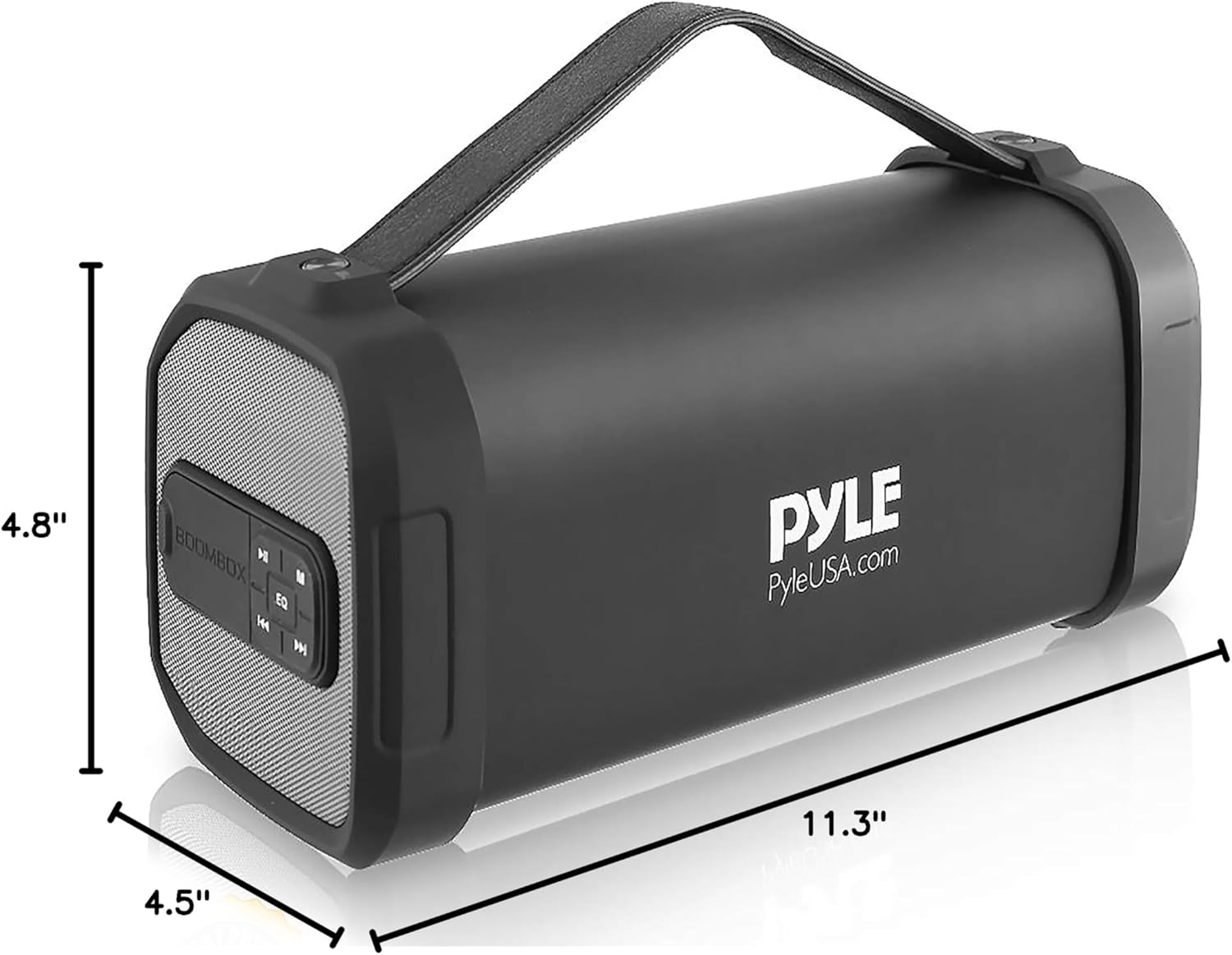
Image 3: Diagram illustrating the dimensions of the Pyle PBMSQG9 Portable Bluetooth Speaker: 11.3 inches in length, 4.5 inches in depth, and 4.8 inches in height.
Control Panel Functions:
- Power Button: Press and hold to turn the speaker on or off.
- Mode Button: Short press to switch between Bluetooth, FM Radio, USB, Micro SD, and AUX modes.
- Play/Pause Button: Press to play or pause audio. In FM mode, press to auto-scan and save stations.
- Previous Track/Volume Down Button: Short press for previous track (Bluetooth/USB/SD). Long press to decrease volume.
- Next Track/Volume Up Button: Short press for next track (Bluetooth/USB/SD). Long press to increase volume.
- EQ Button: Press to cycle through available equalizer presets.
Ports and Indicators:
- USB Port: For USB flash drive playback.
- Micro SD Card Slot: For Micro SD memory card playback.
- AUX Input (3.5mm): For connecting external audio devices.
- DC 5V Charging Port: For connecting the USB charging cable.
- LED Indicator: Indicates charging status and operating mode.
Setup
Charging the Battery:
- Connect the small end of the included USB charging cable to the DC 5V charging port on the speaker.
- Connect the larger end of the USB charging cable to a USB power adapter (not included) or a computer's USB port.
- The LED indicator will illuminate to show charging status. It will typically change color or turn off when fully charged.
- A full charge takes approximately 3 hours. Do not leave the device plugged in for extended periods after it is fully charged to preserve battery life.
Powering On/Off:
- To turn on the speaker, press and hold the Power button until the indicator light illuminates and you hear an audible prompt.
- To turn off the speaker, press and hold the Power button again until the indicator light turns off and you hear an audible prompt.
Operating Instructions
Bluetooth Pairing:
- Ensure the speaker is powered on and in Bluetooth mode. If not, press the Mode button until you hear the Bluetooth prompt.
- On your mobile device (smartphone, tablet, etc.), enable Bluetooth and search for available devices.
- Select 'PyleUSA' from the list of devices.
- Once paired, the speaker will indicate a successful connection, and you can begin streaming audio.
- The wireless range is over 30 feet.
FM Radio Operation:
- Press the Mode button to switch to FM Radio mode.
- To auto-scan and save available FM stations, press the Play/Pause button. The speaker will scan and store stations automatically.
- Use the Previous Track and Next Track buttons to navigate between saved stations.
USB/Micro SD Card Playback:
- Insert a USB flash drive or Micro SD card (up to 32GB) containing MP3 or WMA audio files into the respective port.
- The speaker will automatically switch to USB or Micro SD mode and begin playing audio. If not, press the Mode button to select the correct source.
- Use the Play/Pause, Previous Track, and Next Track buttons to control playback.
AUX Input:
- Connect one end of the included 3.5mm audio connection cable to the AUX input port on the speaker.
- Connect the other end of the cable to the headphone jack or audio output of your external device.
- Press the Mode button to switch to AUX mode.
- Control playback and volume from your external device.
Volume Control:
- To increase volume, long press the Next Track/Volume Up button.
- To decrease volume, long press the Previous Track/Volume Down button.
Equalizer (EQ) Settings:
- Press the EQ button to cycle through different equalizer presets to adjust the sound profile to your preference.
Maintenance
- Cleaning: Use a soft, dry cloth to clean the speaker's exterior. Do not use harsh chemicals or abrasive cleaners.
- Storage: Store the speaker in a cool, dry place away from direct sunlight and extreme temperatures when not in use for extended periods.
- Battery Care: To prolong battery life, avoid fully discharging the battery frequently. Recharge the battery regularly, even if the speaker is not used often. Do not overcharge.
- Water Exposure: This speaker is not waterproof. Avoid exposure to water or excessive moisture.
Troubleshooting
| Problem | Possible Cause | Solution |
|---|---|---|
| Speaker does not turn on. | Battery is discharged. | Charge the speaker using the provided USB cable. |
| No sound. | Volume is too low or muted. Incorrect input mode selected. Device not properly connected. | Increase volume on speaker and connected device. Press Mode button to select correct input. Ensure cables are securely connected. |
| Bluetooth pairing fails. | Speaker not in pairing mode. Device too far. Interference. | Ensure speaker is in Bluetooth mode. Move device closer to speaker (within 30 ft). Turn off other Bluetooth devices. |
| FM radio reception is poor. | Weak signal. | Relocate the speaker to an area with better reception. |
| USB/Micro SD card not playing. | Incorrect file format. Card/drive not inserted correctly. Corrupted files. | Ensure files are MP3 or WMA format. Reinsert card/drive. Try a different card/drive. |
Specifications
| Model: | PBMSQG9 |
| MAX Power Output: | 150 Watt |
| Sound System: | 1.1'' Full Range Stereo Speaker |
| Impedance: | 4 Ohm |
| Signal/Noise Ratio: | >60dB |
| Frequency Response: | 100-16kHz |
| Bluetooth Version: | 4.2, A2DP |
| Bluetooth Network Name: | 'PyleUSA' |
| Wireless Range: | Over 30'+ Feet (10 Meters) |
| Digital Audio File Compatibility: | MP3, WMA |
| Maximum USB Flash/Micro SD Card Support: | Up to 32GB |
| Rechargeable Battery: | 3.7V Li-iOn, 1500mAh |
| Power Input: | DC, 5V/1A |
| Dimensions (L x W x H): | 11.3"H x 4.8"W x 4.5"D (approx. 11.2'' x 4.5'' x 4.7'' inches) |
| Item Weight: | 2.5 Pounds |
| Housing Construction Material: | Engineered ABS |
Warranty and Support
This product comes with a Limited Warranty. For specific warranty terms and conditions, please refer to the warranty card included with your purchase or contact Pyle customer support.
For technical support or service inquiries, please visit the official Pyle website or contact their customer service department. Keep your purchase receipt for warranty claims.
Manufacturer: Sound Around -- Dropship


