1. Introduction
This manual provides essential instructions for the safe and efficient operation, maintenance, and troubleshooting of your Bosch Robinair SPX AC400-650 vacuum pump. Please read this manual thoroughly before operating the unit to ensure proper use and to prevent damage or injury. Keep this manual for future reference.
2. Safety Information
Always observe the following safety precautions to reduce the risk of injury or damage to the equipment:
- Electrical Safety: Ensure the power supply matches the pump's requirements. Do not operate with damaged cords or plugs. Always disconnect power before servicing.
- Personal Protective Equipment (PPE): Wear safety glasses and gloves when handling vacuum pump oil or working with refrigerants.
- Ventilation: Operate the pump in a well-ventilated area to dissipate heat and prevent the accumulation of fumes.
- Hot Surfaces: The pump motor and housing may become hot during operation. Avoid direct contact.
- Oil Handling: Use only recommended vacuum pump oil. Avoid skin contact and dispose of used oil responsibly according to local regulations.
- Stable Placement: Always place the pump on a stable, level surface to prevent tipping.
- Intended Use: Use the pump only for its intended purpose of creating a vacuum in sealed systems. Do not use for pumping flammable or corrosive gases.
3. Product Overview
The Bosch Robinair SPX AC400-650 is a robust vacuum pump designed for efficient evacuation of HVAC/R systems. Its reliable performance ensures deep vacuum levels for optimal system operation.
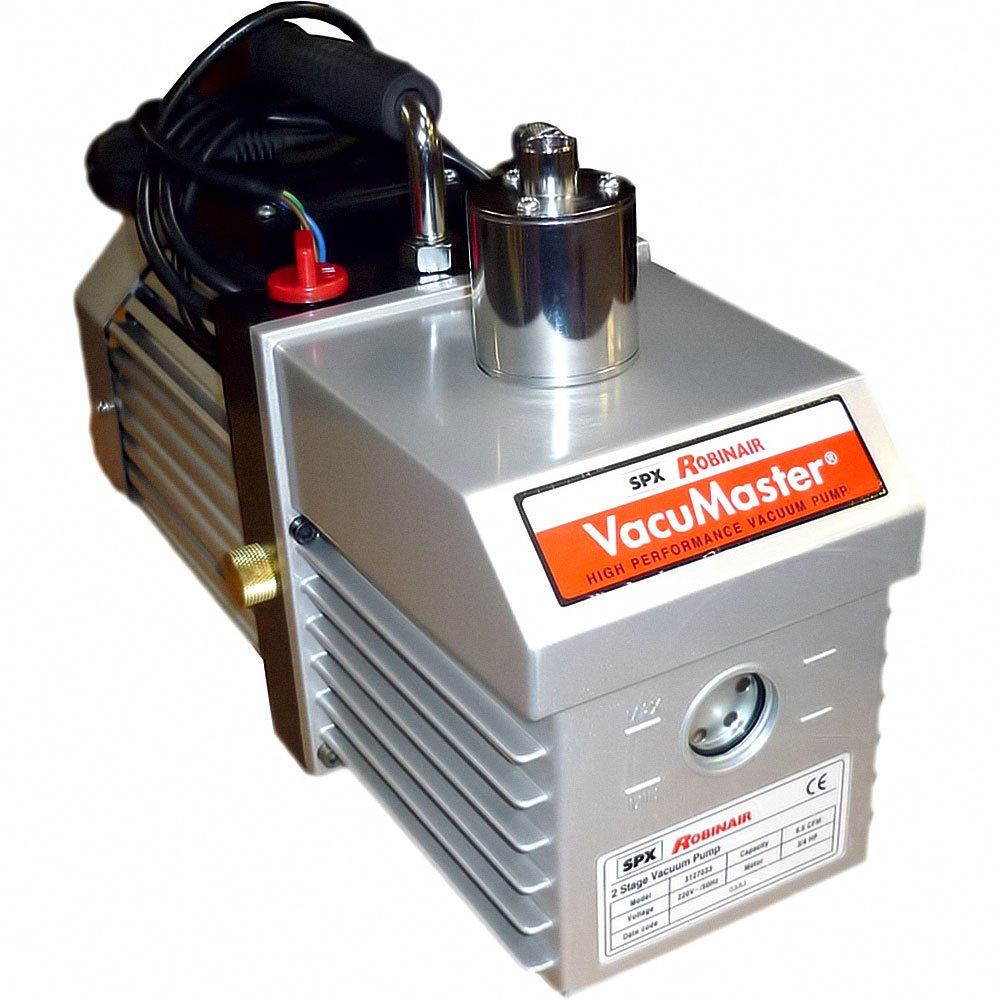
Image showing the Bosch Robinair SPX AC400-650 vacuum pump from a front-side angle, highlighting its compact design and main housing.
4. Setup
- Unpacking: Carefully remove the vacuum pump and all accessories from the packaging. Inspect for any shipping damage.
- Placement: Position the pump on a firm, level surface in a well-ventilated area. Ensure there is adequate space around the unit for air circulation.
- Oil Filling:
- Locate the oil fill cap and remove it.
- Pour the recommended vacuum pump oil into the reservoir until the oil level is between the MIN and MAX marks on the sight glass. Do not overfill.
- Replace the oil fill cap securely.
- Electrical Connection: Connect the power cord to a grounded electrical outlet that matches the voltage and frequency specifications of the pump.
5. Operating Instructions
- System Connection: Connect the vacuum pump to the system to be evacuated using appropriate vacuum hoses and fittings. Ensure all connections are tight to prevent leaks.
- Power On: Turn the power switch to the 'ON' position. The pump should start running.
- Evacuation: Allow the pump to run until the desired vacuum level is achieved. Monitor the vacuum gauge on your manifold or system.
- Monitoring Oil: Periodically check the oil level and clarity through the sight glass during operation. If the oil appears cloudy or discolored, it may need changing.
- Power Off: Once evacuation is complete, close the valve to the system, then turn the power switch to the 'OFF' position.
- Disconnect: Carefully disconnect the vacuum hoses from the pump and the system.
6. Maintenance
Regular maintenance ensures the longevity and optimal performance of your vacuum pump.
- Oil Change: Change the vacuum pump oil regularly, typically after every 10-20 hours of operation or if it appears discolored or contaminated. Refer to the pump's specific instructions for the oil change procedure.
- Cleaning: Keep the exterior of the pump clean and free of dust and debris. Ensure cooling fins are not obstructed.
- Storage: When not in use, store the pump in a clean, dry environment. Ensure the oil is at the correct level and the inlet/outlet ports are capped to prevent contamination.
7. Troubleshooting
If you encounter issues with your vacuum pump, refer to the following common problems and solutions:
| Problem | Possible Cause | Solution |
|---|---|---|
| Pump does not start | No power, faulty switch, motor issue | Check power connection, test outlet, inspect power cord. If problem persists, contact service. |
| Poor vacuum performance | Low oil level, contaminated oil, system leak, worn pump components | Check/change oil. Check all system connections for leaks. If necessary, contact service for inspection. |
| Excessive noise or vibration | Low oil, contaminated oil, loose components, motor issue | Check/change oil. Ensure pump is on a stable surface. Inspect for loose parts. If noise persists, contact service. |
| Oil misting from exhaust | Overfilled oil, contaminated oil, missing/clogged exhaust filter | Check oil level and adjust. Change oil if contaminated. Inspect and clean/replace exhaust filter if applicable. |
For issues not listed here or if solutions do not resolve the problem, please contact authorized service personnel.
8. Specifications
- Brand: Bosch
- Model: Robinair SPX AC400-650
- ASIN: B07BL55HXP
- First Available Date: 15 January 2020
- Guaranteed Software Updates Until: Unknown (as per product data)
For detailed technical specifications such as flow rate, ultimate vacuum, motor power, and oil capacity, please refer to the product label or official Bosch Robinair documentation.
9. Warranty and Support
For detailed warranty information, terms, and conditions, please refer to the official Bosch product documentation included with your purchase or visit the official Bosch website. For technical support, service, or spare parts, please contact your authorized Bosch Robinair dealer or customer service center.


