
1. Introduction
The Walimex pro Flex LED 500 Bi Color is an innovative and highly versatile LED panel light designed for professional video, film, and photography applications. With its powerful 50-watt output and flexible, splash-proof design, it offers new possibilities for creative lighting setups. This large and powerful LED light can be conventionally mounted as continuous light on a lamp stand or flexibly hung, laid down, or positioned as needed.
This manual provides detailed instructions for the setup, operation, and maintenance of your Walimex pro Flex LED 500 Bi Color light. Please read it thoroughly before use to ensure optimal performance and safety.
2. Product Overview

2.1 Key Features
- High Performance: 50 watts of power, providing up to 1,995 Lux at 1 meter distance.
- Excellent Light Quality: High Color Rendering Index (CRI) of up to 95 Ra ensures accurate color reproduction.
- Adjustable Brightness: Stepless dimming from 0% to 100%.
- Bi-Color Temperature: Continuously adjustable color temperature from 3,000K (warm white) to 5,600K (daylight).
- Flexible Design: Bendable, rollable, and splash-proof light mat for versatile positioning and use in various environments.
- Intuitive Control: Modern control unit with an illuminated display showing brightness, color temperature, battery status, and channel control.
- Power Options: Operates via mains power adapter or V-Mount battery (not included) for both studio and mobile use.
- Compact and Lightweight: Easy to transport and highly versatile for practical applications.
- Homogeneous Illumination: Provides soft, even light, ideal for product and portrait photography, film, YouTube productions, video recordings, and interviews.
2.2 What's in the Box
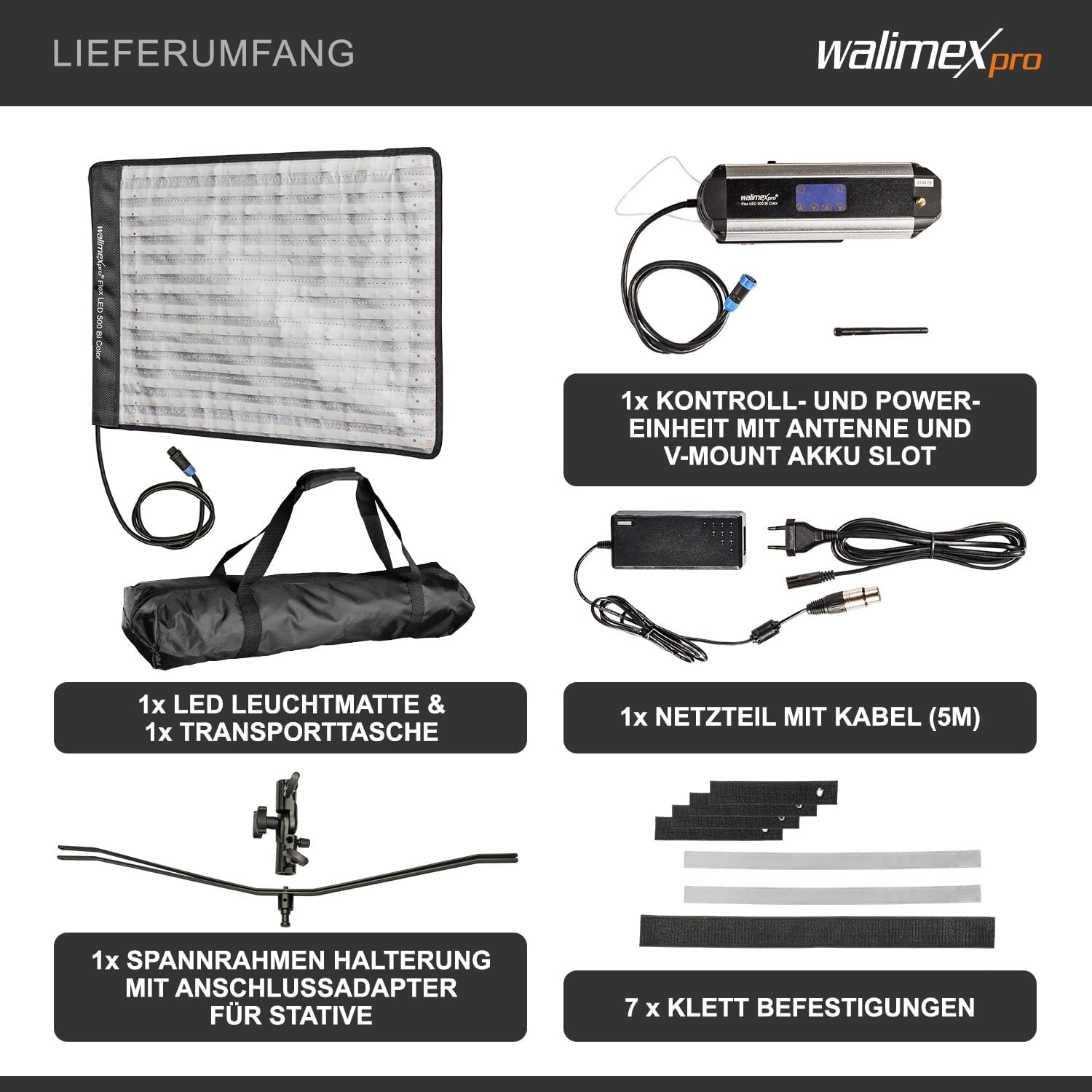
The Walimex pro Flex LED 500 Bi Color package includes the following components:
- 1x Walimex pro Flex LED 500 Bi Color Light Mat
- 1x Control and Power Unit with 2.4 GHz Antenna and V-Mount Battery Slot
- 1x Power Supply Unit with 5-meter Cable
- 1x Frame Holder with Connection Adapter for Tripods
- 7x Velcro Fasteners
- 1x Transport Bag
3. Setup
- Unpack Components: Carefully remove all components from the transport bag.

The compact transport bag for the Walimex pro Flex LED 500 Bi Color, designed for easy portability. - Attach Frame Holder: Insert the Walimex pro Flex LED 500 Bi Color light mat into the provided frame holder. The frame holder is designed to keep the mat flat and can be slightly stiff initially.
- Mount on Stand: Attach the frame holder with the light mat to a suitable lamp stand using the connection adapter. Ensure the adapter is securely tightened.

The Walimex pro Flex LED 500 Bi Color light mat fully assembled on a lamp stand, ready for use. - Connect Control Unit: Connect the light mat to the control and power unit.
- Power Connection:
- Mains Power: Connect the power supply unit to the control unit, then plug the power supply into a wall outlet.
- Battery Power: For mobile use, attach a compatible V-Mount battery (not included) to the V-Mount slot on the control unit.
- Positioning: Position the light as desired. The flexible nature of the mat allows for various creative placements, including hanging with velcro fasteners or simply laying it down.
4. Operating Instructions
The control unit provides easy access to all settings:
- Power On/Off: Locate the power button on the control unit and press it to turn the light on or off.
- Adjusting Brightness: Use the dedicated controls on the illuminated display to adjust the brightness from 0% to 100%. The display will show the current brightness level.
- Adjusting Color Temperature: Use the controls to set the desired color temperature between 3,000K and 5,600K. This allows you to match ambient light or create specific lighting moods. The display will indicate the current color temperature.
- Monitoring Status: The illuminated display provides real-time information on brightness, color temperature, and battery status (if using a V-Mount battery).
- Wireless Control: The control unit includes a 2.4 GHz antenna, allowing for potential wireless control of multiple lights (additional equipment may be required and is not included). Refer to the control unit's specific instructions for wireless pairing.


5. Maintenance
- Cleaning: Although the light mat is splash-proof, avoid submerging it in water. To clean, gently wipe the surface with a soft, damp cloth. Do not use harsh chemicals or abrasive cleaners.
- Storage: When not in use, store the light and its components in the provided transport bag in a cool, dry place, away from direct sunlight and extreme temperatures.
- Cable Care: Ensure all cables are free from kinks or damage. Do not pull on cables to disconnect.
6. Troubleshooting
| Problem | Possible Cause | Solution |
|---|---|---|
| Light does not turn on. |
|
|
| Brightness or color temperature cannot be adjusted. |
|
|
| Light flickers or is inconsistent. |
|
|
If you encounter problems not listed here or if the suggested solutions do not resolve the issue, please contact Walimex pro customer support.
7. Specifications
| Attribute | Value |
|---|---|
| Model Number | 22491 |
| Brand Name | Walimex pro |
| Item Dimensions (L x W x H) | 66 x 13 x 1 cm |
| Item Weight | 2500 Grams |
| Package Dimensions | 35 x 30 x 30 cm |
| Package Weight | 4.41 pounds |
| Color | Black, silver-plated |
| Size | Flex LED 500 Bi Color, 50W |
| Water Resistance | Water resistant (splash-proof) |
| Focus Type | Fixed |
| Batteries Required | 1 Lithium-Ion battery (for mobile use, not included) |
| Connectivity Technology | Bluetooth (Note: Review mentions 2.4 GHz antenna for wireless control) |
| Flash Modes Description | Constant continuous light, steplessly dimmable, color temperature 3000-5600K adjustable |

8. Warranty and Support
For warranty information, please refer to the terms and conditions provided at the time of purchase or visit the official Walimex pro website.
Should you require technical assistance, have questions about your product, or need to report an issue, please contact Walimex pro customer support.
You can find more information and contact details on the official Walimex pro store page: Walimex pro Store.