
Nitecore TIP2017
Nitecore Tip 360 Lumens USB Rechargeable Keychain Flashlight
Model: TIP2017 Copper - Instruction Manual
1. Introduction
Thank you for choosing the Nitecore Tip 360 Lumens USB Rechargeable Keychain Flashlight. This compact and powerful device is designed for everyday carry, offering exceptional brightness and convenient features. This manual provides detailed instructions for its proper use, maintenance, and troubleshooting.
2. Key Features
- Brightest Keychain Flashlight: Produces up to 360 lumens with four brightness levels and a maximum beam distance of 81 yards.
- Easy to Operate: Features a power button for on/off and a mode button to cycle through settings. Includes new Daily Mode and Constant On Mode.
- Rechargeable with Long Battery Runtime: Built-in 500mAh Li-ion battery and USB charging port with red charge indication light. Provides power up to 90 minutes at 150 lumens and over 46 hours on lower mode.
- Premium Copper Construction: Solid outer case machined from premium copper for a unique look and feel. Copper will oxidize over time, developing a vintage appearance.
- Perfect for Everyday Carry: Includes a removable pocket clip and button cover to prevent accidental activation.

Figure 1: Nitecore Tip 360 Lumens Keychain Flashlight in Copper.

Figure 2: Detail of the premium copper construction, which will develop a unique patina over time.

Figure 3: The Nitecore Tip's compact size (2.39"x0.96"x0.54") and powerful 360 lumen output, weighing only 0.83oz.
3. What's Included
The Nitecore Tip 2017 package includes:
- NITECORE TIP 2017 keychain flashlight
- Removable multi-purpose clip
- Key ring
- Belt clasp
- Instruction manual
- Warranty card
4. Setup
4.1 Initial Charging
Before first use, fully charge your Nitecore Tip flashlight. Connect the included USB cable to the flashlight's charging port and a USB power source. The red charge indication light will illuminate during charging and turn green when fully charged.
4.2 Attaching the Multi-Purpose Clip
The removable multi-purpose clip can be attached to the flashlight for various carrying options or to cover the USB port and buttons for protection.
- For Carrying: Slide the clip onto the flashlight body from the tail end until it securely snaps into place. This allows you to clip the flashlight to pockets, belts, or other gear.
- For Button/Port Protection: Flip the clip around and slide it over the buttons and USB port. This acts as a physical lockout barrier to prevent accidental activation and protects the USB port from dust and debris.
5. Operating Instructions
5.1 Power On/Off
- To turn on: Press the power button (⏻).
- To turn off: Press the power button (⏻) again.
5.2 Switching Brightness Levels
With the flashlight on, press the mode button (☰) to cycle through the four brightness levels: Ultralow, Mid, High, and Turbo.
5.3 Operating Modes: Daily Mode vs. Constant-on Mode
The Nitecore Tip 2017 offers two intelligent operating modes:
- Daily Mode: The flashlight will automatically shut off after 30 seconds of inactivity. This mode is suitable for short-time illumination and helps prevent power loss from accidental activation.
- Constant-on Mode: The flashlight will remain on until manually turned off via the power switch. This mode provides continuous illumination.
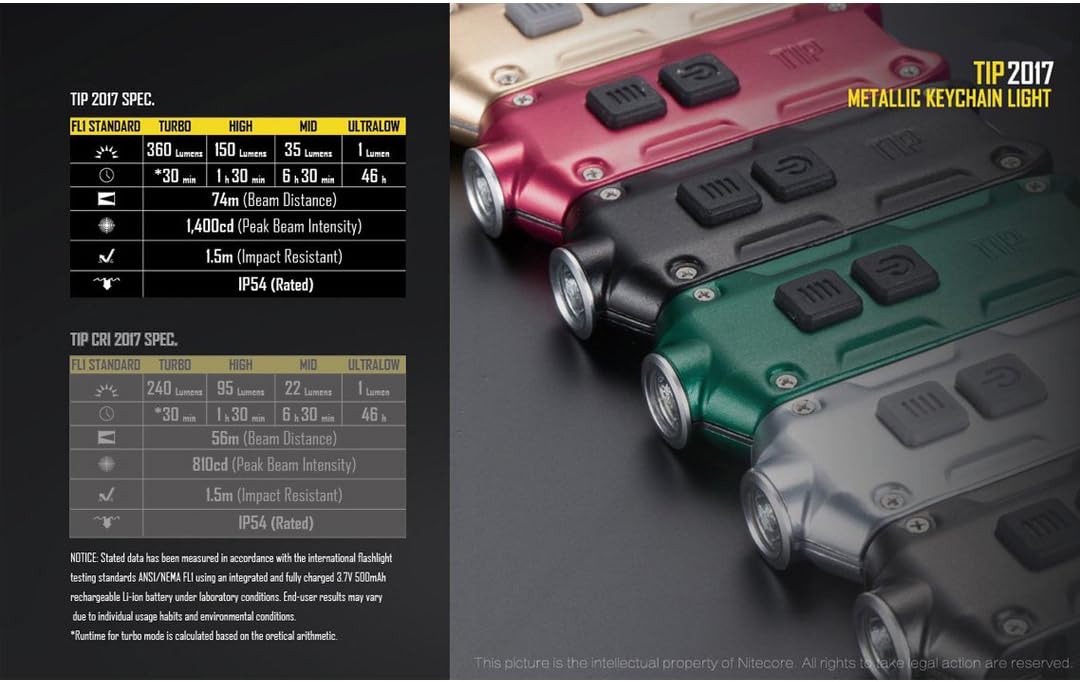
Figure 4: Daily Mode provides short bursts of light and automatically shuts off after 30 seconds to conserve battery.

Figure 5: Constant-on Mode provides continuous illumination until manually turned off.
5.4 Switching Between Daily Mode and Constant-on Mode
To switch between these modes, press and hold both the power button (⏻) and the mode button (☰) simultaneously until the flashlight briefly flashes:
- A single flash indicates Daily Mode.
- A double flash indicates Constant-on Mode.
5.5 Temporary Constant-on (from Daily Mode)
If the flashlight is in Daily Mode and has shut off due to the 30-second timer, pressing the power button (⏻) within 3 seconds will temporarily activate Constant-on Mode. The next time the light is turned on, it will revert to Daily Mode.
Video 1: Official Nitecore Tip 2017 overview, demonstrating features like the removable clip and intelligent operating modes.
6. Maintenance
- Cleaning: Wipe the flashlight with a soft, damp cloth. Avoid harsh chemicals or abrasive materials.
- Charging: To maintain battery health, charge the flashlight regularly, even if not in frequent use. Avoid fully depleting the battery for extended periods.
- Storage: Store the flashlight in a cool, dry place away from direct sunlight and extreme temperatures.
- Copper Patina: The copper body will naturally oxidize and develop a unique patina over time. This is a normal characteristic of copper and does not affect performance. If desired, the copper can be polished to restore its original luster.
7. Troubleshooting
| Problem | Possible Cause | Solution |
|---|---|---|
| Flashlight does not turn on. | Low battery; Accidental activation prevention engaged; Internal fault. | Charge the battery fully. Ensure the multi-purpose clip is not covering the buttons. If issues persist, contact customer support. |
| Flashlight does not charge. | Faulty USB cable/power source; Charging port obstructed; Internal battery issue. | Try a different USB cable and power source. Check the USB port for debris. If the charging indicator does not light up, contact customer support. |
| Light intensity is intermittent. | Low battery; Mode selection issue; Internal fault. | Ensure the battery is fully charged. Verify the operating mode (Daily vs. Constant-on). If the problem continues, contact customer support. |
8. Specifications
| Attribute | Value |
|---|---|
| Model Name | NITTIPC (TIP2017) |
| Brightness | 360 Lumens (Max) |
| Light Path Distance | 81 Yards |
| Power Source | Battery Powered |
| Battery Type | 1 Lithium Ion (included) |
| Runtime | 46 hours (Ultralow mode) |
| Light Source Type | LED |
| Material | Plastic (internal), Copper (external) |
| Color | Copper |
| Item Weight | 0.06 Kilograms |
| Item Dimensions (LxWxH) | 2.39 x 0.96 x 0.54 inches |
| Special Feature | Premium, Removable Clip |
| Country of Origin | China |
9. Warranty and Support
This Nitecore product is covered by a manufacturer's warranty. Please refer to the included warranty card for specific terms and conditions. For technical support, service, or warranty claims, please contact Nitecore customer service through their official website or the retailer where the product was purchased.
For more information, visit the official Nitecore Store on Amazon.
Related documentsTIP2017

Ask a question about this manual
Ask about setup, troubleshooting, compatibility, parts, safety, or missing instructions. Manuals+ will review the question and use this page’s manual context to help answer it.