
1. Introduction
This manual provides essential information for the proper installation, operation, and maintenance of your Miwi-Urmet 1131 Door Intercom System. The 1131 model is a 4+n universal home telephone designed for reliable communication with your outdoor door station and for controlling door access. Please read this manual thoroughly before installation and use to ensure optimal performance and safety.
2. Product Overview
The Miwi-Urmet 1131 is a robust and user-friendly indoor intercom unit. It features a classic handset design for clear audio communication and a dedicated button for electric door lock release.
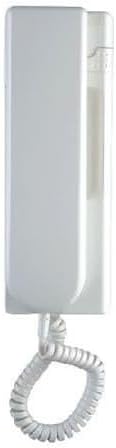
Figure 1: Front view of the Miwi-Urmet 1131 intercom handset, showing its white casing and coiled cord.

Figure 2: Angled view of the Miwi-Urmet 1131 intercom handset, resting horizontally, highlighting its sleek design.

Figure 3: Close-up angled view of the Miwi-Urmet 1131 intercom handset, showing a potential volume control or switch on the side.
3. Setup and Installation
Installation should be performed by a qualified technician to ensure compliance with local electrical codes and proper system functionality. The 1131 model is designed for 4+n wiring systems.
3.1 Mounting the Intercom Unit
- Choose a suitable indoor location, typically near the entrance, at an accessible height.
- Mark the drilling points on the wall using the mounting bracket as a template.
- Drill holes and insert wall plugs if necessary.
- Secure the mounting bracket to the wall using appropriate screws.
3.2 Wiring Connections
Refer to the wiring diagram provided with your complete intercom system kit. The 1131 handset typically connects to the central control unit or distribution box using a 4+n wire configuration. Ensure all connections are secure and correctly terminated.
- Terminal 1: Speech (outgoing)
- Terminal 2: Speech (incoming)
- Terminal 3: Common Ground
- Terminal 4: Call Signal
- Terminal n: Door Lock Release (specific terminal may vary, consult system diagram)
After wiring, carefully attach the intercom handset to the mounting bracket.
4. Operating Instructions
4.1 Answering a Call
- When the outdoor unit rings, lift the handset from its cradle.
- Speak into the microphone and listen through the earpiece to communicate with the visitor at the door station.
4.2 Opening the Door
- While communicating with the visitor (or after lifting the handset), press the dedicated door release button on the intercom unit. This button is typically marked with a key symbol.
- The electric door lock will momentarily activate, allowing the visitor to enter.
4.3 Ending a Call
Place the handset back into its cradle to end the conversation and reset the intercom system.
5. Maintenance
The Miwi-Urmet 1131 intercom system requires minimal maintenance to ensure long-term performance.
- Cleaning: Use a soft, dry cloth to wipe the exterior of the unit. For stubborn marks, a slightly damp cloth with mild soap can be used, followed by drying. Avoid abrasive cleaners, solvents, or excessive moisture.
- Cord Care: Periodically check the coiled cord for any signs of wear or damage. Avoid stretching or tangling the cord excessively.
- Environmental Conditions: Ensure the unit is not exposed to direct sunlight, extreme temperatures, or high humidity, which can affect its electronic components.
6. Troubleshooting
If you experience issues with your Miwi-Urmet 1131 intercom, consult the following common problems and solutions:
| Problem | Possible Cause | Solution |
|---|---|---|
| No sound from handset (earpiece or microphone) | Loose wiring connection; faulty handset; issue with outdoor unit or central control. | Check all wiring connections. Ensure handset is properly seated. If problem persists, contact a qualified technician. |
| Door release button does not work | Incorrect wiring for door release; faulty button; issue with electric lock or power supply. | Verify door release wiring. Ensure the electric lock is receiving power. Contact a technician if the issue continues. |
| Intercom does not ring | No power to system; faulty outdoor call button; wiring issue. | Check power supply to the entire intercom system. Inspect outdoor call button for damage. Verify call signal wiring. |
For issues not listed here or if solutions do not resolve the problem, please contact a qualified service technician or Miwi-Urmet support.
7. Specifications
- Model: 1131
- Type: 4+n Universal Home Telephone
- Brand: MIWI-URMET
- ASIN: B07BGG9796
- Shipping Dimensions: 25.6 x 8.2 x 6.9 cm
- Weight: 360 grams
- First Available Date: November 13, 2024
8. Warranty and Support
For information regarding warranty coverage, technical support, or service for your Miwi-Urmet 1131 Door Intercom System, please refer to the documentation provided with your purchase or visit the official MIWI-URMET website. It is recommended to keep your proof of purchase for warranty claims.
For direct inquiries, you may contact MIWI-URMET customer service through their official channels.