
1. Introduction
Thank you for purchasing the Britz SoundBar Solo BA-K9 2CH Multimedia Speaker. This manual provides important information regarding the setup, operation, and maintenance of your new soundbar. Please read this manual thoroughly before using the product to ensure proper functionality and to prevent damage.
2. Safety Information
To ensure safe operation and prolong the life of your device, please observe the following safety precautions:
- Do not expose the soundbar to water or excessive moisture.
- Do not place the soundbar near heat sources such as radiators, heat registers, stoves, or other apparatus (including amplifiers) that produce heat.
- Use only attachments/accessories specified by the manufacturer.
- Unplug this apparatus during lightning storms or when unused for long periods of time.
- Refer all servicing to qualified service personnel. Servicing is required when the apparatus has been damaged in any way.
- Ensure proper ventilation and do not block any ventilation openings.
3. Package Contents
Please check the package for the following items:
- Britz SoundBar Solo BA-K9 Speaker Unit
- Remote Control
- Power Adapter (Corded Electric)
- User Manual (this document)
4. Product Overview
The Britz SoundBar Solo BA-K9 is a 2-channel multimedia speaker designed for use with LED/LCD displays up to 32 inches, smartphones, and tablets. It features a compact design and comes with a remote control for convenient operation.
4.1 Front View
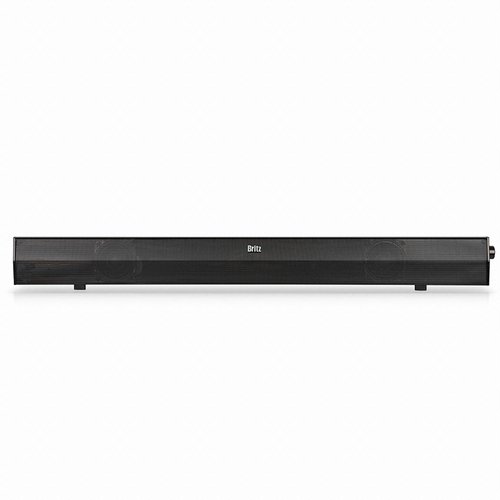
Image: Front view of the Britz SoundBar Solo BA-K9, showing the speaker grille and minimalist design.
4.2 Rear Panel
The rear panel houses all the necessary connection ports.
(Image of the rear panel showing input/output ports would be placed here if available.)
- Power Input: For connecting the power adapter.
- USB Port: For connectivity (e.g., playing media from a USB drive, if supported, or for power).
- Audio Input: For connecting external audio sources (e.g., 3.5mm AUX, RCA).
4.3 Remote Control
The included remote control allows for convenient adjustment of volume, input selection, and power.
(Image of the remote control showing button layout would be placed here if available.)
- Power Button: Turns the soundbar on or off.
- Volume Up/Down: Adjusts the master volume.
- Input Select: Cycles through available audio inputs (e.g., USB, AUX).
- Mute Button: Mutes or unmutes the audio.
5. Setup
Follow these steps to set up your Britz SoundBar Solo BA-K9:
- Placement: Place the soundbar on a stable, flat surface, preferably directly in front of your LED/LCD display. Ensure there is adequate space for ventilation. The soundbar is designed for bar mounting.
- Connect Audio Source:
- For TVs/Monitors: Connect an audio cable (e.g., 3.5mm AUX or RCA, not included) from your TV's audio output to the soundbar's audio input.
- For Smartphones/Tablets: Connect your device using a compatible audio cable to the soundbar's audio input.
- For USB Media: Insert a USB drive into the USB port on the rear panel.
- Connect Power: Connect the power adapter to the soundbar's power input, then plug the adapter into a wall outlet.
- Power On: Press the power button on the soundbar or the remote control to turn on the device.
6. Operating Instructions
6.1 Power On/Off
Press the Power button on the remote control or the soundbar to turn the unit on or off.
6.2 Volume Adjustment
Use the Volume Up (+) and Volume Down (-) buttons on the remote control to adjust the sound level.
6.3 Input Selection
Press the Input Select button on the remote control to cycle through available audio sources (e.g., AUX, USB).
6.4 Mute Function
Press the Mute button on the remote control to temporarily silence the audio. Press it again to restore sound.
7. Maintenance
Proper care ensures the longevity of your soundbar:
- Cleaning: Use a soft, dry cloth to clean the surface of the soundbar. Do not use liquid cleaners or aerosols.
- Storage: If storing the soundbar for an extended period, unplug it from the power source and store it in a cool, dry place.
- Ventilation: Ensure that the ventilation openings are not blocked to prevent overheating.
8. Troubleshooting
If you encounter issues with your soundbar, refer to the following common problems and solutions:
| Problem | Possible Cause | Solution |
|---|---|---|
| No power | Power cable not connected; Power outlet not working | Ensure power cable is securely connected. Try a different power outlet. |
| No sound | Incorrect input selected; Volume too low; Audio cable not connected properly | Select the correct input source. Increase volume. Check audio cable connections. |
| Remote control not working | Batteries depleted; Obstruction between remote and soundbar | Replace remote control batteries. Ensure clear line of sight to the soundbar's IR receiver. |
9. Specifications
| Feature | Detail |
|---|---|
| Model Name | BA-K9 |
| Speaker Type | Soundbar |
| Channel Configuration | 2.0 Channel |
| Connectivity Technology | USB |
| Power Source | Corded Electric |
| Control Method | Remote |
| Compatible Devices | Smartphone, Tablet, LED/LCD Displays (up to 32 inch) |
| Product Dimensions (LxWxH) | 6.8 x 5.8 x 60 cm |
| Item Weight | 1.02 kg |
| Mounting Type | Bar Mount |
10. Warranty and Support
For warranty information and technical support, please refer to the warranty card included with your product or visit the official BRITZ website. Keep your purchase receipt as proof of purchase for warranty claims.
For further assistance, please contact BRITZ customer service.