
Introduction
This manual provides essential instructions for the safe and efficient operation of your WAOUKS 72V 3A Lead Acid Battery Charger, Model WA240-7203B. Please read this manual thoroughly before using the product to ensure proper function and to prevent damage or injury. This charger is designed for 72V Lead Acid, AGM, Gel, VRLA, and OPZV batteries.
Safety Instructions
Always adhere to the following safety guidelines to prevent electric shock, fire, or damage to the charger or battery:
- Do not expose to water: The charger is not waterproof. Avoid contact with liquids.
- Ventilation: Charge in a well-ventilated room. Ensure the charger's cooling fan is unobstructed.
- Flammable materials: Do not expose the charger to volatile gas or open flames.
- Heat dissipation: The aluminum casing of the charger acts as a heat sink. Do not cover it during operation.
- Correct voltage: Ensure the charger's output voltage matches your battery's voltage (72V).
- Correct polarity: Connect the charger to the battery with correct polarity. Reverse polarity protection is built-in, but incorrect connection should be avoided.
- Indoor use only: This charger is intended for indoor use.
- Unplug when not in use: Disconnect the charger from the power outlet and battery when not in use.
Package Contents
Verify that all items are present in the package:
- WAOUKS 72V 3A Lead Acid Battery Charger (Model WA240-7203B)
- US Standard AC Power Cable
- Spare Fuses (2 units)
- Owner's Manual (this document)
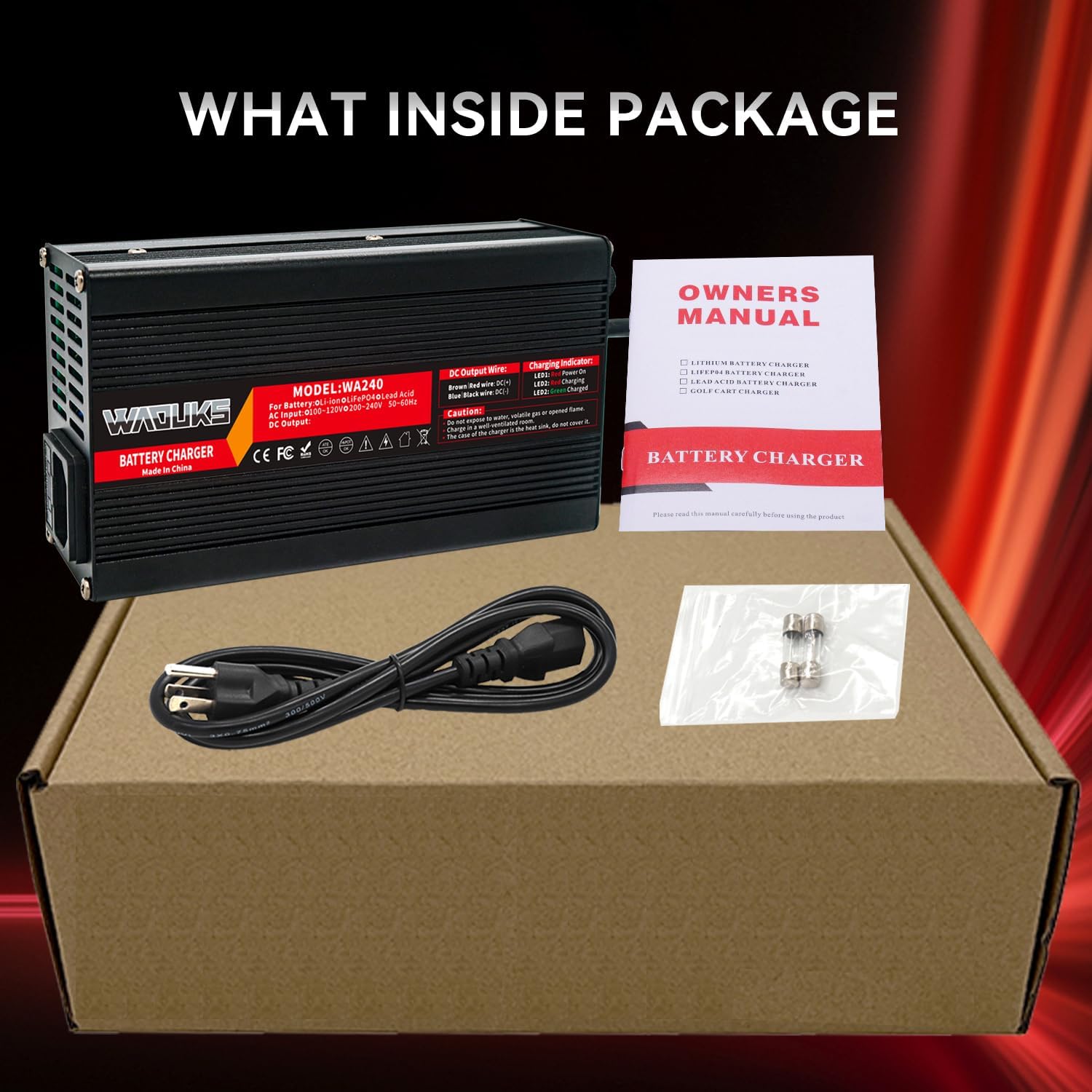
Product Overview and Specifications
The WAOUKS WA240-7203B is a robust and intelligent charger designed for various 72V lead-acid battery types. It features a durable aluminum shell and multiple protection mechanisms.
Key Features:
- Three-stage intelligent charging mode: Constant Current, Constant Voltage, and Trickle (Floating Charge) for optimal battery health.
- Automatic shut-off upon full charge.
- Integrated cooling fan for efficient heat dissipation.
- Comprehensive protection: Over voltage, Over Current, Short Circuit, Reverse Polarity, and Temperature protection.
- LED indicators for power and charging status.
- Durable aluminum alloy casing.
Technical Specifications:
| Model | WA240-7203B |
| AC Input | 100-120Vac, 50/60Hz |
| DC Output | 72V / 3A |
| Compatible Battery Types | 72V Lead Acid, AGM, Gel, VRLA, OPZV |
| Charging Mode | 3-Stage (CC-CV-Float) |
| DC Output Connector | 3-pin C13 N+ L- (default) |
| Dimensions (L x W x H) | 6.7 x 3.55 x 1.97 inches (170 x 90 x 50 mm) |
| Weight | 2.2 pounds (1 kg) |
| Shell Material | Aluminum |


Setup
- Inspect the Charger: Before each use, visually inspect the charger and cables for any signs of damage. Do not use if damaged.
- Ensure Ventilation: Place the charger in a dry, well-ventilated area, away from direct sunlight, heat sources, and flammable materials. Ensure the cooling fan is not blocked.
- Connect to Battery: Connect the DC output plug of the charger to the charging port of your 72V battery. Ensure a secure connection. The default DC plug is a 3-pin C13 N+ L- connector.
- Connect to AC Power: Plug the AC power cable into the charger's input port, then plug the other end into a standard 100-120Vac, 50/60Hz wall outlet.
Operating Instructions
Once properly set up, the charger will begin the charging process automatically. The intelligent three-stage charging ensures optimal battery charging.
LED Indicator Status:
- LED1 (Red): Indicates that the charger is powered on.
- LED2 (Red): Indicates that the battery is currently charging.
- LED2 (Green): Indicates that the battery is fully charged.

When the battery is fully charged, the charger will automatically stop charging and switch to a trickle/floating charge mode (indicated by LED2 turning green) to maintain the battery's charge without overcharging.
Maintenance
- Cleaning: Keep the charger clean and free from dust and debris. Use a dry, soft cloth for cleaning. Do not use liquid cleaners.
- Storage: Store the charger in a cool, dry place when not in use.
- Cable Care: Avoid bending or kinking the power cables excessively. Do not pull the cables to disconnect.
- Fuse Replacement: If the charger stops working, check the fuse. Replace it with a fuse of the same rating (spare fuses are included). Refer to the charger's label for fuse specifications.
Troubleshooting
| Problem | Possible Cause | Solution |
|---|---|---|
| Charger not turning on (LED1 off) | No AC power; Faulty power cable; Blown fuse. | Check AC outlet and power cable connection. Replace fuse if blown. |
| Charger not charging (LED2 remains red or off after connecting to battery) | Battery not connected properly; Battery voltage too low or too high; Faulty battery; Charger malfunction. | Ensure secure connection to battery. Verify battery voltage is 72V. Test with another known good battery if possible. If issues persist, contact support. |
| Charger gets excessively hot | Poor ventilation; Overload; Internal fault. | Ensure charger is in a well-ventilated area and not covered. Reduce load if possible. Discontinue use and contact support if overheating persists. |
| Cooling fan not operating | Fan malfunction; Charger not under load. | The fan may only activate when the charger reaches a certain temperature or is under load. If the charger is hot and the fan is not running, discontinue use and contact support. |
| Difficulty connecting DC plug to device | Incompatible plug; Manufacturing variance. | Ensure the DC plug type (3-pin C13 N+ L-) is compatible with your device. Do not force the connection. Contact support if you believe there is a compatibility issue. |
Warranty and Support
For warranty information or technical support, please contact WAOUKS customer service through the retailer where the product was purchased or visit the official WAOUKS website. Please have your model number (WA240-7203B) and purchase date available when contacting support.