Introduction
The Sierra Modern Home Smart WiFi Ultrasonic Aromatherapy Diffuser & Humidifier combines the benefits of aromatherapy with modern smart home technology. This device disperses essential oils and humidifies the air using ultrasonic vibrations, creating a fine, cool mist. It can be controlled via physical buttons, a smartphone app, or voice commands through Alexa and Google Home.
Important Safety Information
- Avoid direct skin contact with undiluted essential oils.
- Keep out of reach of children and pets.
- Ensure proper ventilation during use.
- The diffuser operates by filling the tank with cold water, preferably distilled.
- The device automatically switches off in case of low water levels.
- The leak-resistant water tank ensures a clean, hassle-free experience. For best results, avoid overfilling, close the water tank cap securely, and keep the diffuser upright during use.
Package Contents
- 1 Sierra Modern Home Smart Diffuser
- 1 Power cable
- Instruction and support contact manuals
Setup Guide
Physical Setup
- Place the diffuser on a flat, stable surface.
- Remove the top cover of the diffuser.
- Fill the water tank with cold water, preferably distilled, up to the maximum fill line. (Capacity: 400ml)
- Add 2-3 drops of your preferred essential oil into the water tank.
- Replace the top cover securely.
- Connect the power cable to the diffuser's base and then to a power outlet.
App Download and Wi-Fi Connection
The diffuser is compatible with the Tuya Smart app (or Smart Life app).
- Download the "Tuya Smart" app from your phone's app store (iOS App Store or Google Play Store). Look for the logo with a white "T" on an orange background.
- Register a new account or sign in if you already have one.
- Plug in your diffuser. Ensure it is in pairing mode (the indicator light should be flashing). If not, hold the power button for approximately 5 seconds to reset it.
- In the Tuya Smart app, tap the '+' button to add a new device.
- Select "Small Home Appliances" > "Diffuser" or "Humidifier (Wi-Fi)".
- Connect to your 2.4 GHz Wi-Fi network and follow the in-app prompts to pair your diffuser.
- Confirm that your unit is blinking repeatedly during the pairing process.
- Once added, the app will display "Aromatherapy machine has been added."
Voice Assistant Integration (Alexa & Google Home)
- Open your Alexa or Google Home app.
- Go to "Skills & Games" (Alexa) or "Works with Google" (Google Home).
- Search for "Tuya Smart" and enable the skill.
- Link your Tuya Smart account by signing in with your Tuya credentials.
- Your voice assistant will automatically discover the diffuser.
- You can now use voice commands like: "Alexa, turn on my diffuser," "Alexa, set diffuser to high," or "Hey Google, turn off diffuser."
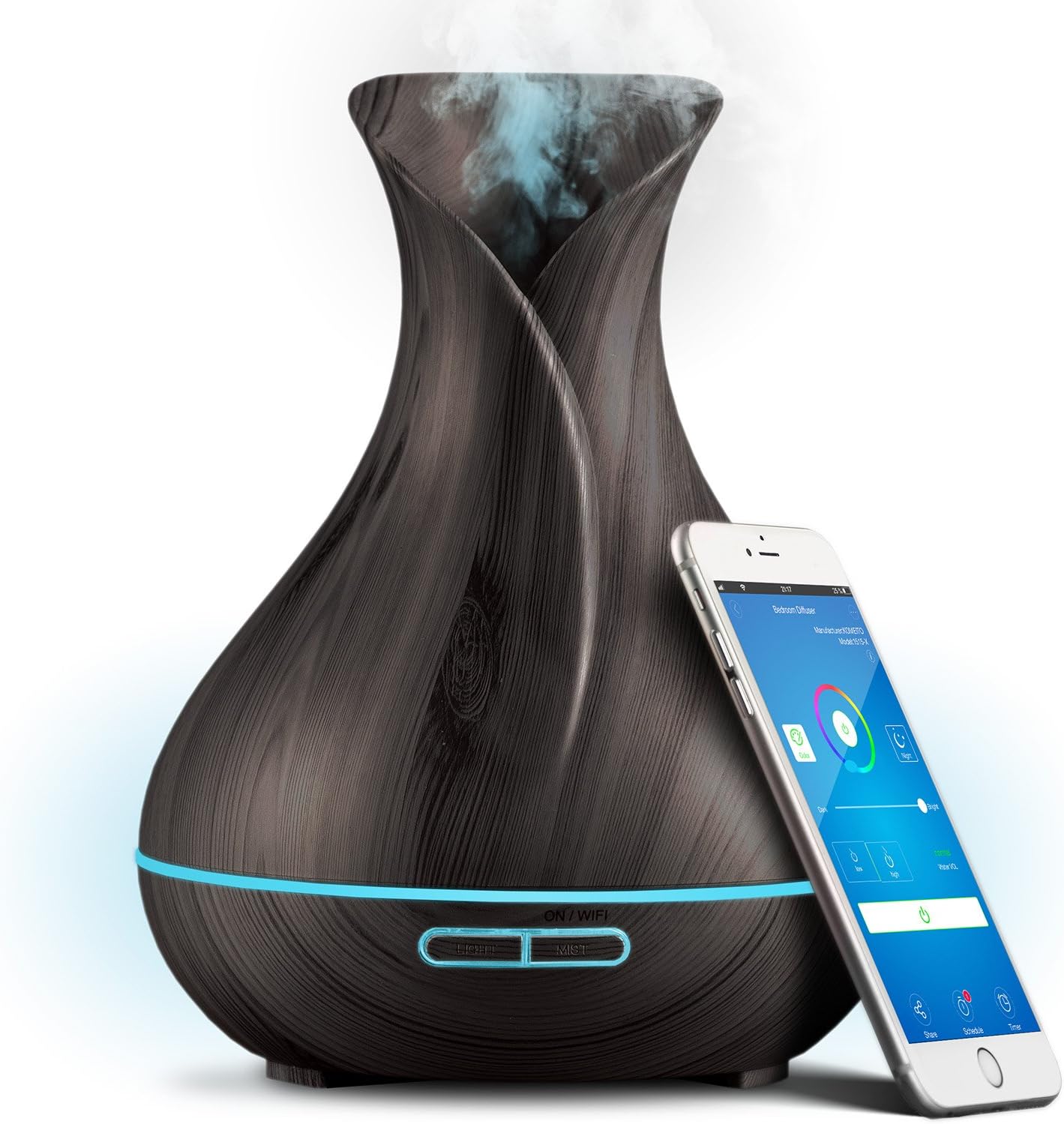
Sierra Modern Home Smart Diffuser with smartphone showing app control.

Exploded view of the Sierra Modern Home Smart Diffuser showing the 400ml water tank and dimensions.
Official product video demonstrating the features and smart capabilities of the Sierra Modern Home diffuser.
Operating Instructions
Manual Control (Device Buttons)
The diffuser features two buttons on its base:
- LIGHT Button: Press to cycle through LED colors or turn the light off. Long press to adjust brightness or select a fixed color.
- MIST Button: Press to turn the mist on/off or select mist intensity (low/high).
App Control
Use the Tuya Smart app to access advanced features:
- LED Color: Choose from 7 pre-made moods, pick any color from a color wheel, or set night light mode.
- Mist Intensity: Adjust between strong and weak mist output (30-50 ml/h spray).
- Timer Settings: Set the diffuser to operate for specific durations (e.g., 1 hour, 3 hours, 6 hours).
- Scheduling: Create custom schedules for the diffuser to turn on/off at desired times on specific days.

Sierra Modern Home Smart Diffuser displaying various LED colors and mist output, controlled by a smartphone app.

Close-up of the Sierra Modern Home Smart Diffuser showing mist output and LED light, highlighting its humidifying capabilities.
User review demonstrating the unboxing, setup, and basic operation of the Sierra Modern Home Smart Diffuser, including adding water and essential oils.
User review highlighting the smart features and app control of the Sierra Modern Home Smart Diffuser.
Maintenance
Cleaning the Diffuser
- Unplug the diffuser from the power outlet.
- Remove the top cover and empty any remaining water from the tank.
- Wipe the inside of the water tank with a soft cloth or sponge. For stubborn residue, use a small amount of white vinegar.
- Clean the ultrasonic disc (located at the bottom of the water tank) gently with a cotton swab dipped in white vinegar. Do not scrub or use abrasive materials.
- Wipe the exterior of the diffuser with a soft, dry cloth.
- Ensure all parts are completely dry before reassembling and storing or reusing.
Water Recommendations
For optimal performance and to prevent mineral buildup, use distilled or purified water.
Troubleshooting
- No Mist Output:
- Check if the water level is sufficient. The diffuser has an auto-shutoff feature when water is low.
- Ensure the top cover is correctly aligned and securely placed.
- Verify the power adapter is properly connected.
- Weak Mist Output:
- Clean the ultrasonic disc as per maintenance instructions. Mineral buildup can reduce mist output.
- Ensure the water level is not too high, which can sometimes impede mist production.
- Diffuser Not Connecting to Wi-Fi/App:
- Ensure your Wi-Fi network is 2.4 GHz. The diffuser may not connect to 5 GHz networks.
- Confirm the diffuser is in pairing mode (flashing indicator light).
- Check your Wi-Fi password and network stability.
- Restart your router and the diffuser, then attempt pairing again.
- Ensure the app has necessary permissions (e.g., location, if requested, though not always essential for Wi-Fi pairing).
- Unusual Noise:
- Ensure the diffuser is on a flat, stable surface.
- Check for any obstructions in the water tank or around the fan vent at the bottom.
Specifications
| Feature | Detail |
|---|---|
| Brand | Sierra Modern Home |
| Model Name | 1 |
| Capacity | 400 Milliliters |
| Power Source | Corded Electric |
| Special Feature | Timer Setting, Smart Control |
| Product Dimensions | 6.5"L x 6.5"W x 9.4"H |
| Coverage | 430.5 Square Feet |
| Light Source Type | LED |
| Item Weight | 1.59 pounds |
Warranty and Support
For warranty information or technical support, please refer to the contact details provided in the included instruction and support contact manuals.