
Ace Instruments AI-DDPG
Ace Instruments AI-DDPG Digital Differential Pressure Gauge User Manual
Comprehensive instructions for installation, operation, and maintenance.
1. Product Overview
The Ace Instruments AI-DDPG is a Digital Differential Pressure Gauge designed for precise measurement of differential pressure in various environments, including clean rooms and HVAC systems. It features an integrated 4-digit LED display and offers a measurement range of -100 to 100 Pascals.

Figure 1: Front view of the AI-DDPG Digital Differential Pressure Gauge, showing the red LED display and control buttons.
Key Features:
- Measuring Parameter: Differential Pressure
- Range: -100 to 100 Pascals
- Accuracy: +/- 0.5% of Full Scale
- Resolution: 1 Pascal
- Display: Integrated 4 Digit Red LED 7 Segment Display (0.5")
- Output: 4-20mA
- Alarm: Built-in Buzzer for process violation alerts
- Mounting: Panel Mounting (Default), Wall Mounting with accessory (Grouting Box)
- Communication: RS-485 Modbus (for BMS/SCADA/PLC integration)
2. Package Contents
Verify that all items are present and undamaged upon unpacking:
- 1 Unit of Ace Instruments AI-DDPG Digital Differential Pressure Gauge
- 1 Pair of Wall-Mounted Hose Nipples
- Silicon Tube
- Mounting Screws
- Instruction Manual (this document)
- Factory Calibration Certificate
3. Safety Information
- Ensure the power supply matches the device specifications (24 Volts D.C. Typical).
- Do not expose the device to corrosive gases or liquids.
- Maximum over pressure is 2 times the rated pressure. Exceeding this may damage the sensor.
- Installation should be performed by qualified personnel.
- Disconnect power before making any electrical connections.
4. Installation
4.1 Mounting Options
The AI-DDPG can be installed using either panel mounting or wall mounting with the provided accessory.
Wall Mounting:
For wall mounting, use the supplied grouting box and screws. The gauge has a 30 mm profundity for cleanroom modular wall fitment.

Figure 2: The gauge's slim profile (30 mm profundity) is suitable for cleanroom modular wall installations.

Figure 3: The wall mounting box and screws provided for secure installation.

Figure 4: Example of the AI-DDPG gauge installed on a wall, typically in a cleanroom or HVAC application.
4.2 Electrical Connections
The device requires a 24 Volts D.C. power supply. Connect the power adapter to the designated terminals at the back of the unit. The gauge also supports RS-485 Modbus communication for integration with Building Management Systems (BMS), SCADA, or PLCs, and provides a 4-20mA output.

Figure 5: The AI-DDPG gauge shown with its standard power adapter.

Figure 6: Detailed view of the AC-DC adapter, specifying input and output voltage (24V DC).
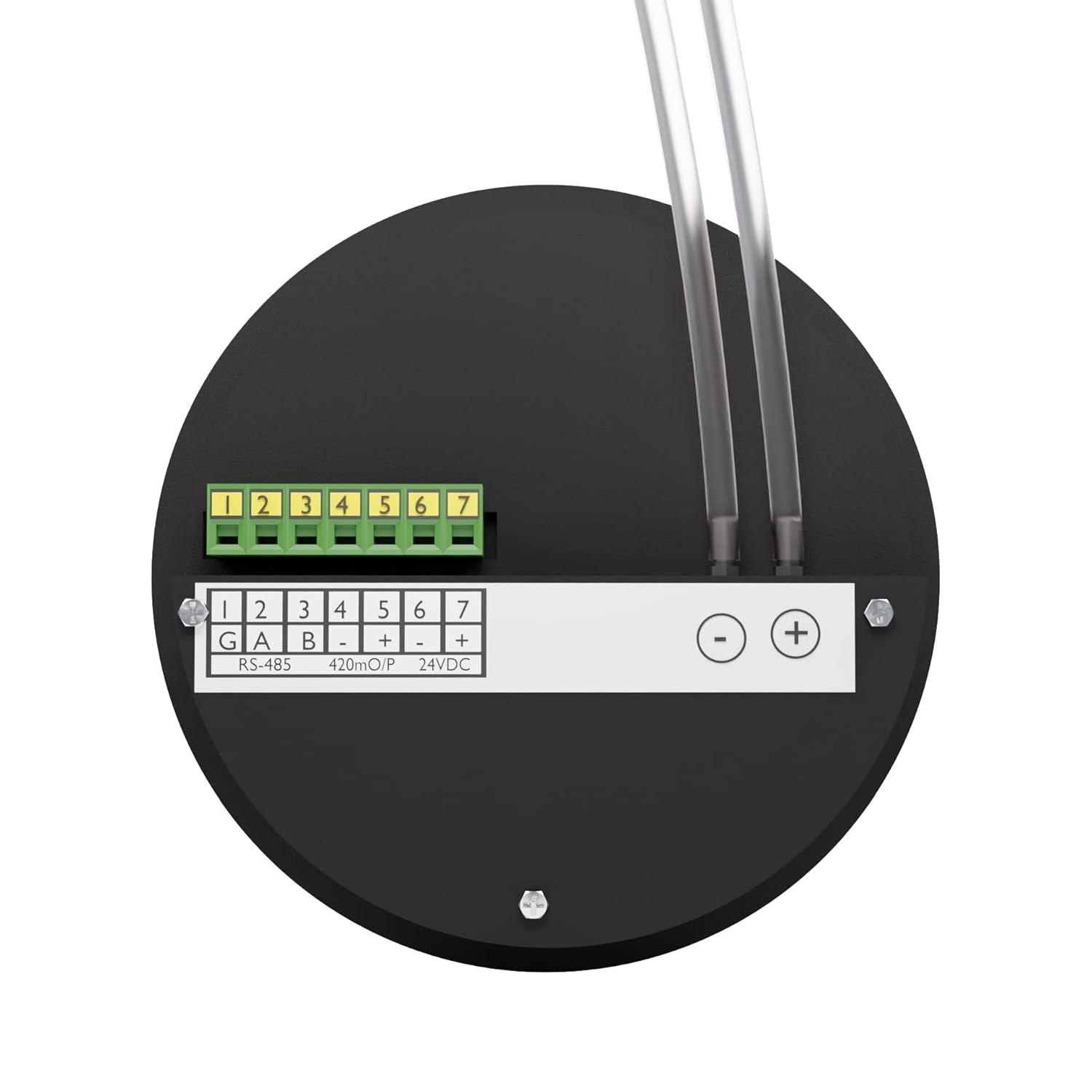
Figure 7: Rear panel illustrating the terminal block for electrical connections (RS-485, 4-20mA, 24VDC) and hose nipples for pressure input.

Figure 8: Close-up of the RS-485 Modbus communication terminals for integration with control systems.
4.3 Pressure Connections
Connect the silicon tubes to the two hose nipples (4mm ABS Plastic) located at the back of the unit. These ports are for high and low pressure inputs to measure the differential pressure.

Figure 9: Illustration of the 1/8" port connection size for high and low pressure inputs on the back of the unit.
5. Operation
5.1 Power On
Once properly connected to the 24V DC power supply, the gauge will power on, and the 4-digit red LED display will illuminate, showing the current differential pressure reading.
5.2 Reading the Display
The display shows the differential pressure value. The unit of measurement (Pascals or mm.W.C.) is indicated by an illuminated LED next to the reading.
5.3 Unit Selection
Press the 'UNIT ACK' button to toggle between Pascals and mm.W.C. measurement units.

Figure 10: The 'UNIT ACK' button allows for easy switching between Pascals and mm.W.C. units.
5.4 Alarm Function
The built-in buzzer will activate to provide an audible alert if the measured differential pressure falls outside predefined limits, indicating a process violation.
5.5 Understanding Differential Pressure
Differential pressure measurement is crucial for monitoring airflow and system performance. It can indicate both positive and negative air pressure conditions.
- Positive Air: Occurs when the pressure in one area is higher than another, indicating efficient airflow and proper ventilation.
- Negative Air: Occurs when the pressure in one area is lower than another, potentially signaling air leaks, ventilation problems, or system inefficiencies.

Figure 11: Visual explanation of positive and negative air pressure as detected by the differential pressure gauge.
6. Maintenance
6.1 Cleaning
Clean the exterior of the gauge with a soft, dry cloth. Do not use abrasive cleaners or solvents. Ensure the device is not exposed to corrosive substances.
6.2 Calibration
The AI-DDPG comes with a factory calibration certificate. Regular re-calibration may be required depending on application and regulatory standards. Refer to your facility's calibration schedule or contact Ace Instruments for service.
7. Troubleshooting
- No Display:
- Check if the power adapter is securely connected.
- Verify the power supply voltage is 24V DC.
- Incorrect Readings:
- Ensure pressure tubes are correctly connected to the high and low pressure ports.
- Check for any kinks or blockages in the silicon tubes.
- Verify the measurement unit (Pascals/mm.W.C.) is correctly selected.
- Consider if re-calibration is necessary.
- Alarm Constantly Active:
- Check the actual differential pressure against the set alarm limits.
- If the pressure is within limits, consult the device's programming guide for alarm threshold adjustment.
- No Communication via RS-485:
- Verify wiring connections for RS-485 (A, B, G).
- Check communication settings (baud rate, parity) on both the gauge and the connected system.
8. Specifications
| Parameter | Specification |
|---|---|
| Measuring Parameter | Differential Pressure |
| Differential Pressure Range | -100 to 100 Pascals |
| Accuracy | +/- 0.5% of Full Scale |
| Resolution | 1 Pascal |
| Display | 4 Digit Red LED 7 Segment Display (0.5") |
| Output | 4-20mA |
| Maximum Over Pressure | 2 Times the rated pressure |
| Sensors | Integrated High Speed Differential Pressure Sensor |
| Mounting Option | Panel Mounting (Default), Wall Mounting with accessory (Grouting Box) |
| Medium | Air or Gases (Non-Corrosive) |
| Connection | 2 Nos. Hose Nipples of 4mm ABS Plastic at the back |
| Alarm Type | Built-in Buzzer Alarm for Process Violation Alert |
| Construction | Matte Finish ABS Plastic Enclosure |
| Power Supply | 24 Volts D.C. Typical |
| Size (Diameter) | 4.5 inches (114.3mm) |
| Depth | 30 mm |
| Weight | 180 Grams |
| Product Dimensions (L x W x H) | 3.94 x 0.79 x 1.05 inches |
9. Warranty and Support
The Ace Instruments AI-DDPG Digital Differential Pressure Gauge is supplied with a factory calibration certificate, ensuring its accuracy at the time of manufacture. For specific warranty terms, technical support, or service inquiries, please refer to the official Ace Instruments website or contact their customer service department directly. Contact information can typically be found on the manufacturer's packaging or website.
Ask a question about this manual
Ask about setup, troubleshooting, compatibility, parts, safety, or missing instructions. Manuals+ will review the question and use this page’s manual context to help answer it.